Workers' comp premium audits assign a cross-trained employee's full payroll to the highest rated class unless records show actual hours by classification. This guide covers Workday's workers' compensation codes, why position-level codes fall short, what to configure in Time Tracking, and how CloudApper AI TimeClock records classification at each punch.

TL;DR
Under the interchange of labor rule in NCCI-based manuals, payroll can be split between workers' comp classes only when records show actual time in each class, and estimates are not allowed. Workday assigns codes through jobs, positions and location overrides, so every hour carries the position's code unless a task switch is recorded. Map time entry codes or worktags to classifications and report hours by class. CloudApper AI TimeClock captures the classification at each task change punch and writes tagged time blocks to Workday.
Table of Contents
- What Workday Handles Natively
- Where the Premium Audit Goes Wrong
- What to Configure in Workday First
- Where Native Time Entry Stops
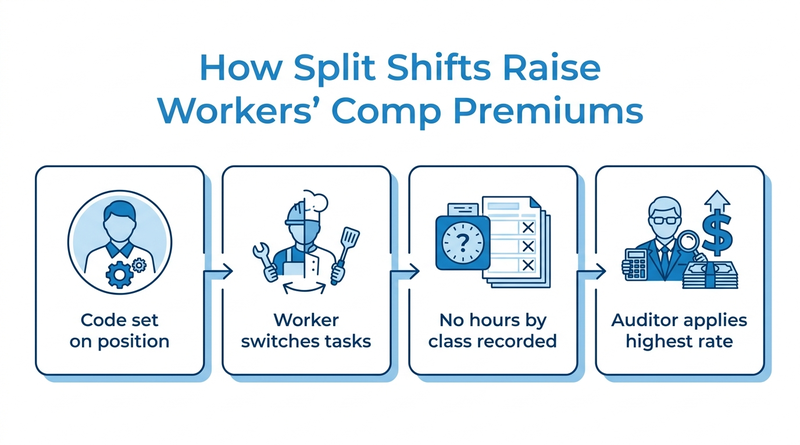
Workday workers’ compensation codes only protect you in a premium audit if your records show actual hours by classification. Without them, the auditor can assign an employee’s entire payroll to the highest rated class they touched. The rule behind it is one line from the workers’ compensation Basic Manual, Rule 2-G in North Carolina’s NCCI-based version: “Estimated or percentage allocation of payroll is not permitted.”

So when a cross-trained employee splits a shift between the stockroom and the forklift, the split has to be recorded, not estimated. CloudApper works alongside Workday at the point where those hours get recorded, because that is where the audit is usually won or lost.
What Workday Handles Natively
Workday stores workers’ compensation codes and assigns them through jobs and positions, with overrides for locations where a different code applies. Payroll reports wages by code, and Time Tracking can put worktags on time blocks so an hour can differ from the default assignment. For single-classification employees this is enough, and the choice between position management and job management mostly determines how cleanly the code follows the person.
Where the Premium Audit Goes Wrong
The code sits on the position, not the hour. A receiving clerk who spends three hours a day driving a forklift carries the clerical code on every hour unless something records the split. Payroll then estimates a percentage at year end, which Rule 2-G disallows; it requires records of actual time in each classification. When a worker holds two positions, the split shows up in the same place as blended overtime across multiple positions, and the same data gap causes both problems.
What to Configure in Workday First
- Review codes on every job profile and location override before renewal.
- Create time entry codes or worktags that map one-to-one to the classifications your auditor recognizes.
- Require the worktag when a worker switches tasks, and keep the list short, because the wrong time entry code gets picked when the list is long.
- Build a report of hours and wages by classification per worker, and keep it with the audit file described in preparing for a Workday audit.
Where Native Time Entry Stops
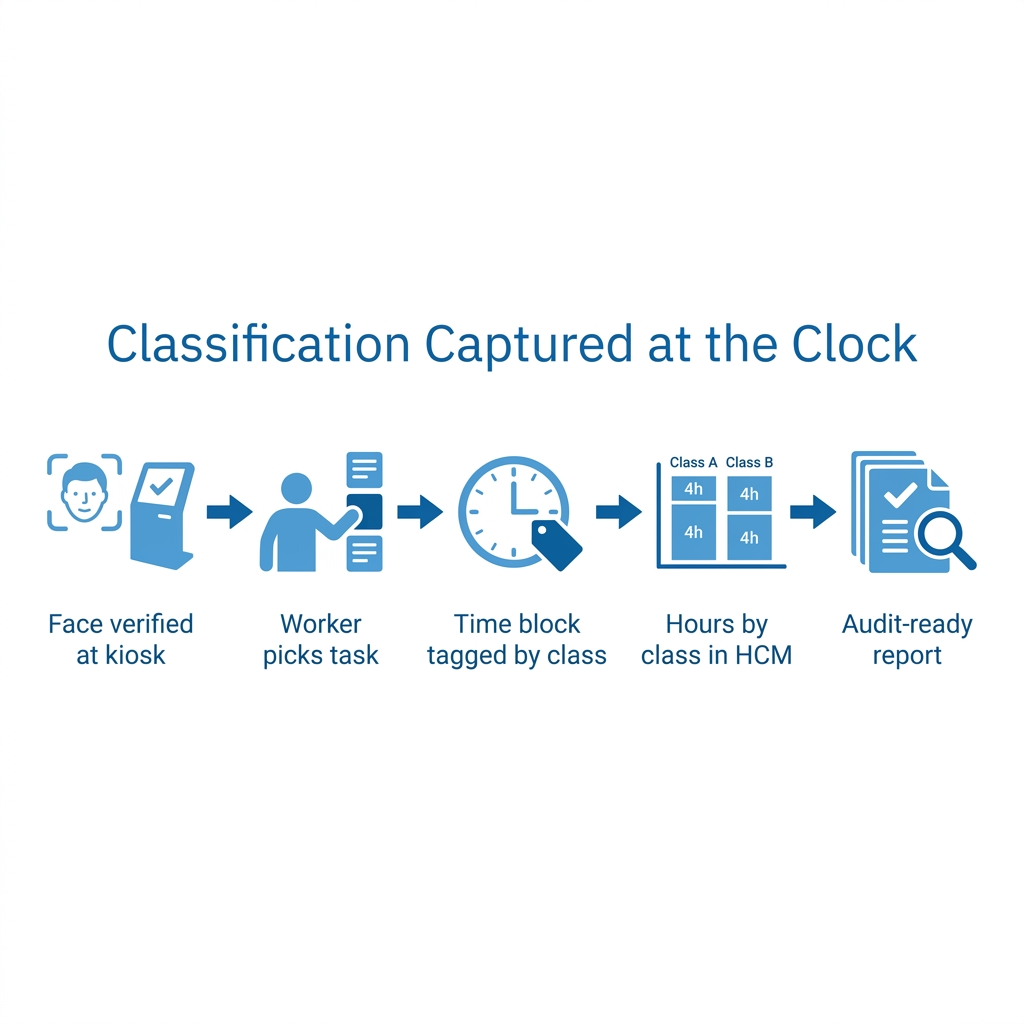
Every option above depends on the worker recording the task switch at the moment it happens. On a plant floor or in a warehouse, that means a timesheet filled in at the end of the week from memory, which an auditor can treat as an estimate. This is where CloudApper captures the classification at the clock, when the work changes.
How CloudApper AI TimeClock Records Hours by Classification
CloudApper AI TimeClock for Workday lets a worker punch a task change at the kiosk, choosing from only the classifications their position allows. Facial recognition confirms who punched, as it does against buddy punching in Workday Time Tracking. Each punch writes a time block with the right worktag to Workday, so payroll reports actual hours by classification instead of a year-end estimate.
Frequently Asked Questions
Q: Where are workers’ compensation codes set up in Workday?
Workday assigns workers’ compensation codes through jobs and positions, with location-level overrides.
Q: Can one employee’s payroll be split between workers’ comp classes?
Yes, if payroll records show actual time and payroll in each classification. Estimated or percentage splits are not permitted under the Basic Manual’s interchange of labor rule.
Q: What happens if payroll is not split by classification?
The auditor assigns the employee’s entire payroll to the highest rated classification that applies to any part of their work.
Q: How do I track hours by workers’ comp code in Workday?
Use time entry codes or worktags that map to each classification, and report hours and wages by worktag per worker.
Q: Why did my workers’ comp premium audit go up?
Often because cross-trained employees’ split hours were not documented, so their full payroll moved to a higher rated class.
Q: Do workers’ comp rules differ by state?
Yes. Many states follow NCCI rules, while others run independent rating bureaus with their own manuals.
Q: Can a time clock record workers’ comp classifications?
Yes. A task change punch carrying the matching worktag gives Workday actual hours by classification.
If your last premium audit moved payroll into a higher class, talk to the CloudApper team about capturing classification hours at the clock, alongside Workday.

What is CloudApper AI Platform?
CloudApper AI is an advanced platform that enables organizations to integrate AI into their existing enterprise systems effortlessly, without the need for technical expertise, costly development, or upgrading the underlying infrastructure. By transforming legacy systems into AI-capable solutions, CloudApper allows companies to harness the power of Generative AI quickly and efficiently. This approach has been successfully implemented with leading systems like UKG, Workday, Oracle, Paradox, Amazon AWS Bedrock and can be applied across various industries, helping businesses enhance productivity, automate processes, and gain deeper insights without the usual complexities. With CloudApper AI, you can start experiencing the transformative benefits of AI today. Learn More
- Useful Links:
- Agentic AI
- No-Code/Low-Code
- Custom Software
- HCM Personalization
- iPaaS
- FedRAMP

Brochure
CloudApper AI TimeClock
For accurate & touchless time capture experience.
Download Brochure
CloudApper AI Solutions for Workday



- Works with








- and more.
Similar Posts

How to Rehire in Workday: Service Dates, I-9 and ACA…

The Workday Mobile App and Off-the-Clock Work: Which Hourly Tasks…