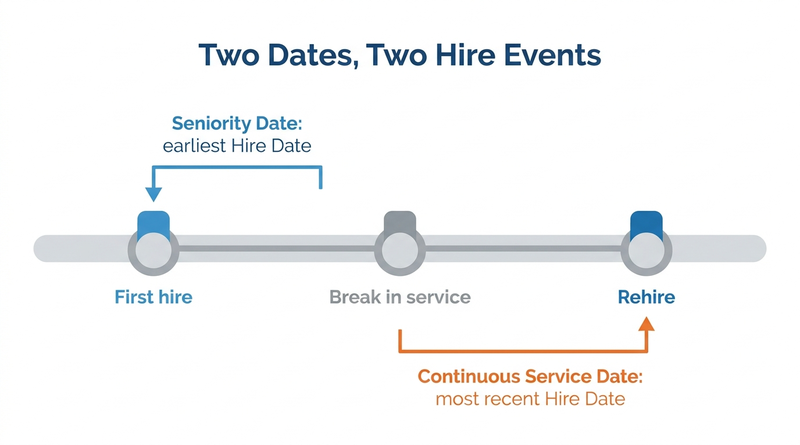
The Workday Seniority Date and Continuous Service Date populate from different hire events, so they diverge after a break in service. This guide explains how each date behaves, why your contract decides which one drives layoff and bumping, and where calculations need support outside native configuration today.

TL;DR
The Workday Seniority Date populates from the earliest Hire Date and the Continuous Service Date from the most recent Hire Date, and a manual edit to either stops automatic population. After a rehire the two can differ, so the date that drives layoff, bumping, or bidding must come from the collective bargaining agreement, not from the field name. Public customer pages show organizations using the same field in different ways, and ranking rules such as hours in classification are typically built outside the dates themselves. CloudApper AI for HCM Personalization can apply contract-specific rules to Workday data alongside Workday.
Table of Contents
- Three Dates, Three Different Hire Events
- Why the Field Name Does Not Settle It
- A Decision Rule Before Anyone Edits a Date
- Where the Date Ends and the Ranking Begins
Compare two fields on any rehired worker: the Workday Seniority Date and the Continuous Service Date. Workday fills them from different hire dates, so after a break in service they will not match, and your layoff or bumping list depends on which one your contract actually means. CloudApper AI for HCM Personalization runs alongside Workday and can apply contract-specific rules to dates like these instead of leaving them to spreadsheets.
Three Dates, Three Different Hire Events
Per Workday documentation for the Edit Service Dates task, the dates populate like this:

| Field | Populates from | After a manual edit |
|---|---|---|
| Seniority Date | Earliest Hire Date | Automatic population stops until the worker is rehired |
| Continuous Service Date | Most recent Hire Date | Stops until you edit it to match the Hire Date or rehire the worker |
| Union Seniority Date | Confirm in your tenant | Confirm in your tenant |
Edit Service Dates runs stand-alone or as a subprocess on any business process except Hire.
Why the Field Name Does Not Settle It
Public customer pages show one field meaning different things. Northeastern Illinois University describes Continuous Service Date as the date used for vacation accrual, bumping rights, and service awards. The University of Washington defines layoff seniority as calendar days of continuous service from the most recent hire date, and records the layoff seniority unit as a custom organization. Western Illinois University’s bumping presentation defines seniority as time worked in a classification, converted to hours. These are practitioner patterns, not Workday rules: the contract decides, and the tenant is configured to match.
A Decision Rule Before Anyone Edits a Date
- Get the seniority definition in writing from labor relations, quoting the agreement.
- Map it to a field, a custom organization, or a report, and name an owner for Edit Service Dates.
- Test rehires, acquired employees, and leave returns, since the rehire path decides which date moves.
- Check downstream effects: service dates can feed accruals, so confirm in your tenant before correcting, and review time off balance mismatches afterward.
- Make bulk fixes through a controlled mass data change, and keep the evidence an auditor will ask for in a Workday audit.
Where the Date Ends and the Ranking Begins
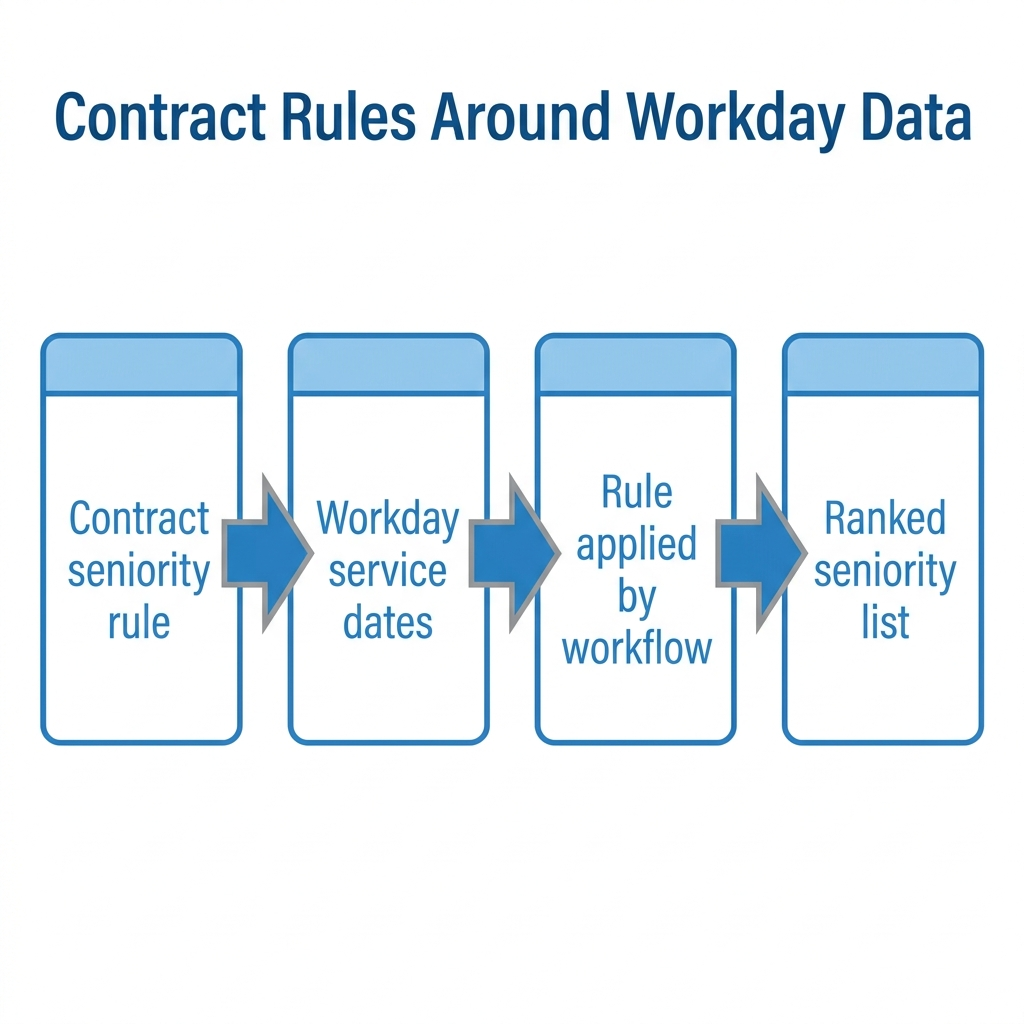
This is a practitioner pattern: Workday stores and exposes dates, while the ranking, such as hours in classification or a bumping chain, is usually built in custom organizations, reports, or spreadsheets. CloudApper’s AI for HR Systems page names the result: “Seniority, shift differentials and bumping rights get calculated by hand every pay period, and errors creep in.” This is a gap CloudApper AI for HCM Personalization targets. Our union work rules guide covers the wider setup.
Running Contract Rules Around Workday Data
CloudApper AI for HCM Personalization builds on the dates Workday already holds. It lists union pay progression errors among the problems it addresses, so an organization-specific rule can run as a workflow instead of a manual check. Uses include ranking workers by the contract’s definition and checking step eligibility with automated step pay progression.
Frequently Asked Questions
Q: What is the difference between Seniority Date and Continuous Service Date in Workday?
Seniority Date populates from the earliest Hire Date. Continuous Service Date populates from the most recent Hire Date. Editing either manually stops its automatic population.
Q: Which Workday date should be used for union seniority and layoffs?
Use the date or calculation your collective bargaining agreement defines. Workday does not pick one for you, so confirm the mapping with labor relations and in your tenant.
Q: Does Workday automatically calculate bumping rights from Seniority Date?
A stored date is not a bumping calculation. Confirm in your tenant what reports or custom organizations rank workers for bumping.
Q: How do I edit service dates in Workday?
Run the Edit Service Dates task, stand-alone or as a subprocess on any process except Hire.
Q: What happens to these dates when a worker is rehired?
A rehire restores automatic population for dates that were edited manually. Confirm in your tenant how your rehire process treats each field.
If seniority and bumping calculations still live in spreadsheets, talk with CloudApper about running your contract rules alongside Workday.

What is CloudApper AI Platform?
CloudApper AI is an advanced platform that enables organizations to integrate AI into their existing enterprise systems effortlessly, without the need for technical expertise, costly development, or upgrading the underlying infrastructure. By transforming legacy systems into AI-capable solutions, CloudApper allows companies to harness the power of Generative AI quickly and efficiently. This approach has been successfully implemented with leading systems like UKG, Workday, Oracle, Paradox, Amazon AWS Bedrock and can be applied across various industries, helping businesses enhance productivity, automate processes, and gain deeper insights without the usual complexities. With CloudApper AI, you can start experiencing the transformative benefits of AI today. Learn More
- Useful Links:
- Agentic AI
- No-Code/Low-Code
- Custom Software
- HCM Personalization
- iPaaS
- FedRAMP
Brochure
CloudApper AI TimeClock
For accurate & touchless time capture experience.
Download Brochure
CloudApper AI Solutions for Workday


- Works with








- and more.
Similar Posts

Workday Time Entry Cost Center Override: Why Hours Post to…

Tipped Employee Payroll in Workday: Where Shortfalls Hide Until a…