A compliance guide for Workday customers on paying donning, doffing, and pre-shift walking time under the FLSA. Learn how to configure time calculations, close the capture gap, and build defensible payroll records.
TL;DR
A $22.25 million verdict in East Penn Manufacturing confirmed that flat grace periods do not satisfy the FLSA for donning, doffing, and pre-shift walking time. Workday Time Tracking can calculate compensable blocks through time entry codes and create calculations, but the compliance gap sits at the capture point, not the payroll engine. CloudApper AI TimeClock fills that gap by recording actual timestamps at gowning stations and facility entry points, syncing to Workday for payroll processing.
Table of Contents
- What the FLSA Requires for Pre-Shift and Post-Shift Activities
- How Workday Time Tracking Handles the Calculation
- The Compliance Gap Between Calculation and Capture
- A Compliance Checklist for Donning, Doffing, and Walking Time
A $22.25 million jury verdict against a battery manufacturer proved one thing: paying a flat grace period instead of actual donning and doffing time does not satisfy the FLSA. The Third Circuit affirmed that result in Secretary, United States DOL v. East Penn Manufacturing Co. (2024), holding that employers bear the burden of proving unpaid minutes are de minimis. For payroll teams running Workday Time Tracking, the question is whether your time calculations capture the right minutes and hold up in discovery. CloudApper AI TimeClock works alongside Workday to capture those minutes at the point of activity, before workers reach a browser.
What the FLSA Requires for Pre-Shift and Post-Shift Activities
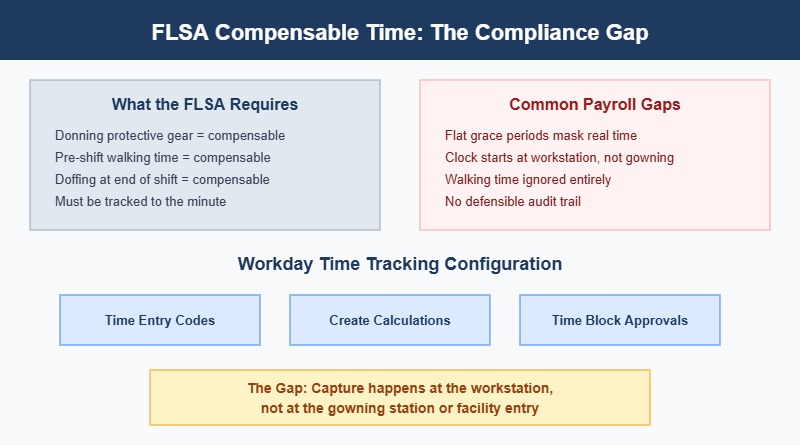
The FLSA treats donning and doffing of required uniforms, PPE, or safety gear as compensable when the activity is “integral and indispensable” to the principal work. The Supreme Court confirmed this in IBP, Inc. v. Alvarez (2005), which also held that walking time between the changing area and the production floor is compensable once the continuous workday has begun. Each category can carry a different duration and different time entry codes in Workday. State laws in California, New York, and Washington may impose stricter standards. Your policy must account for the most protective rule that applies.
How Workday Time Tracking Handles the Calculation
Workday provides configuration tools that apply once time data exists in the system. Time Block Conditional Calculations tag a time block when it meets shift or calculated field conditions. Time Block Create Calculations generate an additional compensable block, for example adding eight minutes of donning time to every shift carrying a specific job profile or location tag. These feed into payroll through earnings codes, and overtime aggregation rolls the extra minutes into weekly totals. For organizations with an established fixed duration per activity, this native path works. Confirm your configuration in your tenant.
The Compliance Gap Between Calculation and Capture
Workday calculates accurately from whatever data it receives. The gap sits between the physical activity and the time record. A create calculation generates time by rule, but it does not prove a specific worker donned PPE at 6:47 a.m. and reached the production line at 6:55 a.m. When the DOL or a plaintiffs’ firm subpoenas records, the question is whether eight minutes was the actual time, and whether the punch record matches reality. A flat grace period, as East Penn used, systematically underpays workers whose actual donning time exceeds it.
A Compliance Checklist for Donning, Doffing, and Walking Time
Before your next payroll audit or wage-and-hour review, confirm these items.

First, verify that legal counsel has classified each pre-shift and post-shift activity as compensable or non-compensable, by site and role. CloudApper AI TimeClock supports that recording step by capturing time at activity locations where traditional wall clocks or Workday self-service are impractical.
Second, confirm each compensable activity maps to a distinct time entry code, not a generic “other hours” bucket.
Third, review whether your capture method records actual start and stop times or relies on a flat estimate. If your process uses a fixed addition, recognize the risk the East Penn verdict exposed.
Fourth, check that overtime calculations include donning, doffing, and walking minutes in the weekly total. Excluding compensable time from the regular rate creates a separate FLSA exposure.
Fifth, confirm records survive a three-year lookback. Biometric time clock retention policies must align with the FLSA statute of limitations for willful violations.
Where CloudApper AI TimeClock Closes the Loop
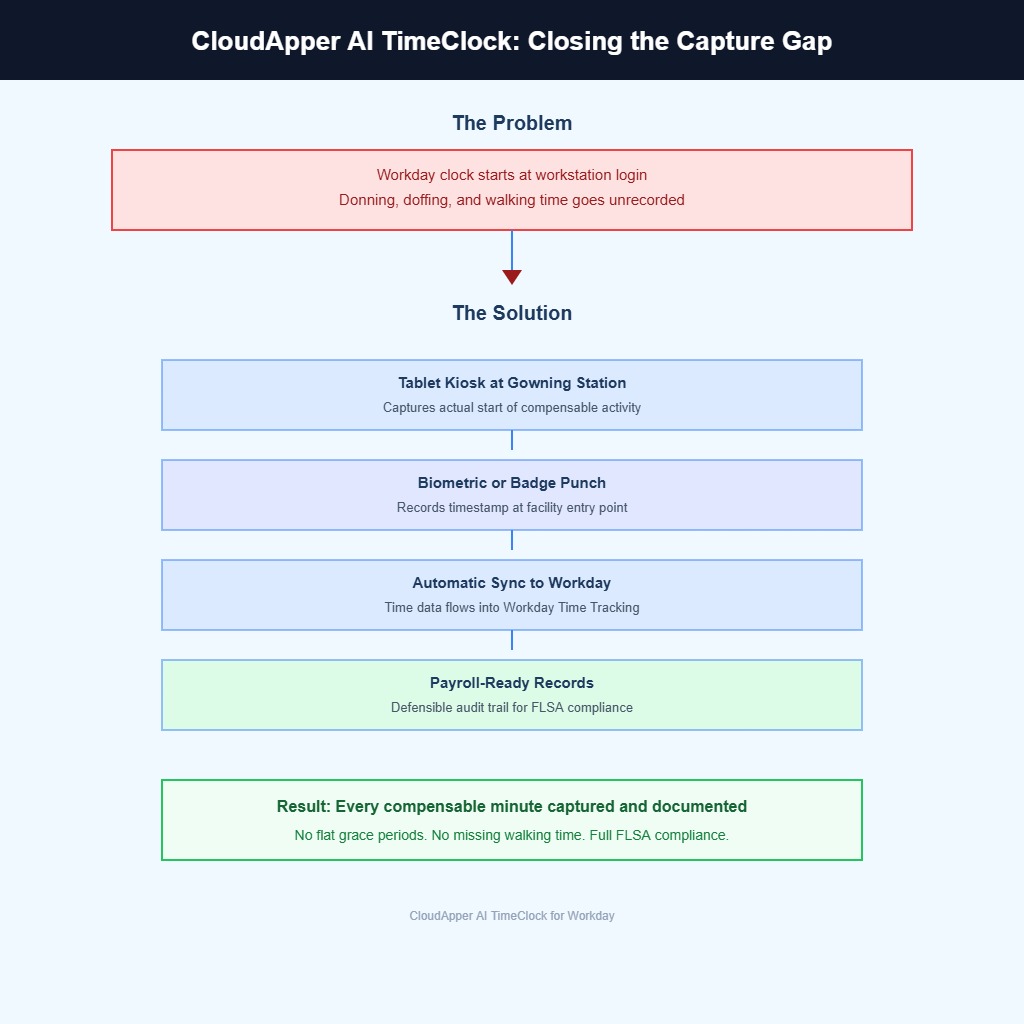
CloudApper AI TimeClock captures punches where donning, doffing, or walking actually begins, using tablet-based kiosks at gowning stations, locker rooms, or facility entry points. Workers punch in before putting on PPE, and the system records the actual timestamp. That data syncs to Workday Time Tracking, where existing time calculations and payroll mappings process it without reconfiguration.
For sites with unreliable connectivity, the offline-first architecture queues punches locally and syncs when a connection resumes. Custom rules handle site-specific policies, each mapping to the correct Workday earning code. The result is a defensible record of compensable time that replaces self-reported estimates and flat allowances.
Frequently Asked Questions
Q: Is all donning and doffing time compensable under the FLSA?
Not automatically. Time is compensable when the activity is integral and indispensable to the employee’s principal work. Required PPE or uniforms generally qualify. Ordinary clothing changes chosen by the employee may not. A collective bargaining agreement can also affect the analysis.
Q: How does Workday track donning and doffing time?
Workday Time Tracking uses time entry codes, time block conditional calculations, and time block create calculations to classify and generate compensable time blocks. The configuration requires that time data already exists in the system, either from a punch, a manual entry, or an integration feed.
Q: Can Workday automatically add pre-shift minutes to a time block?
Yes, through Time Block Create Calculations. An administrator defines the conditions (job profile, location, shift) and the fixed or calculated duration. The system generates the additional block when conditions are met. Confirm the setup in your tenant.
Q: What did the East Penn Manufacturing verdict mean for donning and doffing compliance?
The Third Circuit upheld a $22.25 million jury verdict in Secretary, United States DOL v. East Penn Manufacturing Co. (2024). The court held that paying a flat grace period instead of actual time violated the FLSA, and that the employer bears the burden of proving any unpaid time is de minimis.
Q: Does walking time from the locker room to the production floor count as compensable?
Under IBP, Inc. v. Alvarez, walking time after the continuous workday begins is compensable. If an employee must don required gear in a locker room and then walk to the production floor, that walk is part of the compensable period. Walking before any integral activity begins may be treated as preliminary.
Q: How does CloudApper AI TimeClock help with donning and doffing compliance in Workday?
CloudApper AI TimeClock captures actual punch times at gowning stations or locker rooms using tablet-based kiosks. The recorded timestamps sync to Workday Time Tracking, giving payroll teams actual rather than estimated compensable minutes. The offline-first design works in facilities without reliable connectivity.
Q: Should overtime calculations include donning and doffing time?
Yes. Compensable donning, doffing, and walking minutes must be included in the total hours worked for the week. Excluding them from the overtime calculation creates a separate FLSA regular rate violation.
If your organization is reviewing donning, doffing, or pre-shift walking time policies, CloudApper can help you capture the actual minutes at the point of activity and sync them to Workday without reconfiguring your existing payroll rules. Contact the CloudApper team to see how it works in your environment.

What is CloudApper AI Platform?
CloudApper AI is an advanced platform that enables organizations to integrate AI into their existing enterprise systems effortlessly, without the need for technical expertise, costly development, or upgrading the underlying infrastructure. By transforming legacy systems into AI-capable solutions, CloudApper allows companies to harness the power of Generative AI quickly and efficiently. This approach has been successfully implemented with leading systems like UKG, Workday, Oracle, Paradox, Amazon AWS Bedrock and can be applied across various industries, helping businesses enhance productivity, automate processes, and gain deeper insights without the usual complexities. With CloudApper AI, you can start experiencing the transformative benefits of AI today. Learn More
- Useful Links:
- Agentic AI
- No-Code/Low-Code
- Custom Software
- HCM Personalization
- iPaaS
- FedRAMP
Brochure
CloudApper AI TimeClock
For accurate & touchless time capture experience.
Download Brochure
CloudApper AI Solutions for Workday


- Works with








- and more.
Similar Posts

Workday Seniority Date vs. Continuous Service Date: Which One Drives…
Workday Time Entry Cost Center Override: Why Hours Post to…