Legacy system modernization does not have to mean a two-year rebuild. Here are the four real options, what each one costs, how to protect your audit trail while you switch, and the ten questions to ask any vendor before you sign.
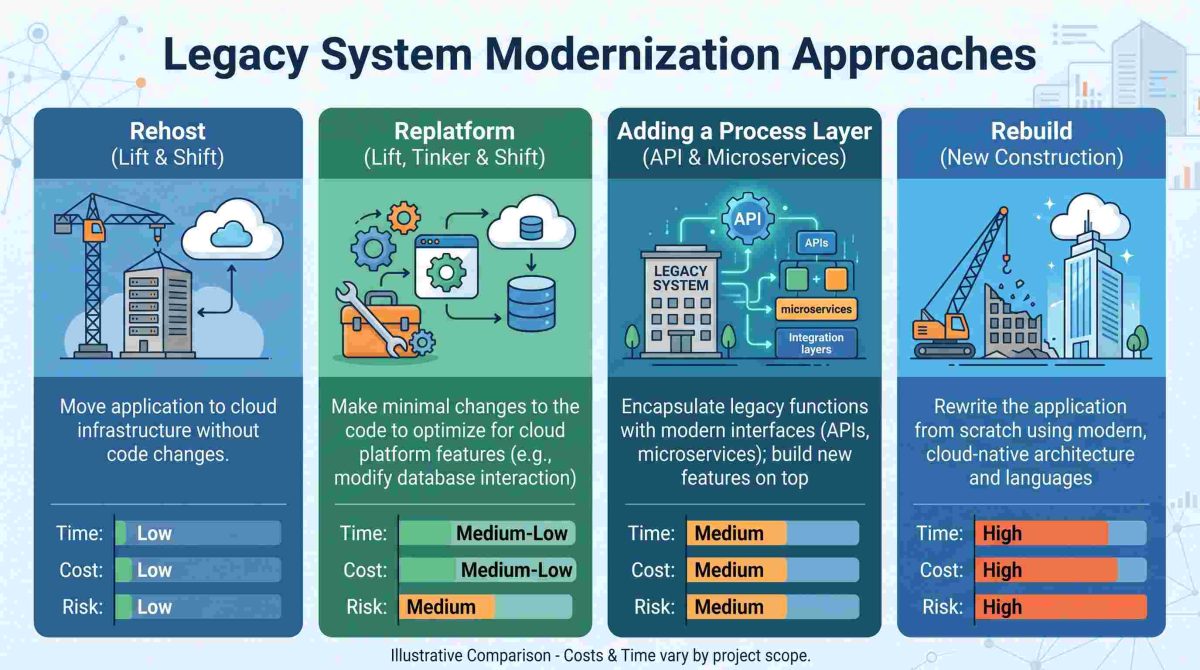
Table of Contents
- What is legacy system modernization?
- Why old systems cost more than you think
- The real reason these projects fail
- Four ways to modernize, and what each one costs
- Can you modernize without replacing the system?
- How do you protect audit trails while you change systems?
- How do you avoid swapping one lock-in for another?
- Can no-code tools handle legacy system modernization?
- How to choose a legacy system modernization partner
- Can old systems work on phones and tablets?
- Where to start
- Frequently asked questions
Legacy system modernization sounds like a technology problem. In most companies, it is a money problem.
Old systems keep working. That is the trap. They keep working just well enough that replacing them never reaches the top of anyone’s list. Meanwhile the cost of keeping them alive climbs every year, and most of that cost never appears as a line item anyone questions.
So this guide skips the theory. Instead, it covers four practical options, what each one really costs, and how to choose a partner you can walk away from later.
What is legacy system modernization?
Legacy system modernization means updating an older business system so it can support how the company works today. The system might be a payroll platform, an ERP, a claims system, or a scheduling tool.
Modernization does not always mean replacement. Often it means adding what the system was never built to do, while leaving the system itself alone.
That distinction matters, because the two paths cost very different amounts. One takes years. The other can take weeks.
Why old systems cost more than you think
The bill for an aging system rarely arrives all at once. It arrives slowly, in three places.
Maintenance eats the budget. According to the US Government Accountability Office, federal agencies typically spend about 80% of their IT budgets just operating and maintaining existing systems. The federal government spends over $100 billion a year on IT, and most of that goes to keeping current systems running rather than improving them.

New work gets crowded out. McKinsey surveyed 50 CIOs at large financial services and technology firms. It found that tech debt equals 20% to 40% of the entire value of a company’s technology estate. Worse, 10% to 20% of the budget set aside for new products gets pulled back into fixing old problems instead. And 60% of those CIOs said their tech debt had grown noticeably in just three years.
Risk builds up quietly. The GAO looked at 11 critical federal systems and found they ranged from 23 to 60 years old. One Defense system is 60. Two Treasury systems are 59 and 51. Eight still run outdated programming languages such as COBOL. Seven carry known security holes that cannot be fixed without modernizing.
Your systems are probably younger than that. But the pattern is the same, and it only moves in one direction.
The real reason these projects fail
Here is the part most vendors skip.
Most modernization programs try to replace the system of record. That is the database holding your employees, your customers, your transactions, your history. It is usually the part that works fine.
What has actually gone out of date is the work around it. The spreadsheets people keep on the side. The approvals that happen over email. The data someone retypes from one screen into another. The report that takes two days to build by hand every month.
None of that is a database problem. All of it is a process problem.
So replacing the database to fix the processes is the most expensive route available. That is why these programs run long, cost more than planned, and often deliver a newer version of the same frustration.
The cheaper move is to leave the record where it is, and fix the work happening around it.
Four ways to modernize, and what each one costs
| Approach | What it means | Time | Cost | Best when |
|---|---|---|---|---|
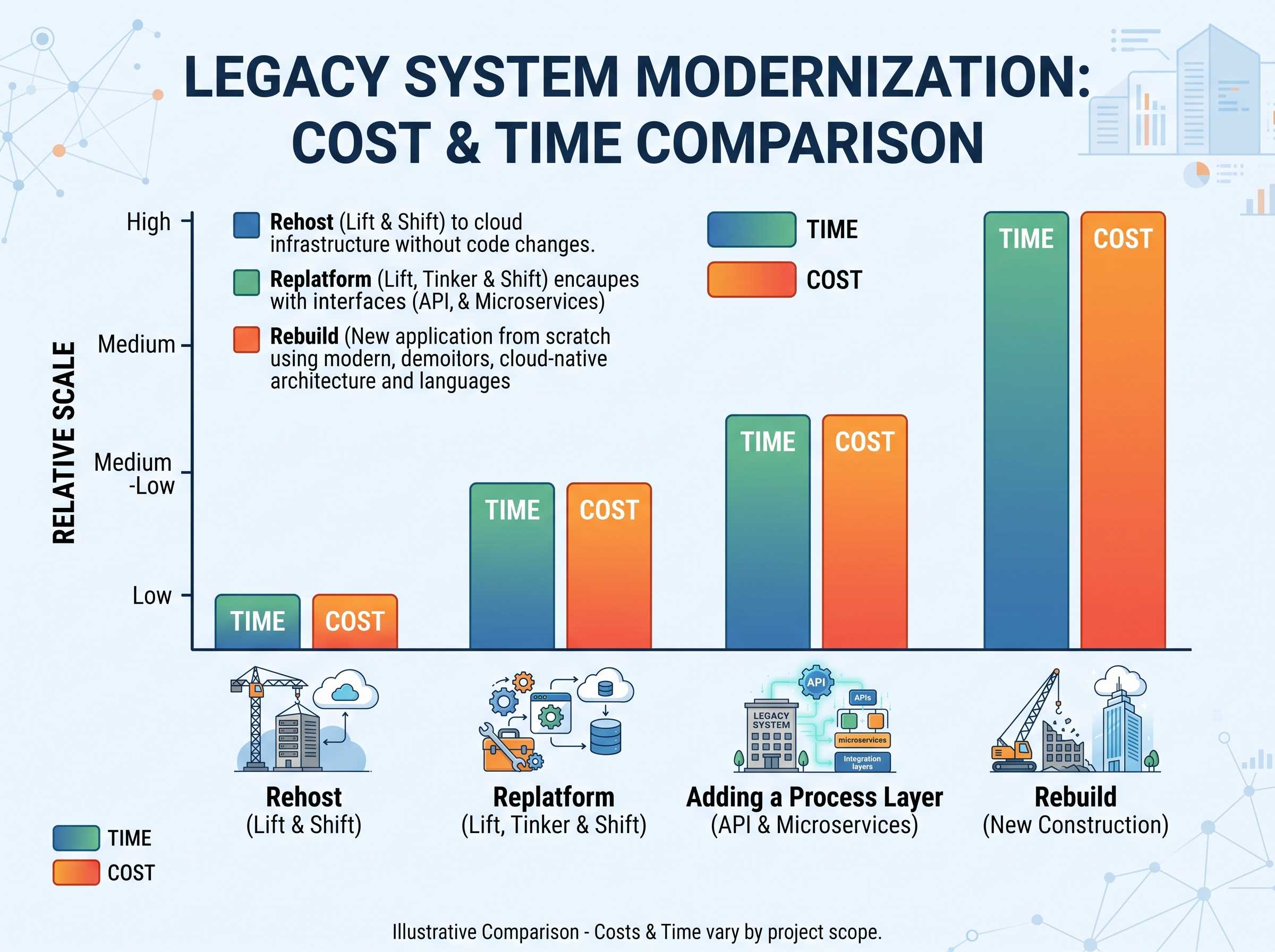
| Rehost | Move the same system to the cloud, unchanged | Months | Low to medium | The hardware is failing but the software is fine |
| Replatform | Move it and update parts of it | 6 to 18 months | Medium | You need better performance, not new features |
| Rebuild | Replace the system entirely | 18 months to several years | Highest | The system genuinely cannot do the job anymore |
| Add a layer | Keep the system, build the missing processes on top of it | Weeks | Lowest | The data is fine but the workflows around it are broken |
Most vendors will steer you toward one of the first three. That is understandable, because those are large projects and large projects are good business for the people running them.
But you should test the fourth option first. If the answer to “what is actually broken?” is a process rather than the data, the fourth option solves it faster and for far less money.
For a closer look at the numbers, we compared the cost of maintaining an unsupported system against modernizing it.
Can you modernize without replacing the system?
Yes, and for most companies this is the better first step.
The method is straightforward. You leave the old system as the official record. Then you put a layer above it that handles the work the old system never handled. That layer connects through an API, so data flows both ways and nothing gets retyped.
What lives in the layer? Approvals. Forms. Mobile access. Notifications. Dashboards. Anything your team currently does in a spreadsheet or over email because the system cannot do it.
What stays in the old system? The record itself. Employee data, transaction history, audit history, reporting of record.
As a result, nothing gets migrated, nothing gets switched off, and no one loses access on a Monday morning. If the layer does not work out, you remove it and the old system is untouched.
We go deeper on the mechanics in our guide to REST API integration for legacy systems.
How do you protect audit trails while you change systems?
This question stops more projects than cost does, especially in finance, healthcare, and government.
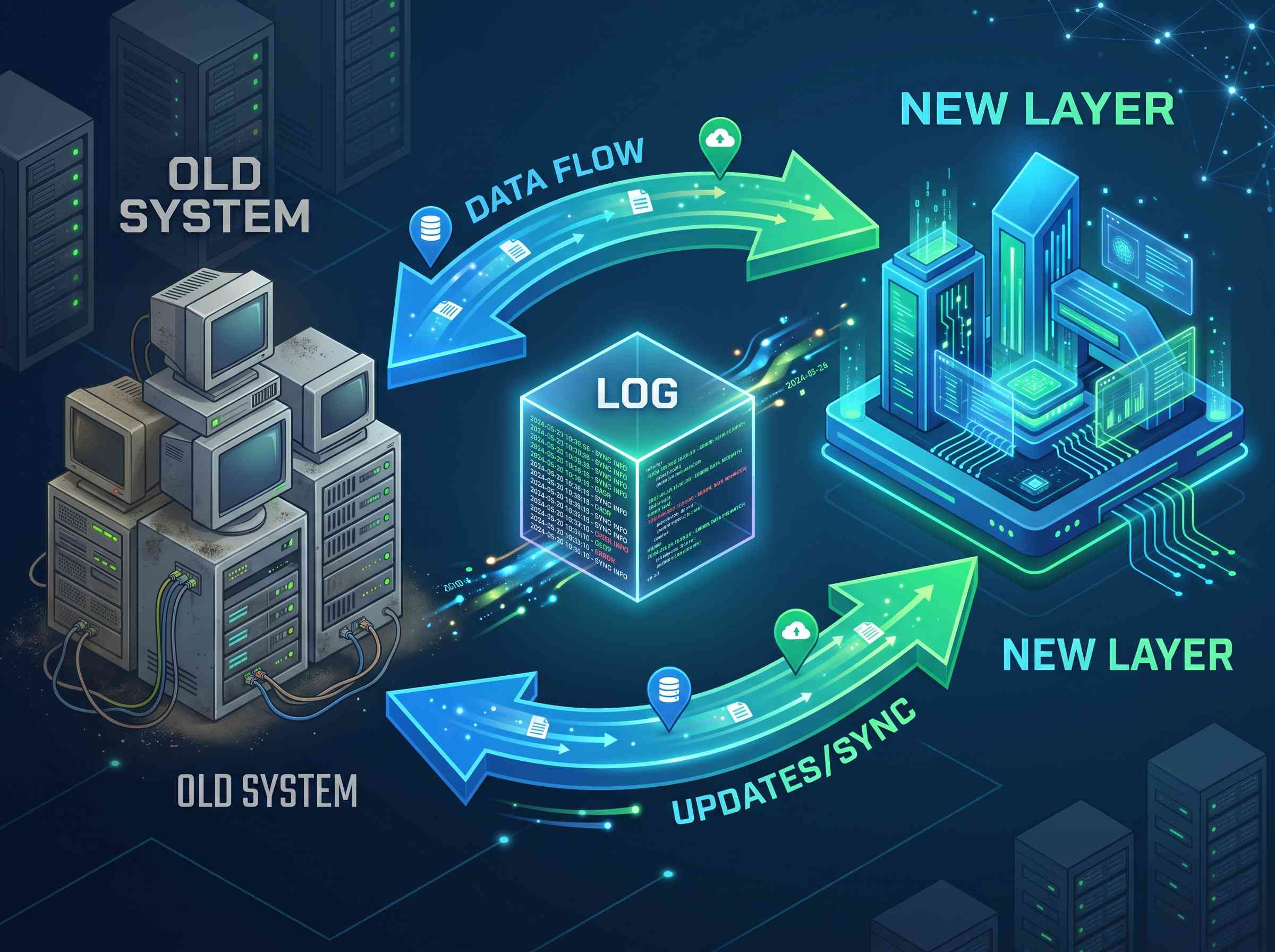
The worry is reasonable. If records live in one system today and another tomorrow, auditors will ask where the history went, who could see it, and whether anyone changed it along the way.
Three rules keep you safe.
Keep one system as the official record. Do not split history across two systems and hope nobody asks. Pick which system is authoritative and write it down.
Log every write in both directions. When the new layer sends data to the old system, log it. When the old system sends data back, log that too. Auditors want to see the chain, not just the result.
Run both in parallel before you commit. For a period, let both systems hold the same records and compare them. Differences show up fast, and they show up before anyone signs off.
Skipping governance because a project is moving quickly is how teams create new risk. We wrote about that specifically in legacy app modernization is not an excuse to skip governance, and about keeping compliance intact during a parallel transition.
How do you avoid swapping one lock-in for another?
This is the quiet failure of modernization. A company escapes a twenty-year-old system and signs a contract that traps it just as tightly. The new system is newer. It is not freer.
Ask four questions before you sign.
First, can you export your own data, in full, whenever you want, without paying for it? Second, who owns the workflows and forms your team builds? Third, if you leave in three years, what does that actually cost, in fees and in rebuild work? Fourth, can your own staff change how it works, or does every change require the vendor?
If a vendor hesitates on any of those, you have your answer.
We covered this pattern in detail in how enterprises recreate the vendor lock-in problem, and looked at the exit side in outsourced modernization and vendor exit cost.
Can no-code tools handle legacy system modernization?
For the layer approach, yes. For a full rebuild of a core system, be careful.
No-code platforms are a good fit when you need to build the processes around a system: forms, approvals, mobile screens, dashboards, notifications, and integrations. Your own team can build and change those, which means you stop waiting in an IT queue for every small request.
They are a poor fit when you need to replace the core record itself, or when the logic is deeply specialised.
So the honest test is simple. If the job is “build the work the old system cannot do,” no-code fits well. If the job is “replace the old system,” treat no-code claims with healthy suspicion.
We compare the two paths side by side in no-code versus traditional development for modernizing legacy systems, and cover the build side in how to build custom enterprise software without deep programming knowledge.
How to choose a legacy system modernization partner
Use this as a checklist in your next vendor call.
- Will they connect to your current system, or do they insist on replacing it?
- Can you export all your data at any time, at no cost?
- Who owns the workflows your team builds?
- What does leaving cost, in money and in rebuild time?
- Can your staff change things without filing a ticket?
- How do they keep audit trails intact during the change?
- Will they run in parallel with your old system first?
- Have they done this in your industry and can they name the system?
- Do they quote weeks, or quarters?
- What happens to your data if they are acquired?
A good partner answers all ten without flinching. Also, watch how they respond to the export question specifically. It tells you the most.
Can old systems work on phones and tablets?
Usually, yes, and you rarely need to rewrite anything.
Most older business systems were built for a desktop in an office. But the people who need them most are often not at a desk. Nurses, drivers, warehouse staff, technicians, and field crews all need the same data on a phone.
The layer approach handles this well. You build a mobile screen that reads from and writes to the existing system. The old system keeps the record. The phone becomes another way in.
We walk through this in migrating from legacy applications to mobile applications.
Where to start
Do not start with the system. Start with the work.
Spend a week writing down every process your team runs outside the system. Every spreadsheet. Every email approval. Every manual report. Every time someone retypes data from one screen to another.
That list is your real modernization backlog. It is also, almost always, shorter and cheaper to fix than anyone expects.
Then rank the list by two things: how much time it wastes, and how much risk it carries. Fix the top three. Measure what changed.
If those three come back solved in weeks, you have your answer about whether you needed a full rebuild. And if fragmented data is part of the problem, start with how to avoid the fragmentation of your company’s data.
Frequently asked questions
What is legacy system modernization?
Legacy system modernization means updating an older business system so it supports how the company works now. It can mean replacing the system, moving it to the cloud, or leaving it in place and adding the missing processes on top.
How long does legacy system modernization take?
It depends on the approach. Adding a layer on top of an existing system takes weeks. Rehosting takes months. A full rebuild takes 18 months to several years.
Do you have to replace a legacy system to modernize it?
No. In most cases the data in the old system is fine, and the processes around it are what have aged. Fixing those processes costs far less than replacing the system, and it carries far less risk.
How much do legacy systems cost to maintain?
More than most budgets show. The GAO found federal agencies spend roughly 80% of their IT budgets operating and maintaining existing systems. McKinsey found that 10% to 20% of budget meant for new products gets diverted into fixing old problems.
What is the biggest risk in a modernization project?
Losing the audit trail. Keep one system as the official record, log every write in both directions, and run both systems in parallel before you commit to either.
Can no-code platforms modernize legacy systems?
They work well for building the processes around a system, such as forms, approvals, mobile access, and dashboards. They are not the right tool for replacing a core system of record.
How do we avoid getting locked into a new vendor?
Ask four questions before signing. Can you export all your data for free at any time? Who owns the workflows you build? What does leaving cost? Can your own team make changes without the vendor?
Where should we start?
List every process your team runs outside the system in spreadsheets and email. Rank that list by wasted time and risk. Fix the top three first.
Closing
Old systems are not really the problem. Waiting is.
The companies that move fastest are not the ones with the biggest budgets or the newest software. They are the ones who stopped waiting for a vendor roadmap, or a budget cycle, or a two-year program, and fixed the work in front of them instead.
CloudApper is the process layer that closes the gaps enterprise software cannot, across HR, ERP, CRM, and beyond, on any platform, in weeks not quarters.

What is CloudApper AI Platform?
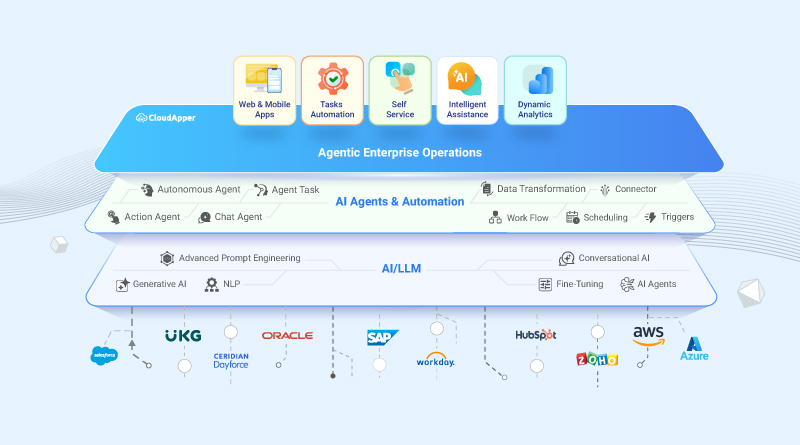
CloudApper AI is an advanced platform that enables organizations to integrate AI into their existing enterprise systems effortlessly, without the need for technical expertise, costly development, or upgrading the underlying infrastructure. By transforming legacy systems into AI-capable solutions, CloudApper allows companies to harness the power of Generative AI quickly and efficiently. This approach has been successfully implemented with leading systems like UKG, Workday, Oracle, Paradox, Amazon AWS Bedrock and can be applied across various industries, helping businesses enhance productivity, automate processes, and gain deeper insights without the usual complexities. With CloudApper AI, you can start experiencing the transformative benefits of AI today. Learn More
- Useful Links:
- Agentic AI
- No-Code/Low-Code
- Custom Software
- HCM Personalization
- iPaaS
- FedRAMP

Brochure
CloudApper hrPad
Empower Frontline Employees with an AI-Powered Tablet/iPad Solution
Download Brochure
CloudApper AI Solutions

- Works with








- and more.
Similar Posts
![Is Your Workforce Management Ready for AI? [Free 90-Second Assessment]](https://www.cloudapper.ai/wp-content/uploads/2026/07/Is-Your-Workforce-Management-Ready-for-AI.jpg)
Is Your Workforce Management Ready for AI? [Free 90-Second Assessment]
Vibe Coding for the Enterprise — the Speed You Want,…