Workday models contingent workers as a distinct worker type with its own contract, security, and staffing processes, but a contract end date only ends the record if the tenant is configured to auto-terminate. Here is what to configure, and where the gaps with your VMS and identity systems remain.

TL;DR
A contingent worker contract end date in Workday only ends the record if the tenant is configured to auto-terminate, which many are not, leaving expired contractors active in headcount and still holding badge, VPN, and SSO access. Workday models the population well: a distinct worker type created through Contract Contingent Worker, extended through Change Job, closed through End Contingent Worker Contract, with separate security groups and a delivered Contingent Workers with Expiring Contracts report. The fixes worth doing natively are enabling auto-termination, scheduling the expiring contracts report, making supplier and contingent worker type required, and building condition rules that keep contractors out of employee-only business processes. What remains structural is reconciliation with the VMS where the contract actually lives, propagating contract expiry to badge and identity systems, and reaching agency and temp workers who hold no Workday login. CloudApper iPaaS closes the first two and CloudApper hrPad the third, with Workday remaining the system of record.
Table of Contents
- What Workday Does Natively
- Where the Friction Shows Up
- What to Do Within Workday First
- Where Native Tools Run Out
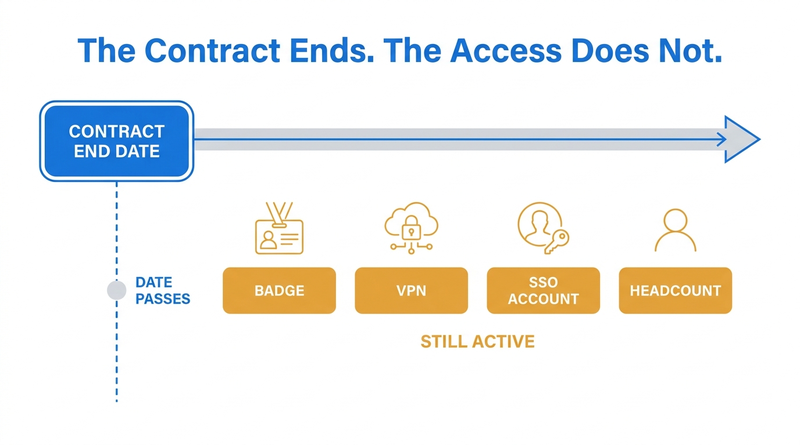
A contract end date in Workday is a data field. Whether it ends anything depends on how your tenant was configured, and in a large number of tenants the answer is that it ends nothing at all.
The date passes. The contingent worker record stays active. The badge still opens the door, the VPN still connects, the Okta account still authenticates, and the person still appears in a headcount report that someone will present to a CFO. Workday ships a delivered report called Contingent Workers with Expiring Contracts precisely because the end date is a flag for a human to act on rather than a control that fires by itself.
That gap is where most contingent workforce problems in Workday actually live. Not in whether Workday can model non-employees, which it does well, but in what the system does on its own versus what it waits for someone to do. Where those waits become structural, an extension layer like CloudApper is what closes them.
What Workday Does Natively
Workday treats a contingent worker as a distinct worker type, not an employee record with a flag on it. That distinction runs deep and it is the right foundation.
You create the record through Contract Contingent Worker, typically as a related action on a supervisory organization. The task captures the contract details: start date, a required contract end date, the supplier or agency, contract ID, and a contingent worker type. That type field matters more than it looks. Organizations use it to bundle which services, systems, and processes a given class of non-employee should receive, so an agency nurse and an independent consultant can be governed differently.

Extensions run through Change Job rather than a separate renewal task, which trips up new admins who go looking for one. Ending the engagement runs through End Contingent Worker Contract, available from the worker profile under Job Change, with reasons that include useful edge cases like No Show and Did Not Start for people who were contracted but never began.
Contingent workers can occupy positions, which means the choice you made about position management versus job management governs them too. If headcount control over non-employees matters to your finance team, position management is the lever.
Security is scoped separately. Contingent workers land in their own security groups by default and do not inherit employee self-service access, which is what you want.
For reporting there are delivered options including Contingent Workers with Expiring Contracts, and the staffing web services expose Contract_Contingent_Worker, End_Contingent_Worker_Contract, and Get_Contingent_Worker_Contract_Info for integration work.
Workday also sells VNDLY, acquired in 2021, as a dedicated vendor management system for the extended workforce. It is licensed separately from HCM and is a different product with a different scope, not a feature you can switch on.
Where the Friction Shows Up
Start with the end date, since it causes the most damage. Whether an expired contract actually ends a contingent worker record is a tenant configuration decision. Plenty of organizations run without auto-termination, which means an expired contract produces a row on a report and nothing else. If nobody runs the report, the record stays active indefinitely. This is the same failure pattern described in what happens to Workday access when an employee is terminated, except worse, because a termination is an event somebody notices and a contract expiry is a date nobody is watching.
Then there is the VMS split. Most organizations of any size source contingent labor through a vendor management system, whether that is VNDLY, Fieldglass, Beeline, or something the procurement team chose years ago. The VMS holds the requisition, the rate card, the timesheet approval, and the invoice. Workday holds the worker record and the access it drives. Neither system is authoritative for the whole lifecycle, and the reconciliation between them is usually a person with a spreadsheet.
Duplicate person records are a chronic problem specific to this population. Contingent engagements end and restart, sometimes with a different agency, sometimes months later. Workday’s own guidance is to search existing records before creating a new pre-hire, but that instruction lives in a job aid rather than in a control, and a hurried manager who cannot find someone by a misspelled name will happily create a second record. The result is one human being with two worker IDs, two access provisioning trails, and two entries in any compliance report.
Co-employment risk deserves its own mention, because Workday will not stop you. The system is perfectly willing to let you run performance reviews, engagement surveys, and manager one-to-ones against contingent workers. Legal counsel usually has firm views about which HR processes should never touch a contractor, and enforcing those views is a configuration exercise nobody has done in most tenants. Your business process condition rules are the place that enforcement has to live.
Headcount reporting is quietly inconsistent. Some delivered reports include contingent workers, some exclude them, and custom reports do whatever their builder decided that day. Two teams presenting workforce numbers from the same tenant can disagree by hundreds of people, and both can be right about what they queried.
Finally, screening and compliance obligations often apply to contingent workers and often get skipped. Agency staff in clinical settings need the same exclusion checks as employees. Contractors on a manufacturing floor need the same safety attestations. The background check business process is built around the hiring flow, and contingent onboarding usually bypasses it.
What to Do Within Workday First
Configure auto-termination on contract end date if your tenant does not have it. This is the single highest-value change available and most organizations that suffer from stale contingent records simply never turned it on. Pair it with an extension process managers actually know how to use, so the fix does not create a wave of people accidentally cut off mid-engagement.
Schedule Contingent Workers with Expiring Contracts to the relevant managers and to HR operations on a weekly cadence, dated thirty days forward. A report nobody runs is not a control. A report that arrives in an inbox is closer to one.
Make contract end date, supplier, and contingent worker type required and validated. Missing supplier data is what makes VMS reconciliation impossible later.
Use contingent worker type deliberately rather than defaulting everyone into one bucket. This is what lets you apply different rules to agency labor, independent contractors, and unpaid affiliates, and it is the field your condition rules will key on.
Build condition rules that exclude contingent workers from employee-only business processes, and have legal confirm the list rather than guessing at it.
Standardize one headcount report definition and publish which population it includes. Whatever you decide, decide it once. If you operate across multiple legal entities or locations, the definition has to hold across all of them or the consolidated number is meaningless.
Document all of it. Worker classification is a question auditors ask about directly, and the answer needs to be a configuration you can show rather than a practice you describe.
Where Native Tools Run Out
Three gaps survive all of the above.
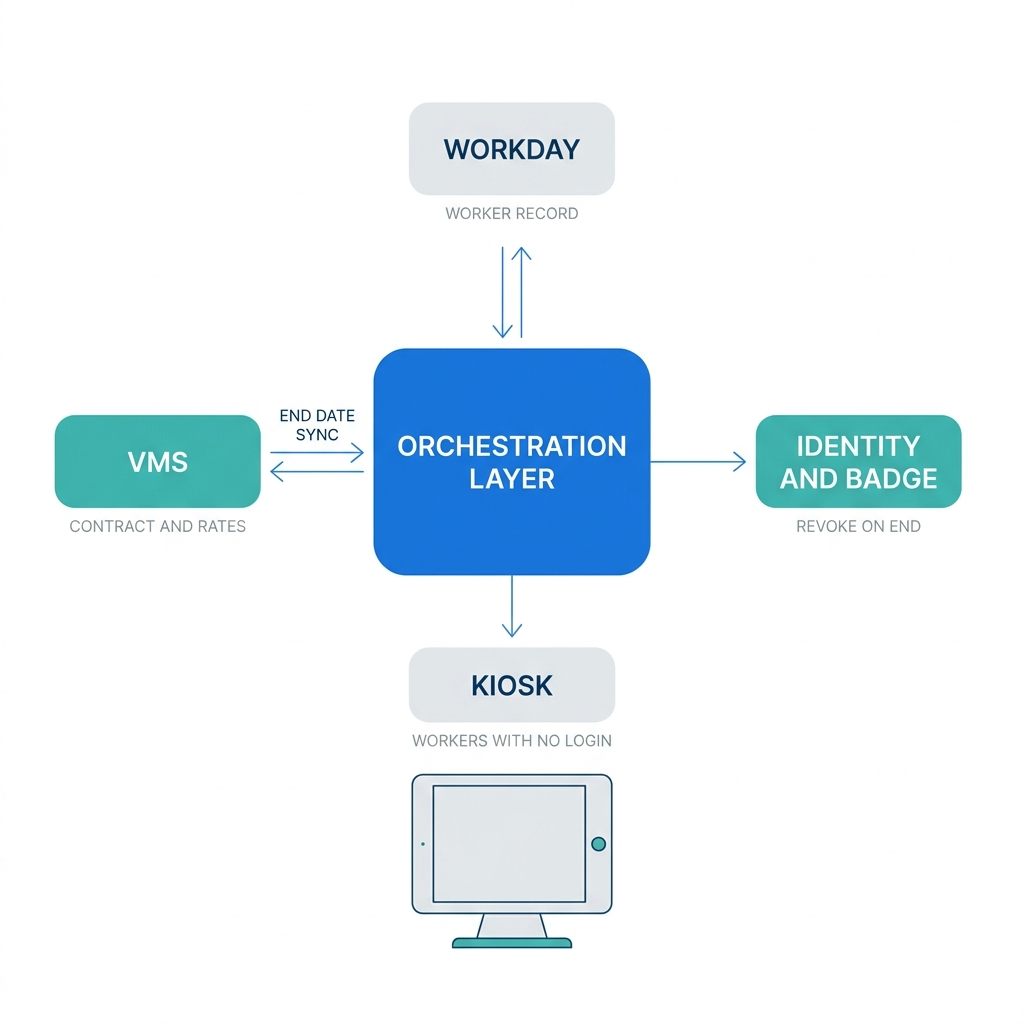
Workday has no reconciliation with the VMS. Auto-termination on end date helps only if the end date in Workday matches the one in the system where the contract actually lives. When procurement extends an engagement in the VMS and nobody updates Workday, auto-termination becomes an active hazard rather than a control, cutting off a worker who is legitimately still engaged. The two systems need to stay in agreement, and Workday will not do that on its own.
Workday ends its own record and stops. Contract expiry should revoke the badge, the network account, the clinical system login, and the equipment assignment. Workday’s record change is a signal that downstream systems have to consume, and if that plumbing is missing, ending the contract in Workday accomplishes exactly one thing.
And a large share of contingent workers cannot reach Workday at all. Agency nurses, warehouse temps, and contract production staff typically hold no Workday license and no login, which is the same wall covered in recurring compliance training tracking for frontline workers. Any obligation that requires the worker to do something in Workday will not be met by this population.
Closing the Gap with CloudApper iPaaS and hrPad
CloudApper iPaaS handles the two integration gaps directly. It keeps Workday and the VMS in agreement, syncing contract end dates and extensions in both directions so auto-termination fires on accurate data rather than stale data, and flagging mismatches for review instead of silently picking a winner. It also propagates the end-of-contract event outward, triggering deprovisioning in the identity provider, badge system, and connected applications, and recording each revocation with a timestamp. That produces the artifact an auditor actually wants: evidence that access ended when the contract did. The pattern is the same one used to sync Workday with other enterprise systems, applied to a population where the consequences of drift are sharper.
CloudApper iPaaS can also run duplicate detection on inbound contingent records, matching against existing person records on identifiers rather than name spelling, and surface probable matches before a second worker ID gets created.
CloudApper hrPad covers the population that cannot log in. A tablet or kiosk at the unit or on the floor lets agency and contract workers complete safety attestations, acknowledge policies, capture time, and confirm credential status without a Workday account. The data flows back to Workday against the correct contingent worker record, so the compliance evidence sits where the auditor will look for it.
For contract metadata Workday’s delivered fields do not capture, CloudApper AI adds the fields and the rules around them without a tenant development cycle.
None of this replaces Workday’s staffing model. Workday stays the system of record for the worker, the contract, and the position. CloudApper handles the coordination across the systems that Workday cannot see.
Frequently Asked Questions
Q: What is a contingent worker in Workday?
A contingent worker in Workday is a distinct worker type used for non-employees such as contractors, agency staff, consultants, and unpaid affiliates. The record is created through the Contract Contingent Worker task and carries contract details including start date, contract end date, supplier, and contingent worker type, with its own security groups separate from employee access.
Q: Does Workday automatically end a contingent worker contract on the end date?
It depends on tenant configuration. Auto-termination on contract end date is a setting rather than default behavior, and many organizations run without it, which means an expired contract shows on a report but leaves the worker record active. Workday delivers the Contingent Workers with Expiring Contracts report as the manual control for tenants that have not enabled auto-termination.
Q: How do I extend a contingent worker contract in Workday?
Use the Change Job task rather than looking for a separate renewal task, and update the contract end date there. Ending an engagement is a different process, End Contingent Worker Contract, reached from the worker profile under Job Change.
Q: What is the difference between a contingent worker and an employee in Workday?
They are separate worker types with separate business processes, security models, and payroll treatment. Employees are hired through the Hire business process and paid through Workday Payroll, while contingent workers are contracted through Contract Contingent Worker and typically paid through a supplier invoice outside Workday Payroll.
Q: How do I report on contingent workers in Workday?
Workday delivers reports including Contingent Workers with Expiring Contracts, and custom reports can be built on the contingent worker population. The important step is standardizing whether your organization’s headcount reports include or exclude contingent workers, since delivered and custom reports vary and two teams can produce different numbers from the same tenant.
Q: Does ending a contingent worker contract in Workday revoke system access?
Only within Workday. Badge systems, identity providers, network accounts, and connected applications each need to consume that event from Workday, and if that integration does not exist, the contract ends while the access continues.
Q: Can contingent workers use Workday self-service?
Contingent workers are placed in separate security groups and do not receive employee self-service access by default. In practice many contingent workers hold no Workday license at all, so any process requiring them to complete something in Workday needs an alternative delivery method.
If your tenant does not auto-terminate on contract end date, that is worth checking this week rather than after an audit raises it. The CloudApper team can look at how your contingent population flows between Workday, your VMS, and your identity systems, and show where records are staying active past their contract dates. Start that conversation at https://www.cloudapper.ai/contact-us.

What is CloudApper AI Platform?
CloudApper AI is an advanced platform that enables organizations to integrate AI into their existing enterprise systems effortlessly, without the need for technical expertise, costly development, or upgrading the underlying infrastructure. By transforming legacy systems into AI-capable solutions, CloudApper allows companies to harness the power of Generative AI quickly and efficiently. This approach has been successfully implemented with leading systems like UKG, Workday, Oracle, Paradox, Amazon AWS Bedrock and can be applied across various industries, helping businesses enhance productivity, automate processes, and gain deeper insights without the usual complexities. With CloudApper AI, you can start experiencing the transformative benefits of AI today. Learn More
- Useful Links:
- Agentic AI
- No-Code/Low-Code
- Custom Software
- HCM Personalization
- iPaaS
- FedRAMP

Brochure
CloudApper AI TimeClock
For accurate & touchless time capture experience.
Download Brochure
CloudApper AI Solutions for Workday



- Works with








- and more.
Similar Posts

Workday W-4 Updates for Hourly Workers: Exempt Renewals, Overtime Deductions,…

Workday Access for Former Employees: How to Deliver W-2s and…