Workday pays shift differentials by clock time, but policies and union contracts are usually written about shifts. This guide covers native time calculation and compensation-based options, midnight-spanning shifts, stacking precedence, FLSA regular-rate exposure, and how CloudApper closes the configuration and punch-accuracy gaps.

TL;DR
Workday supports shift differentials two ways: time-based calculations in Time Tracking that tag hours falling inside a clock-time window, and assignment-based premiums driven by the Work Shift field and compensation. Most problems come from a unit mismatch, because policies and union contracts are written about shifts while time range calculations operate on hours, so majority-of-shift and shift-start rules cannot be expressed without fragile calculation chains. Midnight-spanning shifts, undefined stacking precedence, and differential earnings that do not feed the FLSA regular rate are the other recurring failures, and every time-based rule is only as accurate as the punch behind it. Fix the model, precedence table, and regular-rate settings natively first; where rules outrun the configuration or frontline punch data is unreliable, CloudApper AI TimeClock captures unit, role, and premium context at the clock and CloudApper AI for HCM Personalization and Extensibility holds the organization-specific logic.
Table of Contents
- What Workday Does Natively for Differentials and Premiums
- Where the Friction Shows Up
- What to Do Within Workday First
- Where Native Tools Run Out
Most Workday shift differential disputes trace back to one design choice: the time calculation allocates premium hours by clock time, while many policies and contracts pay by the shift the employee was assigned. A nurse whose shift starts after 6 p.m. can be owed the night differential for every hour worked and still see the first and last minutes paid at base rate.
Across hundreds of nurses and twenty-six pay periods, that small gap becomes a grievance and a retro run. The fix is deciding, before edge cases arrive, which rule the calculation follows. CloudApper works as an extension layer alongside Workday for the cases where the policy is more specific than the configuration can express.
What Workday Does Natively for Differentials and Premiums
Workday gives you two structurally different ways to pay a differential, and knowing which one you are using is most of the battle.
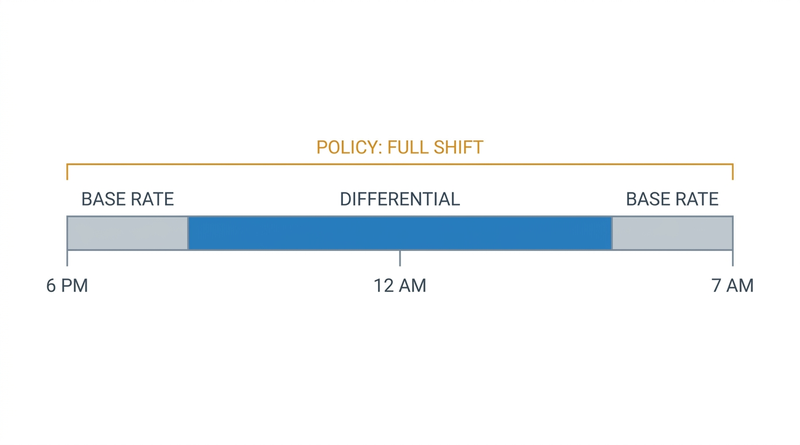
The first is time-based, through Workday Time Tracking. You define time calculations that examine worked time and tag the portions meeting a condition. A time range calculation allocates hours falling between two clock times to a calculation tag, so time worked between 6 p.m. and 6 a.m. can be tagged as night hours. Tags map to time entry codes, codes map to payroll earnings, and the earning carries the differential rate or percentage. Eligibility rules on the time calculation group control which populations the calculation applies to, so a hospital can run different night rules for nursing than for facilities.

The second is compensation-based. The Work Shift field on a position, combined with an allowance plan or shift-differential component in the compensation package, pays a premium tied to the assignment rather than the clock.
Both are legitimate, and the payroll side is solid. Differential earnings can be a percentage of base or a flat hourly amount, restricted by location, union, or pay group, and Workday’s FLSA overtime calculation blends qualifying premiums into the regular rate. View Calculated Time shows what each calculation produced for a worker on a given day, which resolves most disputes.
Where the Friction Shows Up
The most common problem is a mismatch between the policy’s unit and the configuration’s unit. Policies are written about shifts. Time range calculations operate on hours. When a contract says a shift beginning after 6 p.m. earns the differential for its full duration, or that the premium applies when the majority of hours fall in the night window, the delivered time range logic will not produce that answer. It allocates the hours actually inside the window. Getting to a shift-level rule means chaining calculations that evaluate the shift start, count qualifying hours, compare against a threshold, and re-tag the full span, which is buildable and quickly becomes something only its author understands.
Shifts crossing midnight are the second recurring issue. The hours belong to two calendar days, and which day they land on depends on your day breakdown and time period configuration. Get it wrong and a differential lands in the following pay period, weekend premiums count the wrong day, and daily overtime thresholds treat one long shift as two short ones. The same day-boundary questions surface in blended overtime rates for employees working multiple positions.
Third: stacking. A weekend night shift on a holiday, worked by someone picking up a charge differential, can trigger four premiums at once. Whether they compound, whether only the highest applies, and in what order they evaluate is a policy decision that has to be encoded explicitly. If nobody decided the precedence, the calculation order decided it for you. Union environments make this sharper, as covered in handling union work rules and collective bargaining agreements in Workday.
Fourth, and the one that draws regulatory attention: the FLSA regular rate. Shift differentials are remuneration and generally must be included in the regular rate used for overtime. If a differential is paid as a flat allowance outside time tracking, or the earning is not configured to feed the regular-rate calculation, overtime is understated. This stays quiet until a wage-and-hour review, then compounds across every affected period. Multi-jurisdiction employers also face differing state daily-overtime rules, the terrain covered in multi-state payroll tax compliance in Workday.
Fifth is input quality. Every time-based differential is only as accurate as the punch. A worker who clocks in at a shared terminal, or whose supervisor enters time the next morning, produces data that is approximately right. Approximately right is fine for total hours and wrong for a rule keyed to a 6 p.m. boundary, a gap that also shows up in manual versus automated timesheet submission.
Then there is the part that generates tickets. The premium is a payslip line several days later, and the worker who suspects it is missing has no way to check, which is the visibility problem in how employees see their hours in Workday.
What to Do Within Workday First
Decide, and write down, whether each differential is time-based or assignment-based. Most organizations find they have both, applied inconsistently by location, because different implementation phases made different choices. Reconciling that to one intentional model per premium type is the highest-value work available.
Build one calculation tag per distinct premium and keep the tag to code to earning mapping explicit. Encoding two premiums in one tag costs you the moment they must be reported or grieved separately.
Drive applicability through eligibility rules on time calculation groups rather than worker-level overrides, which survive go-live and then nobody remembers why they exist.
Set day breakdown and time period configuration deliberately for overnight populations, and test a midnight-spanning shift end to end, including one that crosses a pay period boundary.
Write your stacking precedence as a table before configuring it, then confirm the calculation order produces that table. Test the ugliest realistic case you have: holiday, weekend, night, and a role premium on one shift.
Confirm every differential earning is configured to participate in the FLSA regular rate. That is a specific setting, not a safe default.
Use View Calculated Time as a routine audit rather than a troubleshooting tool. Sampling overnight workers each period catches configuration drift before employees do, and multi-entity organizations should sample across entities for the reasons in managing multi-location and multi-entity Workday configurations.
Where Native Tools Run Out
Two gaps survive good configuration.
The first is expressiveness. Majority-of-shift rules, differentials that depend on which unit a worker floated to mid-shift, premiums requiring formal role designation for that shift, and contract language treating a shift as a unit rather than a set of hours are rules the delivered calculations were not shaped for. They can be approximated with long calculation chains, and each chain is a maintenance liability that both the next release cycle and the next contract negotiation threaten. CloudApper becomes relevant here not as a replacement for Workday Time Tracking but as the place organization-specific logic lives.
The second is the punch itself. Time-based differentials assume the recorded clock time reflects when the person started and stopped, and which cost center, unit, or role they worked under. For desk-based staff that holds. On a manufacturing floor, a nursing unit, or a distribution center it depends on how time is captured, and Workday self-service was not built for people without a computer.
How CloudApper Closes the Gap
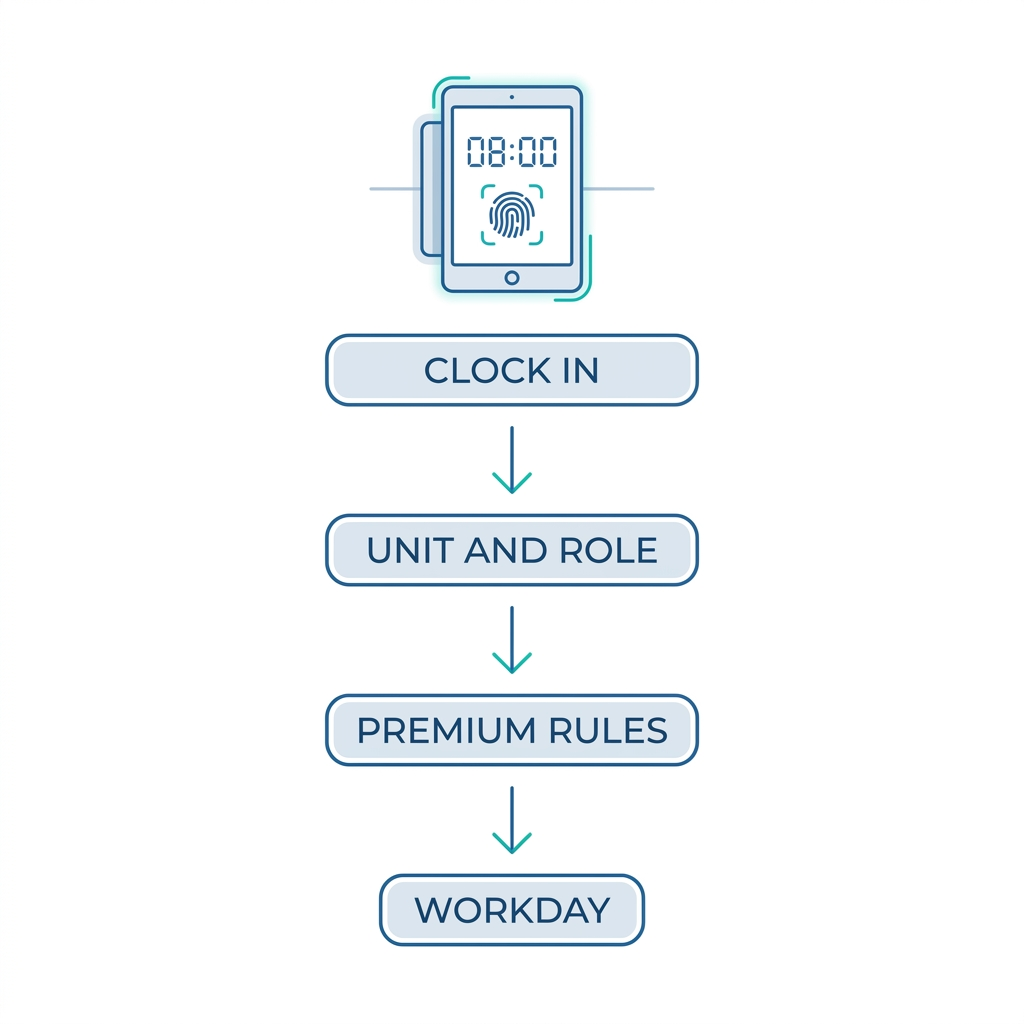
CloudApper AI TimeClock for Workday addresses the input side. It runs on standard tablets as a touchless biometric clock, so punches are attributable to the individual and recorded at the actual minute rather than reconstructed later. Buddy punching, which corrupts differential calculations as much as it inflates hours, stops being a variable.
More useful for premium pay specifically, the clock captures the context the differential depends on at the moment of the punch. A worker transferring to a different unit mid-shift selects the transfer at the clock. Someone picking up a charge or lead role records it there. Attestations confirm the shift assignment, department, or meal break, and it all flows into Workday Time Tracking as clean tagged data rather than a supervisor’s recollection. Geofencing keeps location-based premiums honest for field crews.
Employees also get a place to see their own premium-eligible hours and shift totals before payroll closes, which turns a payslip dispute into a same-day correction instead of the sequence in retro pay and off-cycle payroll correction workflows.
For rules Workday’s calculations cannot express cleanly, CloudApper AI for HCM Personalization and Extensibility holds the organization-specific logic. Majority-of-shift determinations, contract-specific stacking precedence, and role-designation requirements are configured in CloudApper and resolved before data reaches Workday, so the tenant stays close to delivered configuration and union-specific complexity lives somewhere it can change without a regression test across the whole calculation library.
Workday remains the system of record for time and pay. CloudApper supplies the accurate input it needs and carries the rules it was not designed to hold.
Frequently Asked Questions
Q: How do you set up a shift differential in Workday?
There are two paths. For a differential based on when hours are worked, build a time calculation that allocates worked time within a clock-time range to a calculation tag, map the tag to a time entry code, and map the code to a payroll earning carrying the rate or percentage. For a differential tied to an assignment rather than the clock, use the Work Shift field on the position with a compensation allowance or shift-differential component.
Q: Does Workday include shift differential in overtime pay?
It can, but it depends on configuration. Shift differentials are generally part of the FLSA regular rate, and Workday’s overtime calculation is built to blend qualifying premiums into that rate, but the earning must be configured to participate. Differentials paid as flat allowances outside time tracking are the most common reason overtime ends up understated.
Q: How does Workday handle a shift that crosses midnight?
Worked hours are attributed to calendar days according to your day breakdown and time period configuration, so an overnight shift splits across two days unless configured otherwise. That affects which pay period the differential falls in, how weekend and holiday premiums evaluate, and whether daily overtime sees one long shift or two short ones. Test overnight populations end to end, including a shift crossing a pay period boundary.
Q: Can Workday pay a differential for a whole shift when only some hours fall in the night window?
Not with a time range calculation alone, since that logic allocates only the hours inside the window. A majority-of-shift or shift-start rule requires chaining calculations that evaluate the shift, count qualifying hours against a threshold, and re-tag the full span. It is buildable but hard to maintain, which is why organizations with contract-driven shift rules often place that logic in CloudApper and send Workday the resolved result.
Q: How do you handle stacked premiums such as weekend plus night pay?
Decide the precedence as a policy question first: whether premiums compound, whether only the highest applies, and in what order they evaluate. Then confirm your calculation order in Workday produces that outcome, and test the worst realistic combination you have. Without an explicit decision, the calculation order silently becomes the policy.
Q: Can employees see their shift differential hours in Workday?
Workday shows worked time and, after payroll, the earning on the payslip, but employees rarely have a clear pre-payroll view of which hours were tagged as differential-eligible, and frontline workers without regular Workday access typically have none. CloudApper AI TimeClock shows premium-eligible hours and shift totals at the clock, surfacing disputes before payroll closes.
If differential and premium pay is generating grievances, retro runs, or wage-and-hour exposure, the problem is usually split between what the configuration can express and how accurately time is captured on the floor. CloudApper works alongside Workday on both halves. Contact the CloudApper team to walk through your current premium rules and where they are breaking down.

What is CloudApper AI Platform?
CloudApper AI is an advanced platform that enables organizations to integrate AI into their existing enterprise systems effortlessly, without the need for technical expertise, costly development, or upgrading the underlying infrastructure. By transforming legacy systems into AI-capable solutions, CloudApper allows companies to harness the power of Generative AI quickly and efficiently. This approach has been successfully implemented with leading systems like UKG, Workday, Oracle, Paradox, Amazon AWS Bedrock and can be applied across various industries, helping businesses enhance productivity, automate processes, and gain deeper insights without the usual complexities. With CloudApper AI, you can start experiencing the transformative benefits of AI today. Learn More
- Useful Links:
- Agentic AI
- No-Code/Low-Code
- Custom Software
- HCM Personalization
- iPaaS
- FedRAMP

Brochure
CloudApper AI TimeClock
For accurate & touchless time capture experience.
Download Brochure
CloudApper AI Solutions for Workday



- Works with








- and more.
Similar Posts

Workday Biometric Time Clock Compliance: Consent, Retention, and Deletion Rules…

Workday Kiosk Security: Protecting Pay Slips and PII on Shared…