Workday Onboarding assumes an account, an email, and a device. Frontline hires often have none on day one, so tasks sit incomplete and supervisors fill the gap in ways that break I-9 attribution. This guide covers native fixes and where CloudApper hrPad closes the access gap.

TL;DR
Workday Onboarding is well built, but it assumes a new hire with a working account, an email address, a device, and time to complete forms. Frontline hires frequently have none of those on day one, so account activation fails on a mistyped personal email and the tasks never reach anyone. Because most onboarding items are To Do steps that do not block the hire, the backlog stays invisible until payroll or an I-9 deadline exposes it, and supervisors close the gap by completing tasks on workers' behalf, which breaks attribution on exactly the items that require it. Fix what you can natively: split Onboarding Setup by worker type, validate personal email during recruiting, make payment elections, withholding, and I-9 Section 1 required with escalation, and assign the Onboarding Status report an owner per site. Where access itself is the barrier, CloudApper hrPad lets deskless hires verify with face ID, a PIN, or a QR code and complete their own onboarding at the facility, writing results back into Workday.
Table of Contents
- What Workday Does Natively for Onboarding
- Where the Friction Shows Up
- What to Do Within Workday First
- Where Native Tools Run Out
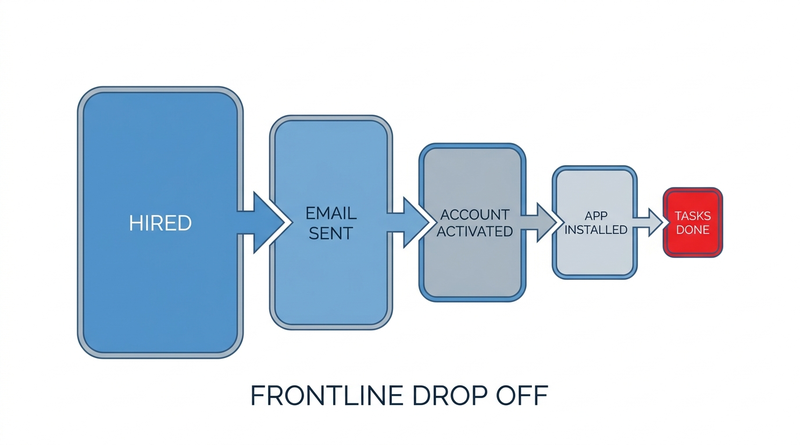
Workday onboarding tasks stall for frontline new hires because the process assumes an account, an email address, a device and ten quiet minutes, and most hourly hires have none of those when the tasks arrive. Two weeks in, a packer can still have empty payment elections and paper checks, with withholding, emergency contact and handbook acknowledgment sitting in an inbox he opened once on a full phone.
The Onboarding Status report shows him at forty percent without showing why, or that thirty-one other hires at the site look the same. CloudApper is relevant as the layer that gives frontline hires somewhere to complete the work Workday is correctly asking for.
What Workday Does Natively for Onboarding
Workday Onboarding is more configurable than most organizations use it for.
Onboarding Setup controls what a new hire sees: which tasks appear, in what order, with what welcome content, and it is assigned through eligibility rules so a nurse, a warehouse associate, and a finance analyst can each get a different experience. The tasks themselves are a mix of business process steps and To Do items, covering federal and state withholding elections, payment elections, government IDs, Form I-9 Section 1, personal information, emergency contacts, document review and acknowledgment, and photo upload.

The routing is sound. Tasks land in the worker’s Workday inbox, notifications go out by email and mobile, due dates and reminders can be configured on steps, and the Onboarding Status report tells you exactly which tasks are outstanding for which workers. Workday also supports beginning onboarding before the start date, so a hire can arrive on day one with paperwork behind them rather than ahead of them.
For a population with corporate email, a laptop, and desk time, this works. The completion problem in those groups is usually a reminder problem, and Workday’s reminders solve it. None of what follows is a criticism of the tool. It is a description of what happens when the tool’s assumptions do not hold.
Where the Friction Shows Up
The root cause is almost always credentials. A frontline hire often has no company email address, so account activation depends on a personal email captured accurately during recruiting. When that address is mistyped, shared with a family member, abandoned, or never collected, the activation message goes nowhere and the worker never has an account to receive tasks in. Everything downstream is a consequence of this one gap, including the screening and paperwork sequence described in connecting screening vendors to Workday Recruiting.
The second issue is that most onboarding tasks do not block anything. To Do items and non-required steps let the hire complete while the tasks stay open indefinitely. There is no natural moment where someone is forced to notice. The hire looks finished in Workday, the worker is on the floor, and a queue of incomplete items accumulates until payroll or compliance surfaces it. Configuring which steps actually gate progress is a business process design question, covered in setting up and troubleshooting Workday business process approvals.
Third, notification delivery. Workday sends the reminder, but reaching a deskless worker through email and a mobile app requires a working address, an installed app, completed multi-factor enrollment, and a person who checks it. Each step drops people, and the cumulative loss is large. This is the same failure described in why Workday notifications are not reaching your frontline employees.
Fourth, the tasks assume conditions the worker does not have. Uploading a government ID means photographing a document on a personal phone and pushing the file through a mobile browser upload control. Withholding elections in English are a barrier for a workforce that is not uniformly English-speaking. A twelve-item task list is a different proposition on a shared break room terminal with a queue behind you.
Fifth, and the one that carries real exposure: managers fill the gap. When a supervisor completes onboarding tasks on a worker’s behalf to clear the report, attribution is lost. For most tasks that is untidy. For Form I-9 Section 1, which the employee must complete and attest to personally, and for tax withholding elections, it is a compliance problem that an audit will find. The I-9 sequence and its timing requirements are covered in Workday I-9 compliance for new hires.
At volume this compounds. Three hundred seasonal hires across a dozen sites in two weeks produces an onboarding backlog that no HR team can chase individually, and the fallback is a spreadsheet and a phone. The same access gap then repeats for every recurring obligation the worker has, which is the pattern in tracking recurring compliance training for frontline workers without Workday logins.
What to Do Within Workday First
Audit your Onboarding Setup assignments before anything else. Most tenants have one setup applied to everyone, which means a warehouse associate receives the same twelve-item experience designed for a salaried professional. Separate setups by worker type and location, and cut the frontline list to what is legally or operationally required in week one. Everything else can be deferred or moved to a later touchpoint.
Fix email capture in recruiting rather than in onboarding. A verified personal email and mobile number collected and confirmed at offer stage removes the largest single failure point. Validating the address at the moment of capture is worth more than any reminder configuration.
Decide which steps must block and make them required with named owners and due dates, rather than leaving compliance-critical items as open-ended To Do tasks. Payment elections, withholding, and I-9 Section 1 belong in the first group. A handbook acknowledgment probably does not.
Configure due dates, reminders, and escalation on the steps that matter. An escalation to a location HR contact after a defined interval turns an invisible backlog into someone’s assigned work.
Run the Onboarding Status report on a fixed cadence, by location, with a named owner per site. The report is good; the gap is that nobody owns it.
Write down what a manager is permitted to do. Assisting a worker who is operating the screen themselves is different from a manager entering data on their behalf, and the difference matters legally for I-9 and withholding. Make that boundary explicit rather than leaving supervisors to invent it under pressure.
Where Native Tools Run Out
After all of that, one condition remains unmet, and it is not a configuration setting. Workday Onboarding requires the worker to have a working account, a device, connectivity, and enough uninterrupted time to complete forms in a language they read comfortably. For a large share of frontline hires, the only place where all of those conditions can be guaranteed is the facility itself, on day one, and Workday’s self-service was not designed to be delivered that way.
The second gap follows from the first. Because there is no supervised in-person path that still preserves attribution, organizations end up choosing between an incomplete record and a manager-completed one. Both are bad, and the second is worse in an audit.
How CloudApper hrPad Closes the Gap
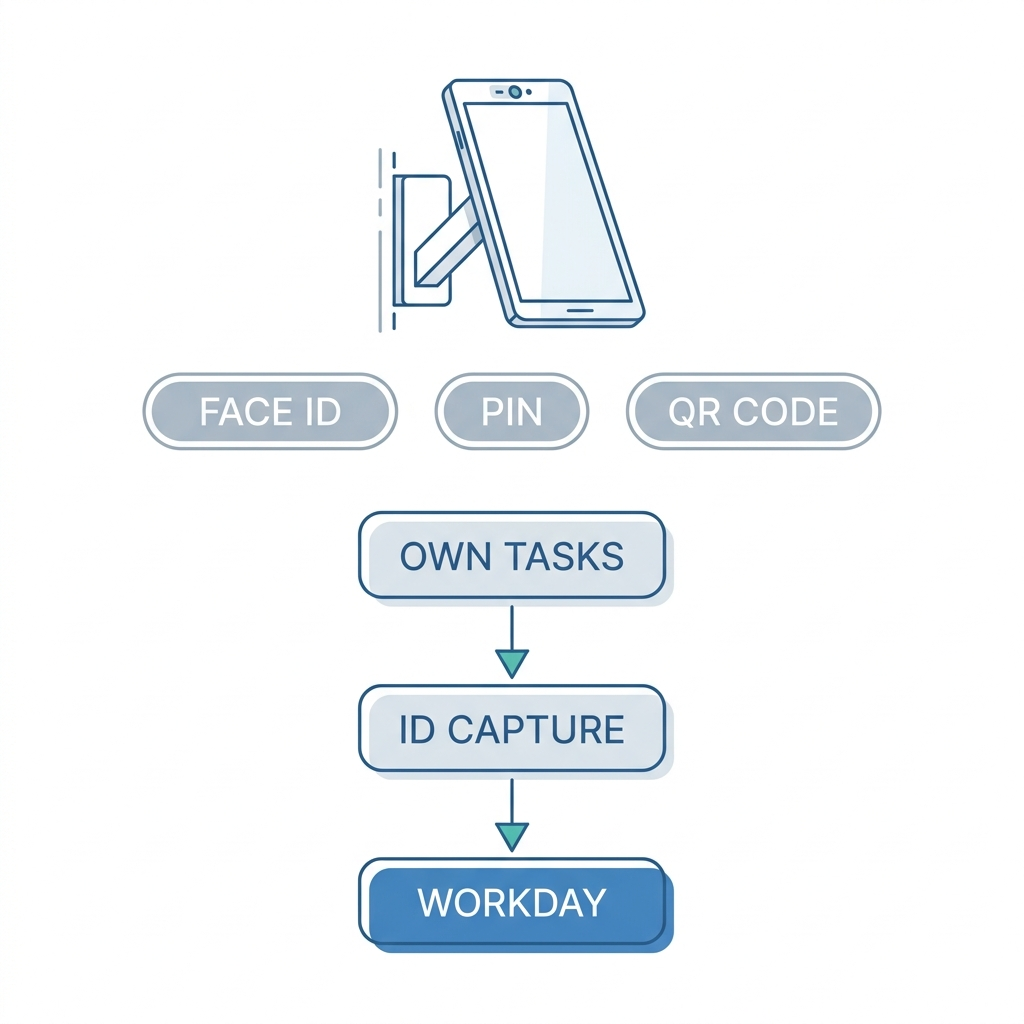
CloudApper hrPad puts onboarding where the new hire already is. It runs on standard tablets mounted at the site, so a worker arriving for their first shift verifies with face ID, a PIN, or a QR code and completes their own onboarding tasks in the first thirty minutes, at the facility, before the backlog ever forms.
Attribution survives, which is the point. The worker is the one entering their withholding elections and completing I-9 Section 1, not a supervisor typing on their behalf, so the record reflects what actually happened. Guided prompts walk through each item in the worker’s language, and the tablet camera handles document capture without requiring a personal phone with storage space and a stable connection.
Completed tasks write back into Workday, so the tenant is the system of record and the Onboarding Status report finally shows something true. Items that remain open are truly open rather than an artifact of a worker who never had access.
The kiosk does not leave after week one. The same tablet handles paystub access, PTO balances, schedules, and the recurring acknowledgments that follow, which means onboarding stops being a one-off deployment and becomes the first use of a channel the worker keeps using. The ongoing version of that problem is described in Workday paystub access for hourly workers. For organizations where the volume itself is the constraint, CloudApper AI Recruiter handles the hiring pipeline feeding into it, and the contingent and non-employee populations that complicate onboarding further are covered in managing contingent workers and non-employees in Workday.
Workday remains where onboarding is configured, tracked, and reported. CloudApper hrPad is how a workforce without desks actually reaches it.
Frequently Asked Questions
Q: Why do Workday onboarding tasks stay incomplete?
Most incomplete onboarding tasks trace back to access rather than motivation. If a new hire has no company email, the account activation message depends on a personal address captured during recruiting, and any error there means the worker never gets an account to receive tasks in. Because most onboarding items are To Do steps that do not block the hire, nothing forces anyone to notice until payroll or compliance surfaces the gap.
Q: How do you check onboarding completion status in Workday?
Run the Onboarding Status report, which lists outstanding tasks by worker and can be filtered by supervisory organization or location. It tells you what is incomplete but not why, so it works best run on a fixed cadence with a named owner per site rather than reviewed only when a problem appears.
Q: Can a manager complete Workday onboarding tasks for an employee?
Some tasks can be completed by others, but several must not be. Form I-9 Section 1 requires the employee to complete and attest to it personally, and tax withholding elections are the employee’s declaration. A manager assisting a worker who is operating the screen is different from a manager entering the data themselves, and organizations should document that boundary explicitly rather than leaving supervisors to decide under time pressure.
Q: When does a new hire get Workday access to start onboarding?
Access is created as part of the hire, and Workday supports beginning onboarding before the start date so paperwork can be finished in advance. In practice, pre-start onboarding only works when the worker can activate the account, which depends on a valid email address and the ability to complete any multi-factor enrollment before day one.
Q: How do you onboard employees who do not have a company email address?
Workday can send activation to a verified personal email, so capturing and validating that address during recruiting is the single highest-value fix. Where personal email is unreliable across a population, the practical alternative is an on-site channel such as a CloudApper hrPad kiosk, where the worker verifies with face ID, a PIN, or a QR code and completes their own tasks at the facility without needing an inbox at all.
Q: Which Workday onboarding tasks actually block the hire?
By default, very few. Business process steps configured as required will hold the process, while To Do items and optional steps allow the hire to complete with tasks outstanding. Deciding deliberately which items gate progress, and configuring payment elections, withholding, and I-9 Section 1 accordingly with due dates and escalation, is what turns onboarding from a suggestion into a controlled process.
If onboarding completion looks fine on paper but your frontline sites tell a different story, the gap is usually access rather than configuration. CloudApper works alongside Workday to give deskless hires a way to complete their own onboarding on day one, at the site, with the record landing back in your tenant. Contact the CloudApper team to look at where your onboarding backlog is actually forming.

What is CloudApper AI Platform?
CloudApper AI is an advanced platform that enables organizations to integrate AI into their existing enterprise systems effortlessly, without the need for technical expertise, costly development, or upgrading the underlying infrastructure. By transforming legacy systems into AI-capable solutions, CloudApper allows companies to harness the power of Generative AI quickly and efficiently. This approach has been successfully implemented with leading systems like UKG, Workday, Oracle, Paradox, Amazon AWS Bedrock and can be applied across various industries, helping businesses enhance productivity, automate processes, and gain deeper insights without the usual complexities. With CloudApper AI, you can start experiencing the transformative benefits of AI today. Learn More
- Useful Links:
- Agentic AI
- No-Code/Low-Code
- Custom Software
- HCM Personalization
- iPaaS
- FedRAMP

Brochure
CloudApper AI TimeClock
For accurate & touchless time capture experience.
Download Brochure
CloudApper AI Solutions for Workday



- Works with








- and more.
Similar Posts

Workday Biometric Time Clock Compliance: Consent, Retention, and Deletion Rules…

Workday Kiosk Security: Protecting Pay Slips and PII on Shared…