Workday handles year-end well for what is already in the tenant. W-2 accuracy is decided by third-party sick pay, fleet, relocation, and equity data that arrives on someone else's schedule. This guide gives the reconciliation sequence, with owners and cutoffs, that prevents a December scramble.

TL;DR
Workday's year-end machinery is complete for what already sits in the tenant: box configuration controls how earnings and deductions map to W-2 boxes, Company W-2 Audit and View W-2 Errors surface problems, and all payrolls including off-cycles must finish before forms are created. The accuracy problem lives at the boundary, because third-party sick pay, fleet personal use, group-term life imputed income, relocation, and equity all originate in systems Workday does not control and arrive on their own schedules. Tax year follows the payment date, so anything discovered in December becomes an off-cycle at best and a W-2c with an amended return at worst. The fix is an inventory of every external taxable event source with a named owner and a cutoff built backward from the final scheduled payroll, quarterly reconciliation to each filed 941 as the quarter closes, and alignment with whoever signs your returns. Where those low-volume files have no monitored channel and the control lives in one person's spreadsheet, CloudApper iPaaS collects, validates, and matches them on a schedule with an audit trail.
Table of Contents
- What Workday Does Natively for Year-End
- Where the Friction Shows Up
- The Reconciliation Sequence
- Where Native Tools Run Out
Workday year-end payroll errors often come from data that never enters the tenant, so no report inside Workday will catch them. A fleet vendor’s monthly personal-use file for fuel cards issued to fifty-three field managers can sit in a departed analyst’s inbox until December 19, leaving payroll four business days and one scheduled run to value eleven months of personal vehicle use in the right tax year.
Most guidance treats reconciliation as a December check against data Workday holds, but much of what makes a W-2 correct lives elsewhere. CloudApper is relevant for one narrow reason: the control point for those external files has to sit somewhere besides one person’s spreadsheet.
What Workday Does Natively for Year-End
For everything already inside the tenant, Workday’s year-end machinery is complete and you should use it rather than rebuilding it.
W-2 output is driven by box configuration. The Maintain W-2 Box Configuration task controls how each earning, deduction, and pay component maps to a W-2 box, with effective dating by tax year, and View W-2 Box Configuration lets you confirm what will actually print. Anything introduced mid-year, a new earning code for a retention bonus or a new pre-tax deduction, needs its mapping verified rather than assumed.

The audits are delivered. Company W-2 Audit and View W-2 Errors surface missing or invalid identifiers, address problems, and box-level inconsistencies before forms are generated. The Payroll Register and payroll result comparisons give you the totals to work from. Workday also enforces sequencing: all payrolls, including off-cycle and on-demand payments, must be complete before year-end forms are created, which is the guardrail against generating W-2s over an unfinished year.
For standard earnings and deductions processed through Workday Payroll, this works. If your organization’s taxable events are entirely native, the year-end problem is a scheduling problem and the delivered tasks solve it.
Where the Friction Shows Up
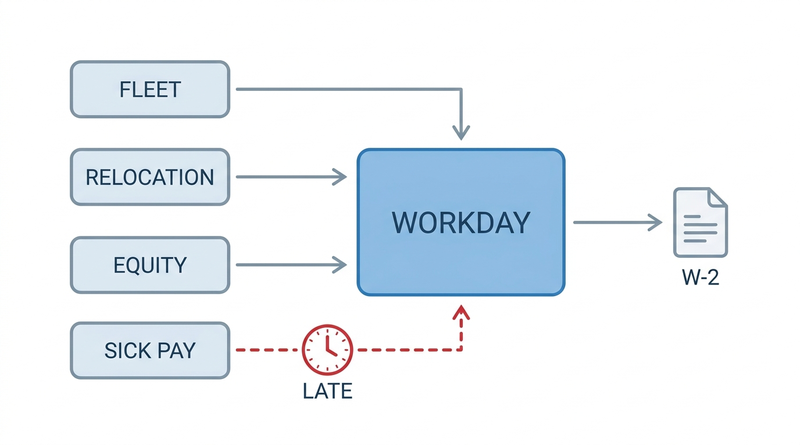
The friction is at the boundary. Taxable events that originate outside Workday still have to appear on a W-2, and the mechanisms that get them there are mostly informal.
Third-party sick pay arrives as a carrier statement, often in the first half of January, covering payments made months earlier. Personal use of a company vehicle comes from fleet as a spreadsheet. Group-term life above the $50,000 IRS threshold generates imputed income often calculated in the benefits system. Relocation and taxable reimbursements sit in accounts payable, and equity events with the stock plan administrator. Each has a different owner, format, and arrival time, and none is on a schedule Workday controls.
The result is predictable. Amounts that should have been taxed through a regular payroll get discovered late and forced into a December off-cycle, or missed entirely and corrected afterward with a W-2c and an amended return. Tax year is determined by the date of payment rather than the pay period, which means a late correction dated in January belongs to the new year regardless of when the underlying benefit was provided. The retro and off-cycle mechanics involved are covered in retro pay and off-cycle payroll correction workflows in Workday.
One stakeholder rarely appears in these discussions: the tax filer or payroll service that signs the returns and the W-2 transmittal. They receive files built on the assumption that Workday is the system of record for everything taxable, and when the quarterly returns they filed do not bridge to annual totals, the variance is theirs to explain and often yours to fund. Asking them in September what they reconcile and what they need is among the highest-value conversations available, and almost nobody has it.
The last problem is ownership. Because these feeds have no system of record, reconciliation lives in a spreadsheet maintained by one or two people who know which vendor sends what and what has to be done to it. That works until one of them leaves in August, which is when the fuel card file stopped being processed above. Auditors treat this as the control weakness it is, which connects to the evidence expectations in preparing for a Workday audit.
The Reconciliation Sequence
This sequence assumes nothing beyond what you already own. Each item names a source, a cutoff, and a sign-off owner, because an inventory without an owner and a date is a list, not a control.
- Build the external taxable event inventory by mid-September. For every source outside Workday, record the vendor, format, recipient, frequency, last successful processing date, and a named owner. Fleet, relocation, equity, third-party sick pay, taxable awards, and expense reimbursements are the usual set. Confirm each contact is still employed.
- Confirm the tax filer’s requirements and their reconciliation calendar. Ask what they bridge, when, and what a variance costs. Do this before Q4 closes.
- Set and publish cutoff dates for each external source, working backward from your final scheduled payroll rather than from December 31, so late-arriving items land in a regular run rather than an off-cycle.
- Reconcile quarter-to-date totals to each filed 941 as each quarter closes, not in December. Variances found in April are corrections; the same variance found in January is an amended return.
- Verify W-2 box configuration for every earning and deduction added during the year, using View W-2 Box Configuration, and confirm annual limits for retirement and tax-advantaged contributions.
- Run the employee data audits early enough to fix them, covering name and identifier validity and mailing addresses, with particular attention to terminated workers whose addresses go stale. Termination-related pay timing is covered in final paycheck and termination pay compliance in Workday.
- Load all external taxable amounts before the final scheduled payroll, then run Company W-2 Audit and View W-2 Errors and resolve every result rather than triaging by size.
- Generate forms in a non-production run first and sample across worker types, including multi-state workers, terminated employees, multi-position workers, and anyone near a wage base limit, before producing final forms.
Two things deserve their own pass. Workers who relocated mid-year or worked remotely from an unregistered state produce allocation problems that surface at filing, covered in multi-state payroll tax compliance in Workday. Premium and differential earnings added during the year have box mapping that is easy to miss, described in shift differential and premium pay configuration.
Where Native Tools Run Out
Run that sequence and most organizations get through year-end without a W-2c. Two things remain unsolved, and it is worth being precise about them rather than gesturing at automation.
The first is ingestion cadence for low-volume, high-consequence files. Workday’s delivered integration patterns handle recurring, structured, high-volume flows well. A carrier sick-pay statement arriving once a year in the carrier’s own layout, a fleet file with eleven monthly tabs, and a relocation vendor’s quarterly summary fit none of them, and each is too small to justify a dedicated build. So they are loaded by hand, the pattern examined in choosing between an EIB and a real integration for mass data changes.
The second is that the inventory itself has no home. The list of which vendor sends what, by when, to whom, is a control document, and in most organizations it exists as institutional memory plus a spreadsheet. Workday has no object for it because it describes things outside Workday, which is the narrow gap CloudApper occupies.
How CloudApper iPaaS Holds the External Feeds
CloudApper iPaaS addresses those two gaps specifically, and it is worth saying plainly that it does not replace anything above. The sequence is still the work.
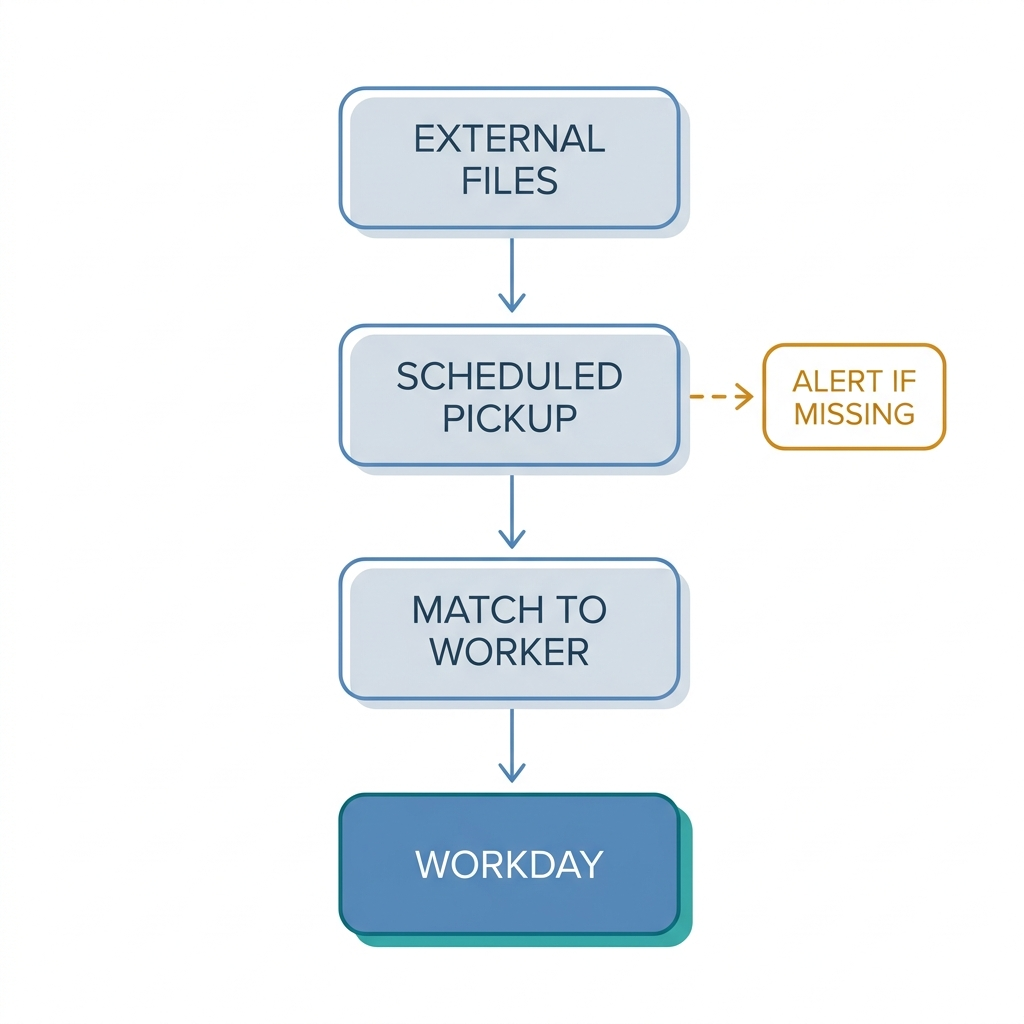
It gives those files a monitored channel. Carrier statements, fleet files, relocation summaries, and equity exports are collected on a schedule, parsed regardless of layout, matched to Workday worker records, and validated before loading, with unmatched items quarantined rather than silently dropped. A file that stops arriving raises an alert in September instead of being noticed in December.
It turns the inventory into an operating system rather than a document. Each source has a schedule, an owner, and a last-successful-run timestamp, which is the evidence an auditor is asking for when they question how you know all taxable events were captured.
It also supports continuous quarterly reconciliation against the filer’s returns instead of an annual bridge, which turns amended returns back into ordinary corrections.
Workday remains where payroll is processed and where year-end forms are produced. CloudApper iPaaS is the control layer around the files Workday never sees.
Frequently Asked Questions
Q: What are the required steps in Workday year-end payroll before generating W-2 forms?
All payrolls for the year, including off-cycle and on-demand payments, must be complete before year-end forms are created. Before that, verify W-2 box configuration for every earning and deduction, resolve everything raised by Company W-2 Audit and View W-2 Errors, confirm employee identifiers and addresses, and load taxable amounts originating outside Workday. Generating forms in a non-production run first lets you sample results before producing finals.
Q: How should Workday payroll data be reconciled with Form 941 and third-party providers before year-end W-2 filing?
Reconcile quarter-to-date wages and withholding to each filed 941 as the quarter closes rather than in December, so variances are corrections rather than amended returns. Separately, confirm with your tax filer which bridges they perform and what they expect to receive. Third-party amounts such as carrier sick pay and equity events should be reconciled to the provider’s own statement before loading, not after forms are generated.
Q: What determines which tax year a payment falls into?
The date of payment governs, not the pay period the work or benefit relates to. A correction processed in January for a benefit provided the previous October is taxed in the new year. This is why late-discovered taxable items are worth forcing into the final scheduled payroll rather than a January off-cycle.
Q: What is third-party sick pay and how does it reach Workday?
Third-party sick pay is disability or sick pay issued by an insurer or third-party administrator rather than the employer, and it is still reportable on the W-2. The carrier provides a statement of amounts paid and taxes withheld, typically after year end, which must be matched to workers and loaded before forms are generated. Because it arrives on the carrier’s schedule, it is a leading driver of W-2c corrections.
Q: What usually causes a W-2c?
Most corrections trace to a taxable item that was never loaded, an earning or deduction mapped to the wrong W-2 box, or a name or identifier that does not match government records. Group-term life imputed income above the $50,000 IRS threshold, personal use of a company vehicle, and third-party sick pay account for a large share, because all three originate outside payroll and depend on someone remembering to collect them.
Q: Do we have to file W-2s electronically?
The IRS lowered the electronic filing threshold so that employers filing ten or more information returns in aggregate across form types in a calendar year must file electronically. Because the count aggregates W-2s, 1099s, and 1095-Cs together rather than treating each type separately, most organizations of any size are above it. Furnishing deadlines to employees and the Social Security Administration remain January 31.
Q: When should year-end preparation actually start?
The Workday-side tasks belong in Q4, but the work that prevents corrections belongs in September: inventorying external taxable event sources, confirming owners and cutoffs, and aligning with your tax filer. Anything discovered in December is a scheduling problem at best, an amended return at worst.
If your last two year-end closes involved a late-arriving file and a scramble, the fix is not a better December checklist but an owner and a cutoff for every source that feeds a W-2. CloudApper works alongside Workday to give those external feeds a monitored channel and an audit trail. Contact the CloudApper team to review which of your taxable event sources currently have neither.

What is CloudApper AI Platform?
CloudApper AI is an advanced platform that enables organizations to integrate AI into their existing enterprise systems effortlessly, without the need for technical expertise, costly development, or upgrading the underlying infrastructure. By transforming legacy systems into AI-capable solutions, CloudApper allows companies to harness the power of Generative AI quickly and efficiently. This approach has been successfully implemented with leading systems like UKG, Workday, Oracle, Paradox, Amazon AWS Bedrock and can be applied across various industries, helping businesses enhance productivity, automate processes, and gain deeper insights without the usual complexities. With CloudApper AI, you can start experiencing the transformative benefits of AI today. Learn More
- Useful Links:
- Agentic AI
- No-Code/Low-Code
- Custom Software
- HCM Personalization
- iPaaS
- FedRAMP

Brochure
CloudApper AI TimeClock
For accurate & touchless time capture experience.
Download Brochure
CloudApper AI Solutions for Workday



- Works with








- and more.
Similar Posts

Workday Biometric Time Clock Compliance: Consent, Retention, and Deletion Rules…

Workday Kiosk Security: Protecting Pay Slips and PII on Shared…