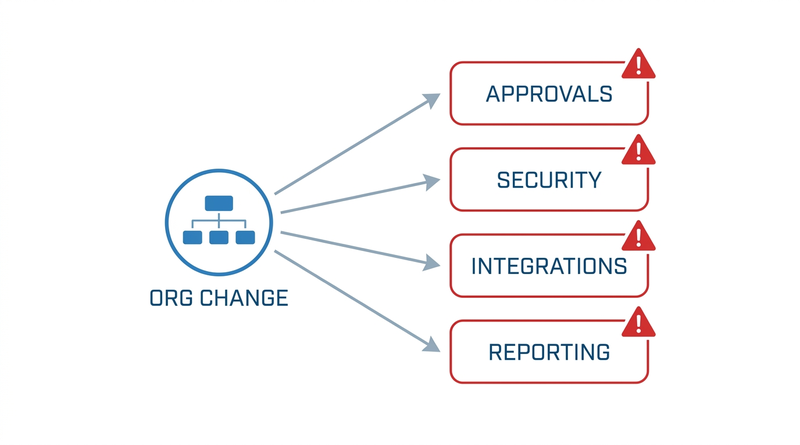
Workday executes supervisory organization restructures cleanly. What breaks is everything hanging off the structure that was never modeled as effective-dated: approval routing, derived security, integrations, and reporting. This guide gives the dependency inventory to run before the effective date.

TL;DR
The structural side of a Workday restructure is well handled: Assign Superior, Create Subordinate, Divide Organization, Inactivate Organization, Move Workers, and Change Organization Assignments all execute cleanly and are effective-dated. What breaks is everything that depends on the org structure but was never modeled as effective-dated. Business processes routing to organization-based roles resolve to whoever holds the role when the step evaluates, so in-flight events misroute. Role-based security shifts with the hierarchy, leaving handover exceptions to be fixed by hand. Integrations read org membership as current state, so a reorg arrives as an undifferentiated batch of movements that identity systems act on. Before the effective date, count the misrouting processes, in-flight events, derived security groups, affected integrations, entity-boundary crossings, and organization-based reports. The one gap that survives is that Workday has no place to hold the exception mapping, which is where CloudApper AI for HCM Personalization and Extensibility and CloudApper iPaaS carry it, with an expiry and an audit trail.
Table of Contents
- What Workday Does Natively for Restructures
- Where the Friction Shows Up
- Measuring Your Own Blast Radius Before the Date
- Where Native Tools Run Out
Workday supervisory organization restructures execute correctly on the effective date; what breaks is everything attached to the structure that was never modeled as effective-dated. Within hours, an in-flight termination routes to a director who no longer owns the team, an identity sync revokes access for forty people who only moved, and a compensation allocation charges a cost center in another legal entity.
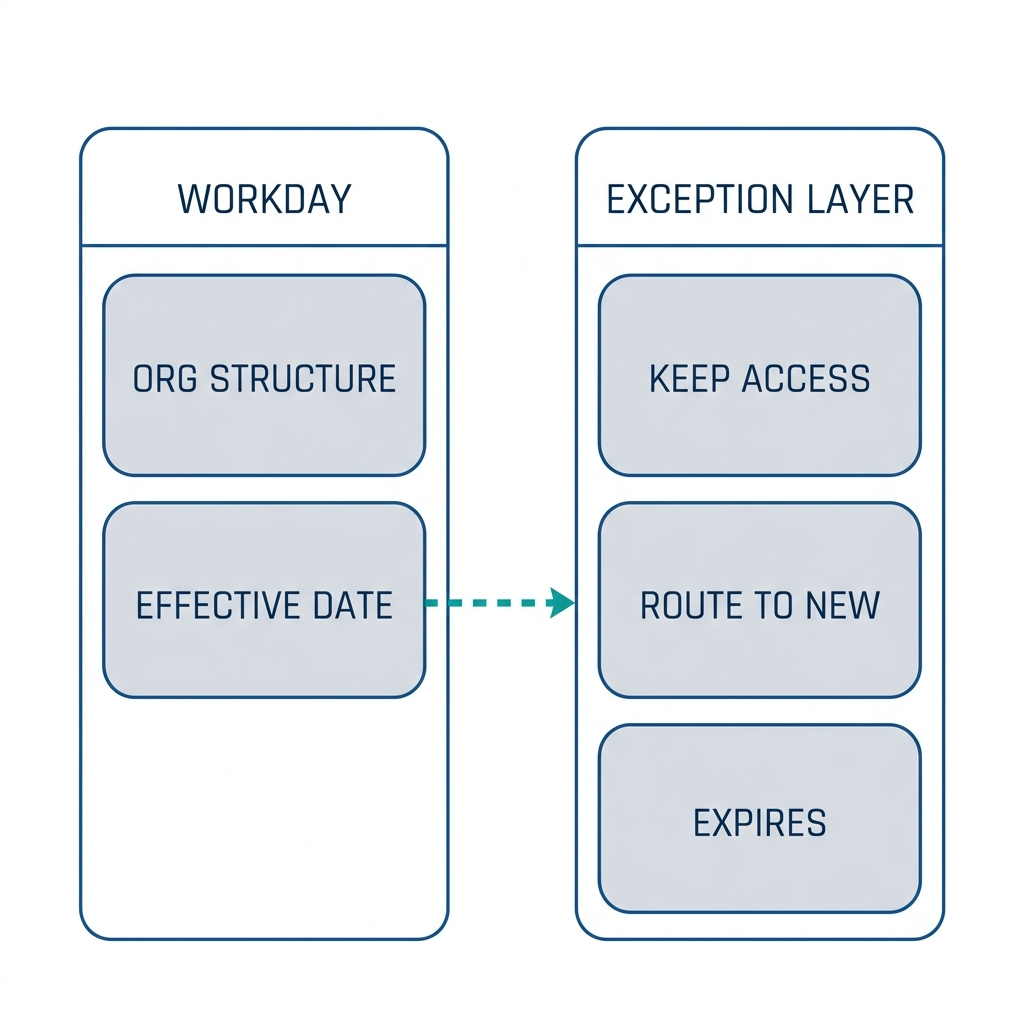
The mapping between a future org structure and the systems that consume it has to live somewhere, and Workday does not offer a place to put it. That is the one point where CloudApper is relevant, as a layer alongside the tenant.
What Workday Does Natively for Restructures
The structural mechanics are the well-solved part, and you should not be building anything around them.
Workday’s reorganization activities cover the shapes a restructure takes. Assign Superior moves an organization under a different parent. Create Subordinate builds a new organization inside the hierarchy, inheriting staffing model, roles, and organizational assignments where configured. Divide Organization splits one organization into two and can carry subordinates across, though inheritance is thinner and fields such as location need populating. Inactivate Organization retires an organization from staffing use. Move Workers, in its supervisory and by-organization forms, relocates people between organizations sharing a staffing model.

For staffing changes at volume, Change Organization Assignments supports mass changes, including an override section applying a selection across every worker a prompt returns. One misconception is worth correcting: Org Studio is not a diagramming tool with a save button. It adds and moves workers and generates Change Job events, which makes it operational and worth governing accordingly.
One piece of folklore deserves retiring. Supervisory organizations do not need recreating every time a manager changes. They are reusable, and updating the manager role on the existing organization is usually correct. Proliferating organizations for personnel changes creates sprawl that makes the next restructure worse.
All of this is effective-dated, and Workday handles the dating well. That is precisely why the failure mode is what it is.
Where the Friction Shows Up
The problem is asymmetric effective dating. The org structure knows about the future. Almost nothing that depends on the org structure does.
Business process routing bites first. A step routing to a role on the supervisory organization resolves against whoever holds that role when the step evaluates, not when the event started. Events in flight on the effective date land with someone who has no context and sometimes no ability to act. Which steps behave this way depends on how each process was built, and most tenants have a mix nobody has inventoried since implementation. The underlying routing mechanics are covered in setting up and troubleshooting Workday business process approvals, and the way delegations compound the problem at scale is covered in why delegate and proxy access breaks down at scale.
Role-based security is second. Access derived from hierarchy position shifts when the hierarchy shifts, which is usually the intent. The exceptions matter: a manager retaining responsibility for a transferred team during handover, an HR partner supporting a population that no longer maps to one branch, an approver whose scope was defined by a retired organization. Those get handled by hand, after someone complains.
Third, integrations consume org membership as current state. A feed to an identity platform, service management tool, or payroll provider asks what is true now and acts on it. A future-dated reorg is invisible until the date arrives, then appears as a large batch of movements with nothing distinguishing a reorganization from a wave of transfers or terminations. Systems that provision and deprovision on that signal act accordingly, the same class of problem described in what happens to Workday access when an employee is terminated.
Fourth, allocation and entity boundaries. Cost center and company assignments move with organizational changes when configured to, and in multi-entity organizations that is where restructures cross lines they should not, which is the terrain of managing multi-location and multi-entity Workday configurations. Related plan eligibility can shift quietly, including absence and accrual behavior, as described in how job changes and supervisory organization changes affect PTO accrual.
The stakeholder missing from most restructure planning is whoever has to sign something afterward. Internal audit and control owners care nothing for the elegance of the hierarchy. They need evidence that access moved when responsibility moved, that no allocation crossed an entity boundary without approval, and that headcount reporting reconciles before and after for sampling. Nobody invites them to planning, and they arrive later with questions the project has nobody left to answer. What they will ask for is set out in preparing for a Workday audit.
Measuring Your Own Blast Radius Before the Date
The useful artifact here is not a checklist of tasks but a set of counts you can produce in your own tenant this week. Each one converts an unknown into a number a CIO can take to a steering committee.
- Count the business processes routing to organization-based roles rather than the worker’s own management chain. This is the highest-value enumeration available and most tenants have never done it. The output is the list of processes that can misroute on the effective date.
- Count events in flight in the affected organizations, by process type, and decide for each whether to complete, rescind, or let them route, against a defined cutoff before the effective date.
- List every security group whose membership derives from the organizations being changed, and identify the exception cases where access needs to persist through a handover. Those need explicit handling, not a post-hoc ticket.
- Inventory outbound integrations consuming supervisory or worker organization membership, and confirm with each downstream owner how their system reads a large same-day movement batch. Identity and access systems come first.
- Reconcile cost center, company, and allocation assignments against the proposed structure, specifically looking for crossings of legal entity boundaries that the structural change would make automatically.
- Identify reports and dashboards aggregating by organization and determine which lose historical comparability. Agree in advance what the before-and-after reconciliation for audit sampling looks like.
- Test the whole sequence in a sandbox refreshed close to the change, and validate against the counts above rather than against a general impression that it worked.
Anything that moves a large population also needs a delivery mechanism decision, since a mass job change at volume runs into the tooling question covered in choosing between an EIB and a real integration for mass data changes.
Where Native Tools Run Out
Run that inventory and the restructure will go considerably better. One gap survives it, and it is specific enough to name precisely.
Workday holds the future org structure. It does not hold an effective-dated view of that structure for anything outside itself. There is no native place to state that on the effective date these forty workers move but retain access, these approvals route to the receiving manager rather than the sending one, and this downstream system should read the batch as a reorganization. That mapping exists in every restructure as a spreadsheet and a series of conversations. It governs a compliance-relevant event and has no system of record.
How CloudApper Holds the Exception Mapping
CloudApper AI for HCM Personalization and Extensibility is where that mapping can live without adding configuration to the tenant that you then have to maintain forever.
The exceptions a restructure generates are organization-specific. A handover period where a departing manager keeps approval authority, a rule that transferred workers retain a security assignment for thirty days, a routing override for one population under a collective agreement, a suppression of manager notifications during the change window. Encoding those in Workday means process versions and security configuration built for a one-time event, then either removed or forgotten. Holding them in CloudApper keeps the tenant close to delivered configuration and gives the exception set an expiry.
On the downstream side, CloudApper iPaaS gives external systems the signal Workday cannot send them. The reorganization batch is identified as a reorganization rather than arriving as an undifferentiated wave of movements, exceptions are held and released on a schedule, and records that fail validation are quarantined and reported rather than acting on stale membership.
Both produce what audit will ask for: a dated record of which exceptions applied to whom, who approved them, and when they expired.
None of this substitutes for the inventory above, and CloudApper is not what makes a restructure work. Workday executes the restructure. CloudApper holds the exceptions the restructure creates in the systems Workday does not reach.
Frequently Asked Questions
Q: How do I execute a supervisory organization reorg in Workday without breaking approvals, security, and integrations?
Treat the structural change as the easy part and inventory the dependencies first. Enumerate business processes routing to organization-based roles, events in flight, security groups deriving membership from the affected organizations, outbound integrations consuming org membership, and allocations that could cross entity boundaries. Test in a recently refreshed sandbox and validate against those counts rather than a general impression.
Q: What Workday tasks and mass actions should I use to move large groups of employees during a reorg?
Move Workers, in its supervisory and by-organization forms, relocates people between organizations sharing a staffing model. Change Organization Assignments supports mass changes with an override section applying across every worker a prompt returns. Org Studio and Mass Actions add and move workers and generate Change Job events. Structural changes use the reorganization activities: Assign Superior, Create Subordinate, Divide Organization, and Inactivate Organization.
Q: Do I need to create a new supervisory organization when a manager changes?
Usually not. Supervisory organizations are reusable, and updating the manager role on the existing organization is normally correct. Creating one for every personnel change produces sprawl that makes reporting harder and the next restructure more expensive.
Q: Why do approvals route to the wrong manager after a reorg?
Because a step configured against a role on the supervisory organization resolves to whoever holds that role when the step evaluates, not when the event started. An event begun before the effective date can therefore complete against the new structure. The fix is knowing which processes route this way and clearing or deliberately handling in-flight events beforehand.
Q: What happens to Workday security access during a supervisory organization change?
Access derived from hierarchy position changes when the hierarchy changes, which is usually intended. The failures are exceptions: handover periods, HR partners supporting populations that no longer map to one branch, approvers whose scope came from a retired organization. Identify these in advance, because Workday has no native concept of a temporary post-restructure access exception.
Q: How do downstream systems know a reorg happened rather than individual transfers?
They generally do not. Integrations consume organization membership as current state, so a future-dated restructure is invisible until the date arrives, then appears as a large batch of movements with no marker identifying it as one event. Systems that provision or deprovision on movement signals act on it, which is why identity integrations should be reviewed with their owners beforehand.
Q: When should reorg planning start in Workday?
The structural build can happen close to the date, but the dependency inventory should start as soon as the shape of the change is known, because its output determines how much remediation is needed. The counts that matter take longer to produce than the restructure itself.
If your last restructure produced a week of routing surprises and an access cleanup nobody scheduled, the gap was not in how the supervisory organizations were built. It was that the exceptions had nowhere to live. CloudApper works alongside Workday to hold that mapping and give it an audit trail. Contact the CloudApper team to review what your next restructure will touch.

What is CloudApper AI Platform?
CloudApper AI is an advanced platform that enables organizations to integrate AI into their existing enterprise systems effortlessly, without the need for technical expertise, costly development, or upgrading the underlying infrastructure. By transforming legacy systems into AI-capable solutions, CloudApper allows companies to harness the power of Generative AI quickly and efficiently. This approach has been successfully implemented with leading systems like UKG, Workday, Oracle, Paradox, Amazon AWS Bedrock and can be applied across various industries, helping businesses enhance productivity, automate processes, and gain deeper insights without the usual complexities. With CloudApper AI, you can start experiencing the transformative benefits of AI today. Learn More
- Useful Links:
- Agentic AI
- No-Code/Low-Code
- Custom Software
- HCM Personalization
- iPaaS
- FedRAMP

Brochure
CloudApper AI TimeClock
For accurate & touchless time capture experience.
Download Brochure
CloudApper AI Solutions for Workday



- Works with








- and more.
Similar Posts

How to Pilot Frontline Self-Service for Workday: Site Selection, Baseline…

Workday Biometric Time Clock Compliance: Consent, Retention, and Deletion Rules…