Moving acquired employees into Workday is rarely a single load. Learn how to carry over service dates and year-to-date wages, what breaks while seller systems run under a transition services agreement, what to settle before close, and how CloudApper iPaaS bridges the interim period.

TL;DR
Moving acquired employees into Workday usually spans a transition period in which the seller's payroll, time clocks, and benefits keep running alongside Workday. Carry over Original Hire, Continuous Service, and Time Off Service dates, confirm whether predecessor year-to-date wages count toward the Social Security wage base, and assign an owner to every interim data flow before close. CloudApper iPaaS bridges seller systems and Workday with prebuilt connectors, validation, and audit logs, and the interim flows are retired at cutover.
Table of Contents
- What Workday Handles Natively
- Where Day One Breaks
- What to Settle Before Close
- Where Native Tools Run Out
The first avoidable cost of moving acquired employees into Workday is often tax you already paid. In an asset purchase, a successor employer may count the wages the seller paid earlier in the year toward the Social Security and FUTA wage bases, as The Tax Adviser explains. If those year-to-date wages never reach your payroll, high earners hit the wage base twice and you pay employer tax on wages that were already taxed. CloudApper connects acquired companies’ systems to Workday during that transition window.
What Workday Handles Natively
Workday is built for this. Acquired workers can be loaded through the hire business process with EIB, placed in a new company and supervisory organization, and assigned to existing benefit plans and pay groups. The worker record carries separate date fields, including Original Hire Date, Continuous Service Date, and Time Off Service Date, so seller tenure can drive PTO accrual and eligibility, as in our rehire guide. Multi-company setups are covered in multi-entity configuration.
Where Day One Breaks
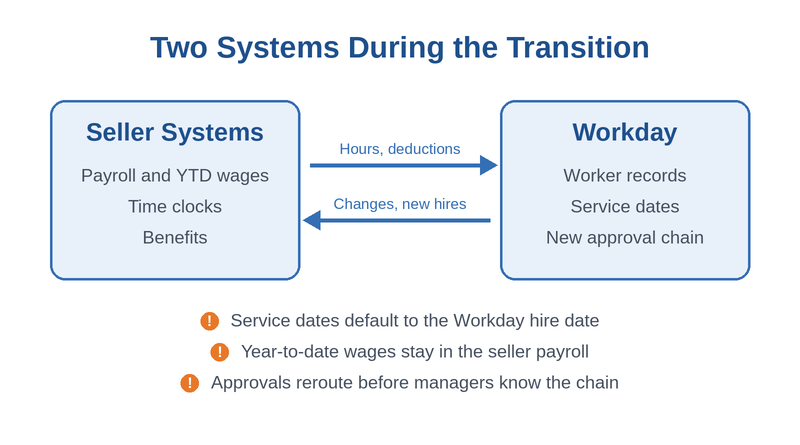
Most deals do not move everyone into Workday on the closing date. The seller’s payroll, time clocks, and benefits often keep running under a transition services agreement for months. During that window, workers exist in two systems. Service dates default to the Workday hire date unless someone overrides them, so long-tenured employees accrue PTO like new hires. Year-to-date wages sit in the seller’s payroll. A supervisory org restructure right after close reroutes approvals before managers know the new chain.
What to Settle Before Close
- Map every seller field to a Workday field, including all service dates, before the first EIB load.
- Confirm with tax counsel whether predecessor wages count toward the wage base and load year-to-date balances accordingly.
- Decide which seller systems stay live under the transition agreement and for how long.
- Define who owns each data flow between seller systems and Workday until cutover.
- Give acquired workers a way to see pay, PTO, and schedules on day one, even before full migration.
A one-time EIB load is fine for the initial hire, but recurring flows during the transition need more, as our guide to EIB versus a real integration explains.
Where Native Tools Run Out
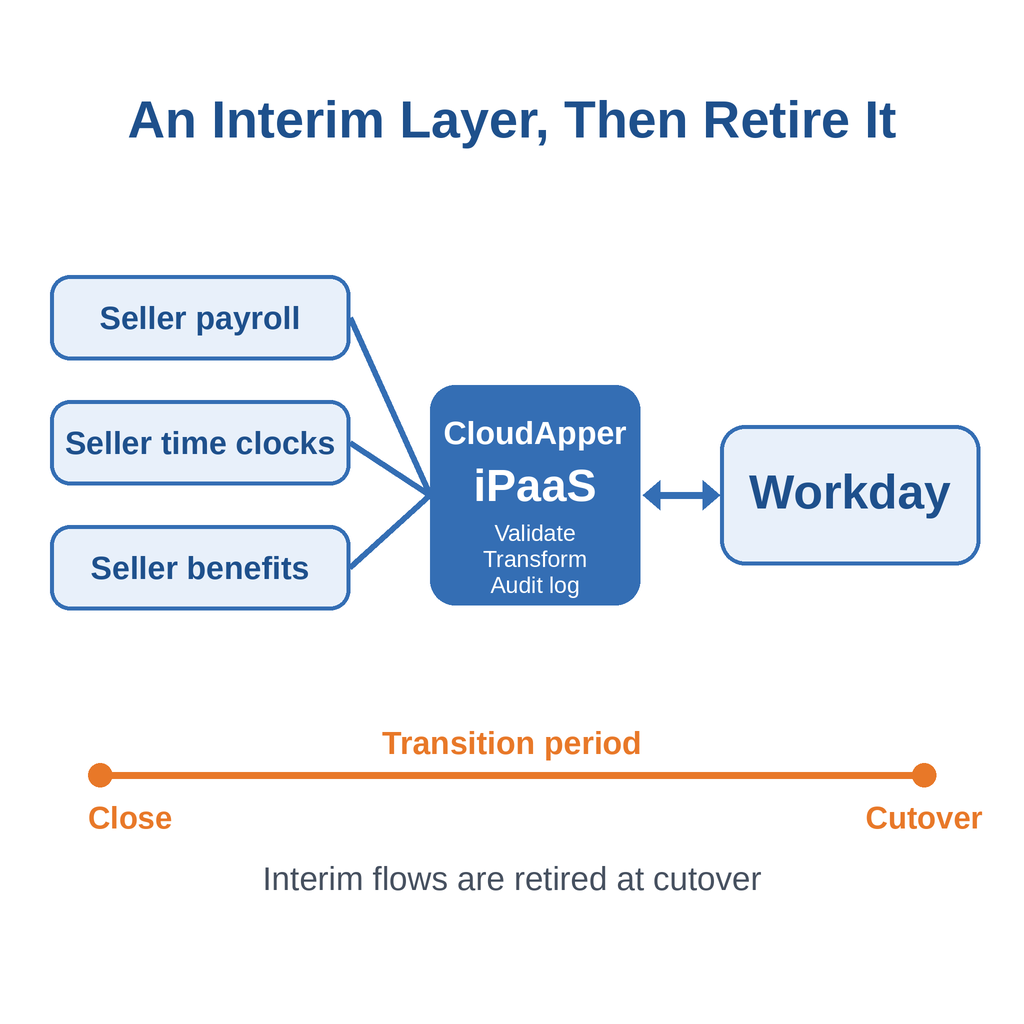
Workday holds the target state, but the transition period lives outside it. Hours from the seller’s clocks, deductions from its payroll, and changes made in Workday all have to move in both directions until cutover, and custom integrations built for a six-month window are expensive to write and harder to retire. This interim layer is where CloudApper iPaaS fits.
How CloudApper iPaaS Bridges the Transition
CloudApper iPaaS offers prebuilt connectors for Workday and common HR, payroll, and CRM systems, configured through a drag-and-drop interface rather than custom code. It syncs data between connected platforms, validates and transforms records, and keeps audit logs for every integration. When the transition agreement ends, the interim flows are retired without leaving custom code behind. For acquired frontline workers without Workday logins, CloudApper hrPad can provide day-one self-service on shared tablets.
Frequently Asked Questions
Q: How do you load acquired employees into Workday?

Most organizations use EIB to run the hire business process in bulk, placing workers in a new or existing company and supervisory organization.
Q: How do I keep acquired employees’ seniority in Workday?
Set Original Hire Date, Continuous Service Date, and Time Off Service Date from the seller’s records instead of letting them default to the Workday hire date.
Q: Do predecessor wages count toward the Social Security wage base?
In an asset purchase that meets the IRS successor employer conditions, they may. Confirm with tax counsel and load year-to-date balances accordingly.
Q: What is a transition services agreement in HR?
It is an arrangement where the seller keeps running services such as payroll or benefits for the buyer for a set period after close.
Q: Should acquired employees go into Workday on day one?
Their worker records can, but payroll and time capture often move later. Plan interim data flows for the gap.
If you are planning to move an acquired workforce into Workday, talk to the CloudApper team about the interim integrations your transition period will need. This article is general information, not tax advice.

What is CloudApper AI Platform?
CloudApper AI is an advanced platform that enables organizations to integrate AI into their existing enterprise systems effortlessly, without the need for technical expertise, costly development, or upgrading the underlying infrastructure. By transforming legacy systems into AI-capable solutions, CloudApper allows companies to harness the power of Generative AI quickly and efficiently. This approach has been successfully implemented with leading systems like UKG, Workday, Oracle, Paradox, Amazon AWS Bedrock and can be applied across various industries, helping businesses enhance productivity, automate processes, and gain deeper insights without the usual complexities. With CloudApper AI, you can start experiencing the transformative benefits of AI today. Learn More
- Useful Links:
- Agentic AI
- No-Code/Low-Code
- Custom Software
- HCM Personalization
- iPaaS
- FedRAMP

Brochure
CloudApper AI TimeClock
For accurate & touchless time capture experience.
Download Brochure
CloudApper AI Solutions for Workday



- Works with








- and more.
Similar Posts

Replacing Time Clocks for Workday Time Tracking: A Cutover Plan…

How to Pilot Frontline Self-Service for Workday: Site Selection, Baseline…