Replacing time clocks for Workday breaks most often on overnight shifts that start on the old clock and end on the new one. Learn how Workday matches time clock events, why cutovers create unmatched punches, a parallel-run cutover plan, and how CloudApper AI TimeClock simplifies it.
TL;DR
When you replace time clocks for Workday, the riskiest punch is the overnight shift that checks in on the old clock and checks out on the new one, which lands as an unmatched event if either half misses Workday or hits a locked period. Reconcile worker IDs, run both clocks in parallel for a full pay period, cut over midweek mid-period, keep the old clock posting until open shifts close, and retain its history for FLSA recordkeeping. CloudApper AI TimeClock runs on standard tablets, so a parallel run means mounting a tablet beside the old terminal, with punches syncing to Workday Time Tracking.
Table of Contents
- How Workday Processes Clock Data
- Where Cutovers Go Wrong
- A Cutover Plan That Survives the First Payroll
- Where Native Tools Run Out
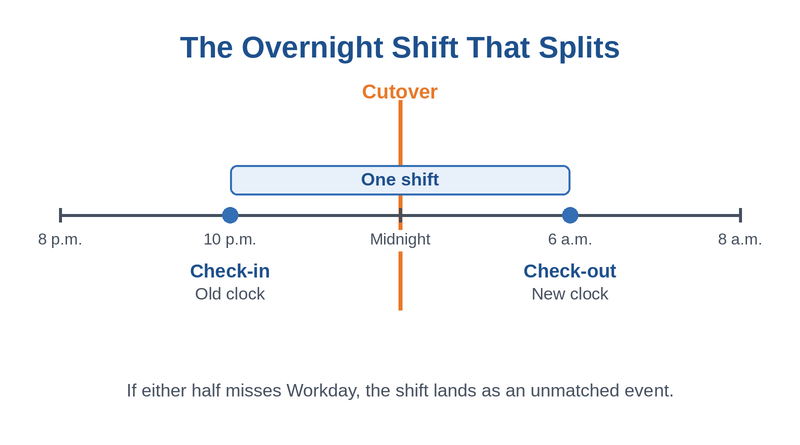
Most plans to replace time clocks for Workday pick the first day of a pay period as the cutover date. For any site that runs overnight shifts, that is the date most likely to break. A worker checks in at 10 p.m. on the old clock, checks out at 6 a.m. on the new one, and the two halves reach Workday from different systems. CloudApper replaces legacy clocks with tablet clocks that sync to Workday, and this plan is built around that overnight punch.
How Workday Processes Clock Data
Workday Time Tracking accepts third-party punches through the Put Time Clock Events and Import Time Clock Events web services. As Workday’s documentation explains, it matches each check-in with the next check-out to build a time block, applies the time entry code’s rounding, and leaves any event without a partner as unmatched. Workday does not care which device sent a punch, so a clean cutover is possible.
Where Cutovers Go Wrong
Overnight shifts that straddle the cutover produce unmatched events, and a check-in loaded into a locked period is rejected outright. Worker identifiers that differ between the old clock and Workday send punches nowhere. The old system is often switched off before its final batch posts, which creates the silent loss described in missing time clock events. The first payroll on the new clock then needs off-cycle corrections.
A Cutover Plan That Survives the First Payroll
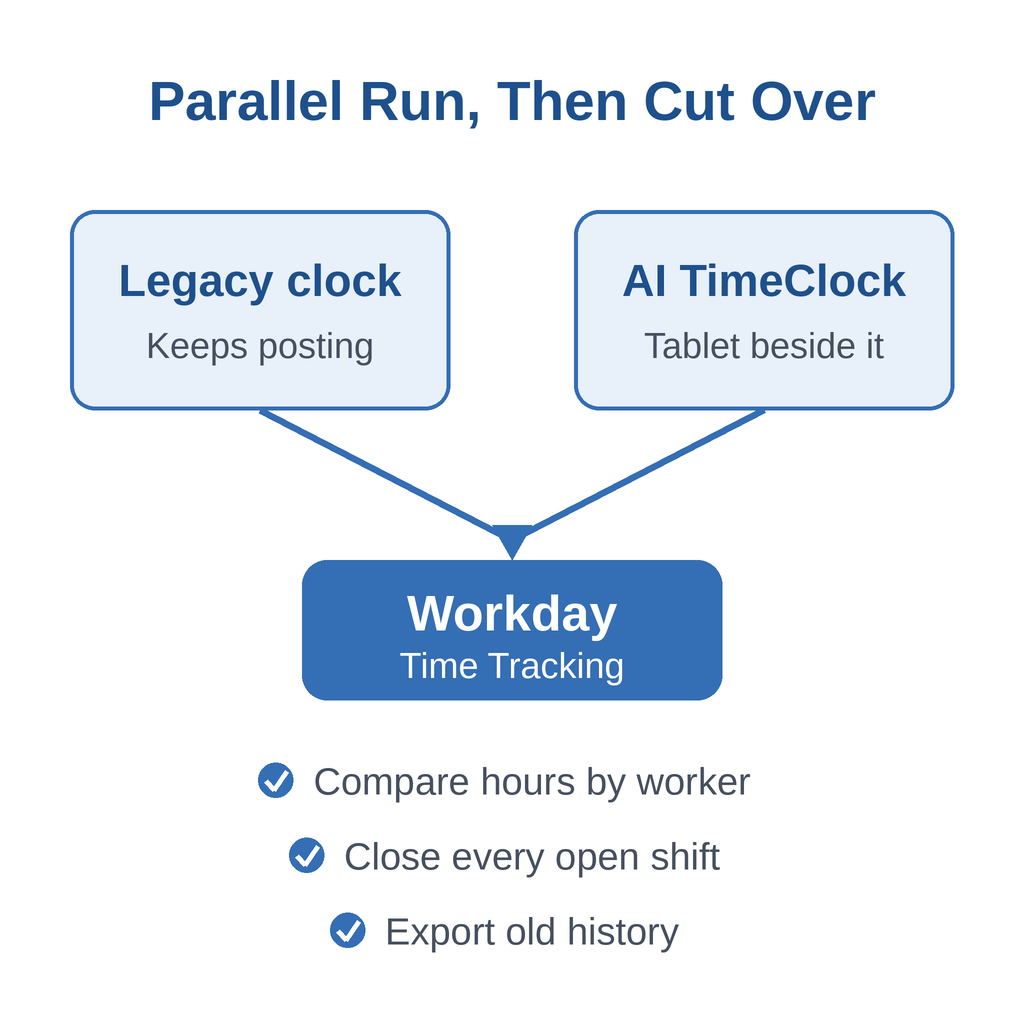
- Reconcile worker identifiers between the new clock and Workday before any device goes live.
- Run both clocks in parallel for at least one full pay period and compare posted hours by worker.
- Cut over midweek in the middle of a period, at a shift change with the fewest workers on the clock.
- Keep the old clock posting until every open shift from before the cutover has a matching check-out.
- Export and retain the old clock’s punch history before decommissioning it.
Under the FLSA, records used to compute wages, such as time cards, must be kept for two years, according to the Department of Labor. Review the first new period’s timesheets instead of relying on bulk approvals.
Where Native Tools Run Out
Workday will match, flag, and reprocess what it receives, but it cannot compare old-clock and new-clock hours side by side during a parallel run, and it cannot reach into a retired device to recover a punch. So the plan depends on how easily the new clock runs alongside the old one, which is where CloudApper AI TimeClock helps.
How CloudApper AI TimeClock Simplifies the Cutover
CloudApper AI TimeClock runs on standard iOS and Android tablets, so a parallel run means mounting a tablet beside the old terminal rather than wiring new hardware. Workers punch with facial recognition, which also addresses buddy punching, or with QR codes, barcodes, or NFC. Punches sync to Workday Time Tracking, including those captured offline. If you enable facial recognition, finish the biometric consent and retention policy before go-live.
Frequently Asked Questions
Q: When is the best time to cut over to a new time clock in Workday?

Midweek, mid-period, at the shift change with the fewest workers clocked in. Avoid pay period boundaries, where overnight shifts split across systems and locked periods.
Q: Why do time clock events show as unmatched in Workday after a cutover?
Workday pairs each check-in with the next check-out. If half a shift never posted from the old clock, the other half stays unmatched.
Q: How long should old and new time clocks run in parallel?
At least one full pay period, so you can compare posted hours by worker across every shift pattern.
Q: How do I fix unmatched time clock events in Workday?
Add the missing event with Add Time Clock Event, import the missing punches, or rerun matching with Run Time Clock Event Processing.
Q: How long must old time clock records be kept?
Under the FLSA, time cards used to compute wages must be kept for two years, so export the old clock’s history before retiring it.
If you are planning to replace time clocks for Workday, talk to the CloudApper team about a parallel run and a cutover date that protects your first payroll.

What is CloudApper AI Platform?
CloudApper AI is an advanced platform that enables organizations to integrate AI into their existing enterprise systems effortlessly, without the need for technical expertise, costly development, or upgrading the underlying infrastructure. By transforming legacy systems into AI-capable solutions, CloudApper allows companies to harness the power of Generative AI quickly and efficiently. This approach has been successfully implemented with leading systems like UKG, Workday, Oracle, Paradox, Amazon AWS Bedrock and can be applied across various industries, helping businesses enhance productivity, automate processes, and gain deeper insights without the usual complexities. With CloudApper AI, you can start experiencing the transformative benefits of AI today. Learn More
- Useful Links:
- Agentic AI
- No-Code/Low-Code
- Custom Software
- HCM Personalization
- iPaaS
- FedRAMP

Brochure
CloudApper AI TimeClock
For accurate & touchless time capture experience.
Download Brochure
CloudApper AI Solutions for Workday



- Works with








- and more.
Similar Posts

How to Pilot Frontline Self-Service for Workday: Site Selection, Baseline…

Workday Biometric Time Clock Compliance: Consent, Retention, and Deletion Rules…