Workday handles sick leave accruals but does not calculate jurisdiction-specific pay rates. Learn how state rules, regular rate formulas, and increment-of-use limits affect absence plan configuration and where CloudApper fills the gap.

TL;DR
Workday Absence Management handles sick leave accruals and balances, but it does not calculate the jurisdiction-specific regular rate of pay that state and local ordinances require. For multi-state employers, the gap between base hourly rate in Workday and the legal pay rate creates a recurring compliance and payroll adjustment burden. CloudApper extends Workday with a rule layer that applies the correct rate formula and validates minimum-use increments by jurisdiction, keeping the system of record unchanged.
Table of Contents
- How Workday Handles Sick Leave Natively
- Where the Rate Calculation Breaks Down
- What to Configure Inside Workday First
- Where Native Configuration Runs Out
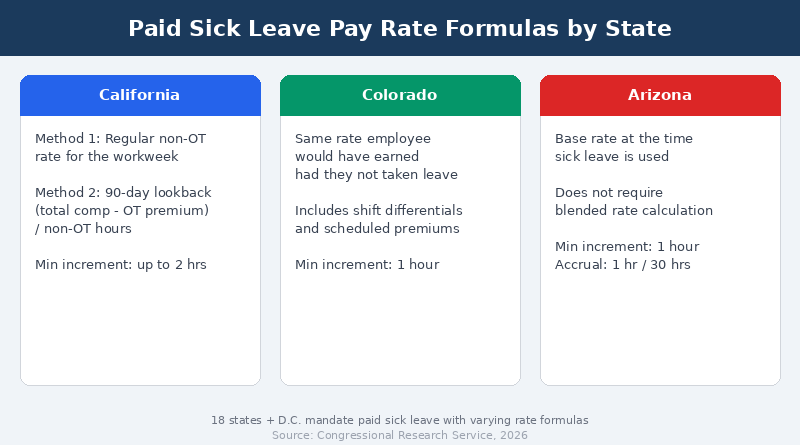
How much do you pay an hourly worker for one hour of sick leave? The question sounds like it has one answer. It does not. California says the regular non-overtime rate for the workweek or a 90-day lookback average. Colorado says the same rate the employee would have earned had they not taken leave. Arizona says the base rate at the time the leave is used. Three states, three formulas, and none of them map cleanly to a single Workday absence plan. For organizations running Workday across multiple states, CloudApper adds a configuration layer that can apply jurisdiction-specific pay rate rules without rebuilding the core absence plan for each location.
How Workday Handles Sick Leave Natively
Workday Absence Management handles paid sick leave through time off plans tied to accrual rules, eligibility conditions, and balance periods. Administrators configure accrual frequency, usage caps, carryover limits, and waiting periods per plan. Workday’s documentation provides an example of state sick leave setup using a one-hour-per-30-hours-worked accrual with a 90-day waiting period and a 48-hour annual cap. That configuration works when one set of rules covers the entire workforce.

For pay rate calculation, Workday typically uses the employee’s base hourly rate or the rate assigned to the time entry code associated with sick time. The absence plan itself does not calculate a “regular rate” in the way state statutes define it. Payroll picks up the rate from the compensation record or the time block, applies the plan’s rules, and processes the payment.
Where the Rate Calculation Breaks Down
The problem starts when state law defines “regular rate” differently from what sits in the employee’s compensation record. California’s Labor Commissioner allows two methods: the non-overtime rate for the workweek in which leave is taken, or total compensation excluding overtime divided by non-overtime hours in the prior 90 days. For an employee earning shift differentials, the base hourly rate in Workday understates the legal obligation.
Increment-of-use rules add a second layer. California permits employers to set a minimum of up to two hours per use. Other jurisdictions allow one-hour minimums or no minimum at all. Workday’s time entry code configuration does not enforce jurisdiction-specific increment floors. The absence plan validates against a balance, not against a local ordinance’s minimum-use rule.
Then there is the local ordinance layer. San Francisco, Chicago, Cook County, and several other municipalities impose requirements that differ from their state’s baseline. A multi-state Workday tenant already carries complexity from payroll tax rules. Adding city-level sick leave rate and increment rules to the same configuration pushes absence plan management into territory where a single plan per state is no longer enough.
What to Configure Inside Workday First
Start with eligibility rules scoped by country region. Create separate time off plans for each state that requires a distinct accrual ratio, usage cap, or waiting period. Use calculated fields to enforce annual caps where Workday’s delivered balance limits do not match the statute. For example, Connecticut covers employers with 11 or more employees today but drops to one or more employees effective January 1, 2027, which means the eligibility headcount threshold must be updated on that date.
For rate-of-pay differences, configure earnings codes that pull from the correct compensation element. If the state requires a blended rate that includes shift differentials, the shift differential configuration must feed into the sick pay calculation rather than being excluded. Review whether the payroll calculation group resolves the correct rate for each jurisdiction before every quarterly audit cycle.
Where Native Configuration Runs Out
Workday’s absence plan framework handles one set of rules per plan. When an employee transfers between locations or works in a jurisdiction that requires a lookback-period average rate, the plan does not recalculate dynamically. The administrator must either build a calculated field complex enough to mirror the statute or accept that payroll will need a manual adjustment after the fact. For organizations operating in 15 or more states, that manual layer becomes a recurring operational cost that grows every time a legislature updates its sick leave law. CloudApper addresses this gap by letting organizations model jurisdiction-specific rate logic, including lookback averages and differential-inclusive calculations, alongside Workday’s standard absence framework.
How CloudApper Extends Workday for Sick Leave Compliance
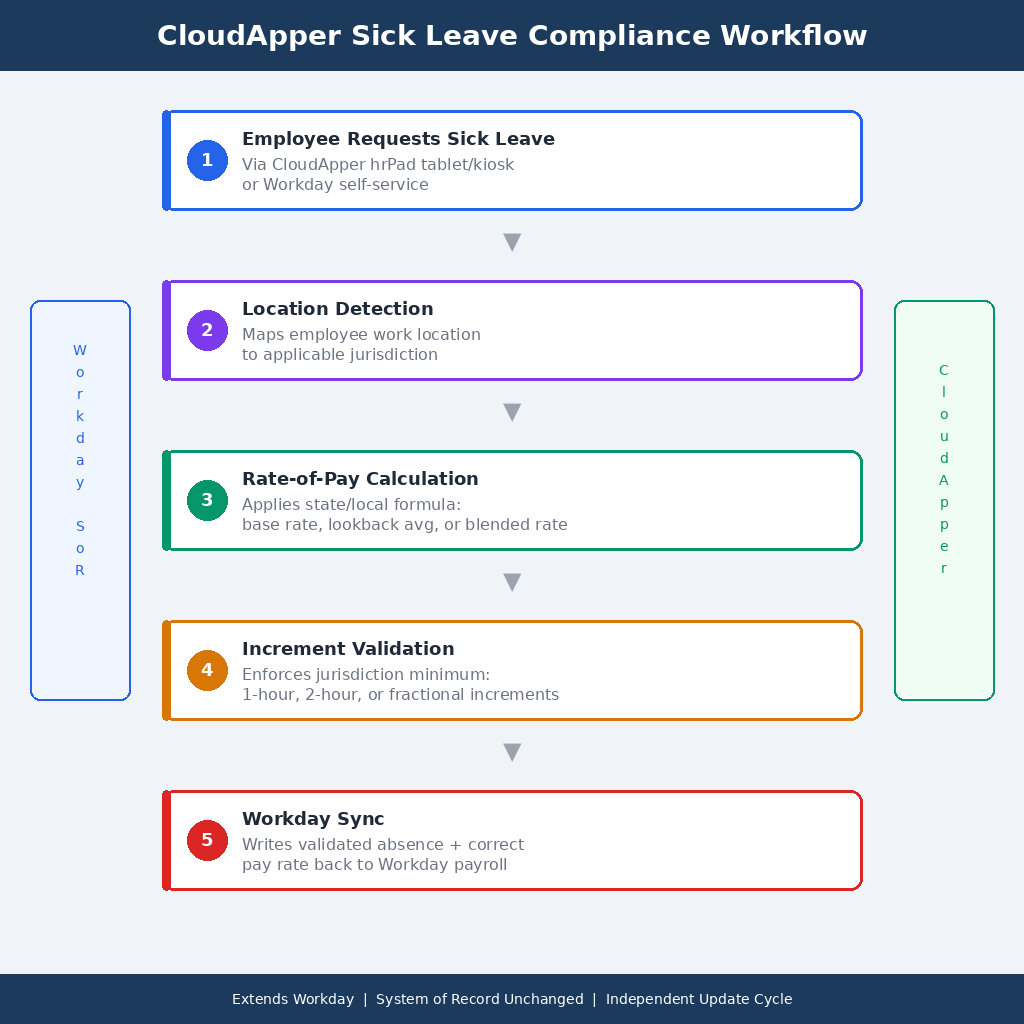
CloudApper AI for HCM Personalization and Extensibility adds a rule layer that maps each employee’s work location to the applicable sick leave statute. When an employee requests sick time through CloudApper hrPad, the system validates the request against the jurisdiction’s minimum increment, checks the correct rate-of-pay formula, and writes the result back to Workday’s absence and payroll records. The calculation sits alongside Workday, not inside it. The system of record stays unchanged while the compliance logic updates independently of Workday’s release cycle.
For frontline workers who do not have Workday logins, hrPad provides a self-service interface where they can view their sick leave balance, submit requests in the correct increment, and see the pay rate that will apply before the request is approved. That visibility reduces the calls to HR that come after a paycheck shows an unexpected sick pay amount.
Frequently Asked Questions
Q: How does Workday calculate the paid sick leave pay rate for hourly workers?
Workday uses the base hourly rate from the employee’s compensation record or the rate tied to the sick time entry code. It does not automatically calculate a jurisdiction-specific “regular rate” that includes shift differentials or a lookback-period average. Administrators must configure earnings codes or calculated fields to match the applicable state rule.
Q: How many states require paid sick leave in 2026?
As of 2026, 18 states plus Washington, D.C. mandate paid sick leave for private-sector employees. Three additional states require general paid leave that can be used for illness. Several cities and counties impose their own requirements that may exceed the state baseline.
Q: Can employers set a minimum increment for paid sick leave use in Workday?
Some states allow employers to set a minimum, such as California’s two-hour maximum floor. Other jurisdictions prohibit any minimum or cap it at one hour. Workday’s absence plan validates against the accrued balance but does not enforce jurisdiction-specific increment rules natively.
Q: What happens when a Workday employee works in a city with stricter sick leave rules than the state?
The employer must follow the rule that provides greater employee benefit. In Workday, this typically requires a separate time off plan or a location-based eligibility override to apply the city’s accrual rate, usage cap, or rate-of-pay formula instead of the state default.
Q: Does Workday’s absence plan recalculate sick pay when an employee transfers between states?
Workday does not automatically recalculate the sick leave pay rate or accrual rules on a mid-period location change. Administrators must update the employee’s plan assignment or build a calculated field that triggers on the job change event. Without that configuration, the prior location’s rules may continue to apply.
Paid sick leave compliance is not a set-and-forget configuration. If your Workday tenant covers employees in states and cities with different pay rate formulas, increment rules, or accrual thresholds, contact CloudApper to see how an extension layer can keep the rules current without rebuilding your absence plans every legislative cycle.

What is CloudApper AI Platform?
CloudApper AI is an advanced platform that enables organizations to integrate AI into their existing enterprise systems effortlessly, without the need for technical expertise, costly development, or upgrading the underlying infrastructure. By transforming legacy systems into AI-capable solutions, CloudApper allows companies to harness the power of Generative AI quickly and efficiently. This approach has been successfully implemented with leading systems like UKG, Workday, Oracle, Paradox, Amazon AWS Bedrock and can be applied across various industries, helping businesses enhance productivity, automate processes, and gain deeper insights without the usual complexities. With CloudApper AI, you can start experiencing the transformative benefits of AI today. Learn More
- Useful Links:
- Agentic AI
- No-Code/Low-Code
- Custom Software
- HCM Personalization
- iPaaS
- FedRAMP
Brochure
CloudApper AI TimeClock
For accurate & touchless time capture experience.
Download Brochure
CloudApper AI Solutions for Workday



- Works with








- and more.
Similar Posts

Workday Overpayment Recovery: State Limits for Hourly Workers

Workday Workweek Overtime: Overnight Shifts Across the Week Line