Enterprise IT organizations running Dayforce eventually hit the same wall: workflows the platform was never designed to handle. Here is what those limits actually look like, why the standard responses fail, and how a governed extension platform resolves the problem without the overhead of building from scratch.

TL;DR
Enterprise IT organizations running Dayforce will eventually encounter workflows the platform cannot handle through native configuration alone — shift attestations, credentialing trackers, mobile supervisor tools that require deep HCM integration. Building those applications from scratch means building a Dayforce integration, a compliance layer, and a deployment pipeline alongside the application itself, and the full scope rarely surfaces until the project is already underway. CloudApper resolves this by providing a governed extension platform with pre-certified HIPAA, SOC 2, and FIPS 140-2 compliance infrastructure and an iPaaS integration layer specifically designed for enterprise HCM systems like Dayforce. The practical outcome is that IT teams can build and deploy governed Dayforce extensions without treating each adjacent workflow as a standalone development project.
Table of Contents
- What Dayforce Does Well — and Where the Edges Show Up
- The Three Ways Enterprise IT Usually Responds — and Why Two of Them Fail
- What “Extending Dayforce” Actually Requires
- The Integration Model: How CloudApper Connects to Dayforce
- Where the Compliance Exposure Sits
- What the Build Decision Looks Like in Practice
- The Practical Starting Point
The requests that reach IT after a Dayforce rollout settles are rarely configuration problems. They are workflows the platform was not designed to handle, and extending Dayforce with custom applications is the usual answer.
A warehouse shift-attestation flow that writes back to Dayforce, a credentialing tracker that feeds audit documentation, a supervisor mobile tool that adds operational rules to scheduling data: none of these are edge cases. This is a structural fact of enterprise software, not a criticism of the platform, because your HCM system will never do everything your organization needs. CloudApper works alongside Dayforce as a platform for governed, compliance-ready custom applications without a separate development team.
What Dayforce Does Well — and Where the Edges Show Up
Dayforce has genuinely strong core capabilities: unified payroll and scheduling, workforce management, talent modules, and a reasonably coherent data model that keeps HR, payroll, and time data in sync. For organizations that previously ran separate systems for each of those functions, moving to Dayforce is a meaningful consolidation.
The trouble starts when an organization’s operational workflows are more granular than the platform’s configuration model allows.

Dayforce’s customization architecture is built around configuration, not extension. You can adjust fields, build workflows within its native automation engine, and use its developer APIs to push and pull data. What you cannot easily do is build a standalone application that lives outside Dayforce’s UI, integrates deeply with its data model, carries its own compliance controls, and works on mobile hardware on a warehouse floor or a clinical unit.
That is a different category of requirement — and it’s one Dayforce was not designed to satisfy. The platform’s native tooling handles configuration within its own environment well. It does not handle the case where an enterprise needs a separate governed application that behaves as an intelligent extension of the HCM rather than a replacement for it.
The Three Ways Enterprise IT Usually Responds — and Why Two of Them Fail
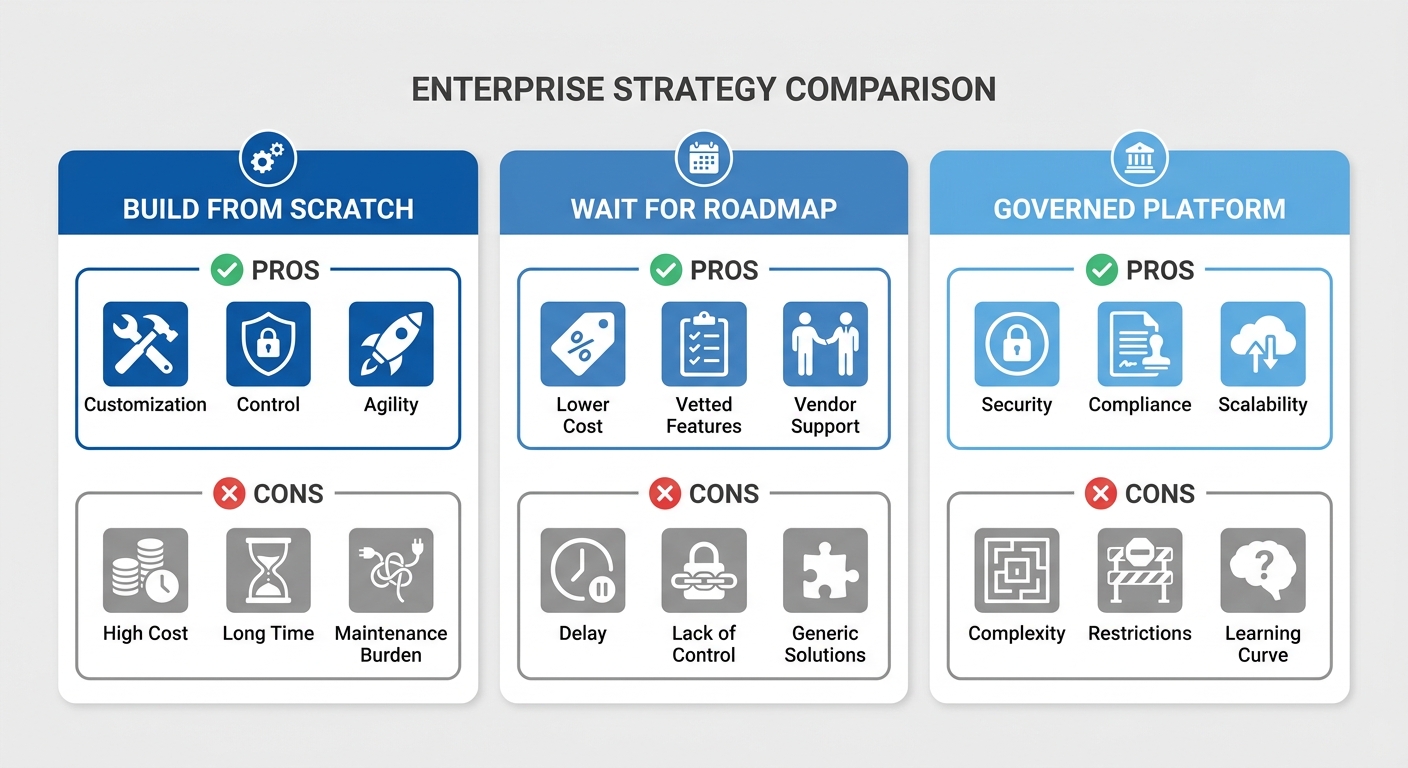
When Dayforce hits its limits, IT teams typically consider three paths: build something custom from scratch, submit a product request and wait, or find a platform that can close the gap without requiring either.
Building from scratch sounds straightforward until the project scope materializes. A custom integration or adjacent application built by an internal development team or a third-party shop requires its own SDLC, its own security review, its own deployment pipeline, and its own ongoing maintenance. For an organization with active HIPAA, SOC 2, or other compliance obligations, that also means the custom application inherits none of Dayforce’s compliance posture — it needs to earn its own. The cost in time and technical debt accumulates quickly, and the pattern looks nearly identical to what enterprises discover when they try to build custom applications around SAP: the integration complexity is underestimated, the governance overhead is underestimated, and the timeline doubles.
Waiting for the roadmap is the path of least resistance and the most expensive in practice. Product requests to major HCM vendors move slowly, and even when a capability arrives, it is rarely tailored to the specific operational model of any individual enterprise. A food and beverage manufacturer’s shift-attestation requirements are not the same as a hospital system’s credentialing workflow requirements, regardless of whether both run Dayforce.
Finding a governed extension platform is the path that resolves the problem structurally — but it requires IT leadership to make a deliberate architectural decision about how custom development happens at the organization, rather than treating each adjacent application as a one-off project.
What “Extending Dayforce” Actually Requires
The word “extension” gets used loosely in this context. It is worth being specific about what a well-governed extension of Dayforce actually looks like, because the requirements are more precise than most IT teams initially assume.
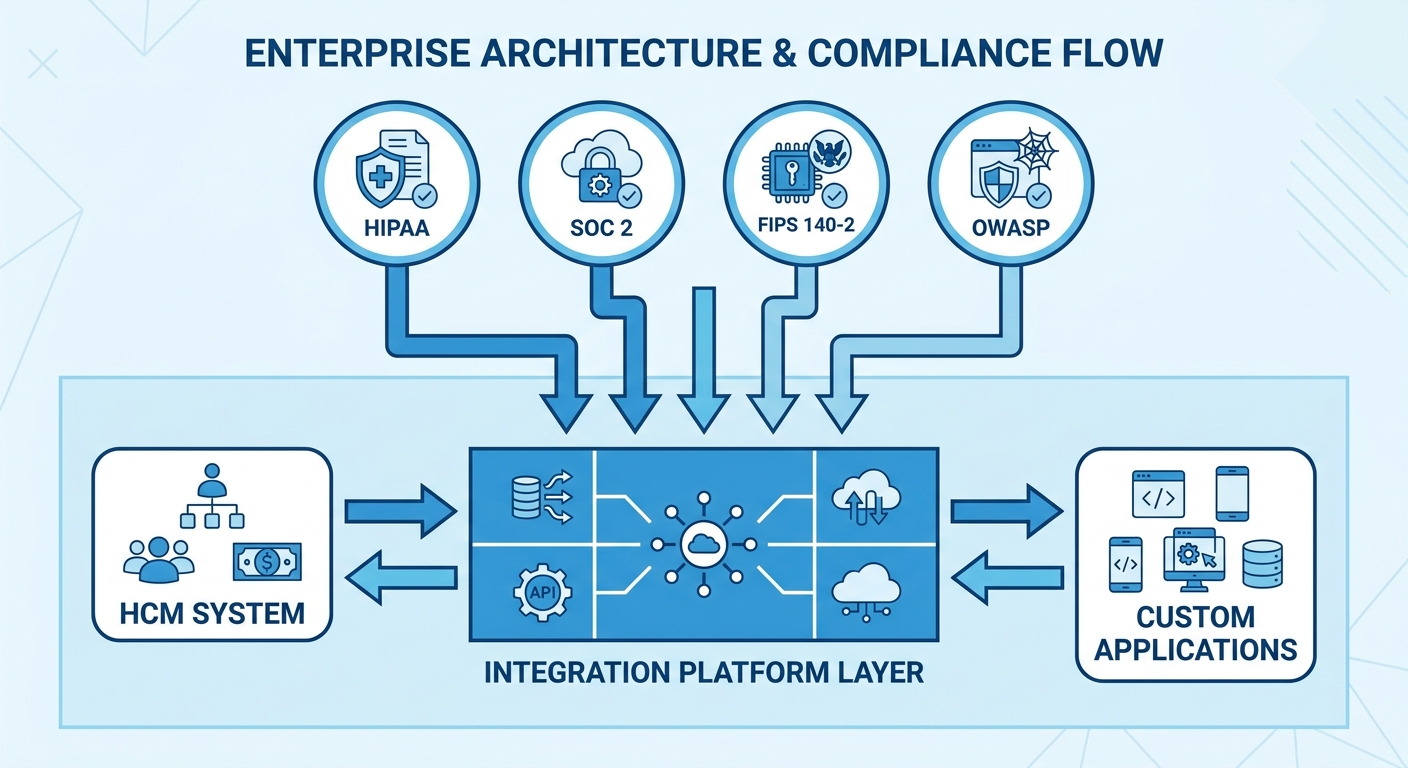
A true extension of Dayforce needs to read from and write to Dayforce data in real time, without creating a parallel data store that drifts out of sync. It needs to operate under the same compliance obligations as the HCM — HIPAA if the organization is a covered entity, SOC 2 if audit obligations require it, FIPS 140-2 if federal standards apply. It needs to be deployable on mobile devices in environments where web applications are impractical. And it needs to be maintainable by IT staff without requiring a development team to push every update.
None of those requirements are unusual. Together, they describe the minimum viable bar for a custom application that an enterprise’s compliance team will actually sign off on.
CloudApper’s platform meets that bar through a combination of pre-certified compliance infrastructure — HIPAA, SOC 2, GDPR, FIPS 140-2, OWASP ZAP — and an iPaaS integration layer built specifically for enterprise HCM and ERP systems. When an IT team builds a custom application on CloudApper to extend Dayforce, they are not starting from a blank API canvas. They are building on a governed environment that already carries the compliance certifications the application needs to inherit. Building internal enterprise apps with AI without creating a compliance liability requires exactly that kind of infrastructure — the certification posture cannot be bolted on after the fact.
The Integration Model: How CloudApper Connects to Dayforce
The integration between CloudApper and Dayforce runs through CloudApper’s iPaaS layer, which handles authentication, data mapping, and event-driven sync between the two environments. For IT teams that have spent time trying to build direct API integrations with Dayforce, the contrast is significant. Dayforce’s REST API is well-documented but requires substantial engineering to handle edge cases: pagination, token management, rate limits, field mapping across organizational hierarchies, and error handling when records don’t match between systems.
CloudApper’s iPaaS abstracts most of that complexity. The practical outcome is that an IT team can configure a bidirectional integration — where a custom application built on CloudApper both reads scheduling and workforce data from Dayforce and writes attestations, approvals, or records back into it — without building and maintaining the integration plumbing themselves.
This matters particularly for organizations that are already managing integrations between Dayforce and other enterprise systems. The data governance challenges enterprises encounter when extending their HCM platform are not unique to any single vendor — they stem from the architectural decision to build custom capabilities adjacent to a system of record that was not designed to accommodate them. The question is whether those custom capabilities are built with governed tooling or without it.
Where the Compliance Exposure Sits
Organizations running Dayforce in regulated environments — healthcare, pharmaceuticals, food and beverage, financial services — have an additional layer of consideration that IT teams in less regulated industries can sometimes defer. Any application that touches Dayforce data in a regulated environment inherits the compliance obligations of that data.
A custom shift-attestation application built for a hospital system that reads employee schedules from Dayforce and records supervisory sign-offs is touching workforce data in a HIPAA-regulated environment. If that application was built without a Business Associate Agreement, without audit logging, without role-based access controls that can be documented in an audit — it is a compliance liability regardless of how well it functions operationally.
What auditors ask about internal app development has expanded significantly as organizations have moved to HCM-adjacent custom tooling. The audit question is no longer just “how is your HCM data protected?” It is “how is every application that touches your HCM data protected, and can you demonstrate it?” An application built on a platform without certified compliance infrastructure cannot answer that question credibly.
This is where the architectural choice of extension platform directly determines the organization’s audit posture — not just its operational capability.
What the Build Decision Looks Like in Practice
The build vs. buy vs. platform decision for enterprise internal app development plays out differently when the requirement is a Dayforce extension rather than a standalone application. The integration dependency changes the calculus.
A team that chooses to build from scratch is not just building an application — they are building an application plus a Dayforce integration plus a compliance layer plus a deployment and maintenance pipeline. The full scope of that commitment is rarely visible at the beginning of the project.
A team that chooses CloudApper is making a different kind of commitment: they are accepting the platform’s architecture in exchange for the platform’s integration layer, compliance posture, and deployment infrastructure. Removing infrastructure overhead from internal app development is not a small operational advantage — for IT teams already stretched across multiple priorities, it is the difference between a project that ships and a project that stalls in DevOps backlogs.
The enterprises that get the most out of Dayforce extensions built on CloudApper are not the ones with the largest IT teams. They are the ones that made an early decision to stop treating each adjacent application as a custom development project and start treating the governed platform as the environment where that development happens.
The Practical Starting Point
For IT teams evaluating whether CloudApper is the right environment for a Dayforce extension, the most productive starting point is a specific workflow requirement rather than a general capability assessment. The question is not “can CloudApper integrate with Dayforce?” — it can. The question is “can CloudApper handle this specific workflow, at this data volume, under these compliance requirements, with this user interface?”
That specificity tends to move evaluations faster than vendor comparisons, because it anchors the conversation in the operational reality the IT team is actually trying to solve — not a feature checklist that rarely maps cleanly to real requirements.
Dayforce will continue to evolve its platform. The roadmap will close some gaps and open others. In the meantime, the workflows your organization needs to run today are not going to wait for the next product release cycle.
CloudApper works with enterprise IT teams to extend Dayforce with governed, compliance-ready custom applications — without the development overhead of building from scratch. If your organization is hitting the limits of what Dayforce can configure natively, contact CloudApper to discuss what a governed extension looks like for your environment.

What is CloudApper AI Platform?
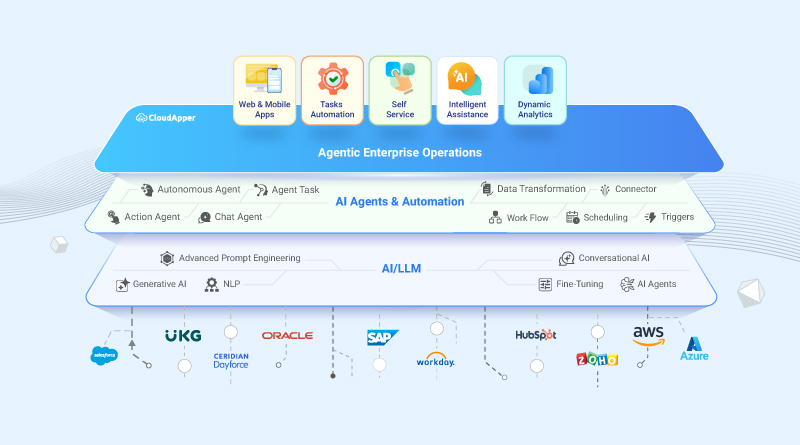
CloudApper AI is an advanced platform that enables organizations to integrate AI into their existing enterprise systems effortlessly, without the need for technical expertise, costly development, or upgrading the underlying infrastructure. By transforming legacy systems into AI-capable solutions, CloudApper allows companies to harness the power of Generative AI quickly and efficiently. This approach has been successfully implemented with leading systems like UKG, Workday, Oracle, Paradox, Amazon AWS Bedrock and can be applied across various industries, helping businesses enhance productivity, automate processes, and gain deeper insights without the usual complexities. With CloudApper AI, you can start experiencing the transformative benefits of AI today. Learn More
- Useful Links:
- Agentic AI
- No-Code/Low-Code
- Custom Software
- HCM Personalization
- iPaaS
- FedRAMP
CloudApper AI Solutions
- Works with








- and more.
Similar Posts

NIST AI RMF and Internally Built Enterprise Applications: The Evidence…

When an Internally Built Application Enters GxP Scope, Every Change…