Before approving a third-party app for Workday, review the integration system user it asks for. Learn how to scope ISSG type, Get and Put domain access, API client tokens, password exemptions and offboarding, and where CloudApper iPaaS helps IT govern every connected app.

TL;DR
Every third-party app connected to Workday runs through an integration system user, and its access is usually scoped by the vendor's install guide rather than your security team. Before approving an app, map each requested domain to a purchased feature, downgrade Put to Get where possible, use a constrained ISSG for partial-workforce apps, and plan token rotation and offboarding. Workday secures each ISU well but gives no single view across vendors, which is where CloudApper iPaaS adds governed, monitored connections alongside Workday.
Table of Contents
- What Workday Gives You Natively
- Where the Friction Shows Up
- What to Check Within Workday First
- Where Native Tools Run Out
The account with the widest reach into your Workday tenant never signs in. A Workday integration system user (ISU) powers every third-party app you connect, and its scope is usually set by the vendor’s install guide, not your security team. Verizon’s 2025 Data Breach Investigations Report found third parties involved in 30% of breaches, double the prior year. CloudApper connects to Workday through ISUs as well, so this review applies to us as much as anyone.
What Workday Gives You Natively
The Create Integration System User task builds a non-human account, and the Do Not Allow UI Sessions setting blocks interactive sign-in. The ISU sits in an integration system security group (ISSG) that receives Get and Put access through Maintain Domain Permissions for Security Group. A constrained ISSG limits data to the organizations you assign. For OAuth, Register API Client for Integrations ties a client to specific functional area scopes. Nothing takes effect until Activate Pending Security Policy Changes runs, which leaves an audit trail.
Where the Friction Shows Up
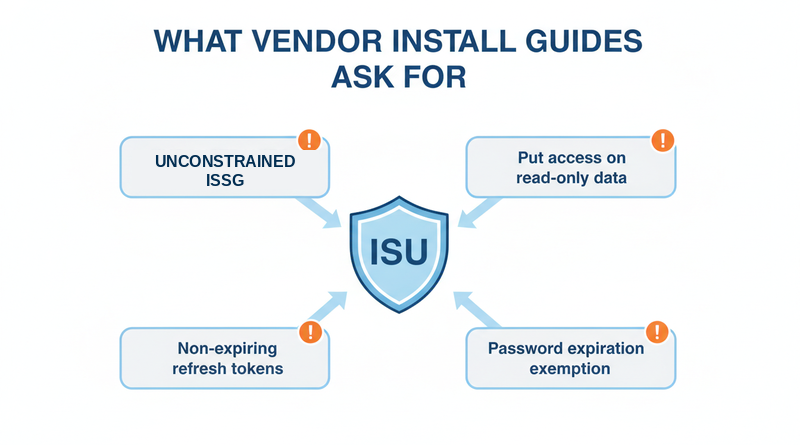
Install guides are written so integrations work on the first try, so they ask broadly: an unconstrained ISSG for an app that serves one plant, Put access on domains the app only reads, non-expiring refresh tokens, and an exemption from password expiration in Maintain Password Rules with no rotation plan. The result is an account that outlives the contract, the ownership problem behind the integration nobody owns.
What to Check Within Workday First
- Map every requested domain to a feature you are buying. No feature, no domain.
- Downgrade Put to Get wherever the app only reads.
- Use a constrained ISSG when the app serves a subset of the workforce.
- Keep Do Not Allow UI Sessions checked and name an owner for the ISU.
- Record when API client secrets and refresh tokens will be rotated.
- Add the ISU to offboarding, the way you handle terminated employee access.
Test the scoped version in a sandbox with masked PII in non-production tenants before go-live.
Where Native Tools Run Out
Workday secures each ISU well but does not show, in one view, what every connected app can touch, when its credentials last rotated, or whether its data flow failed overnight. They surface during a Workday audit and after supervisory org changes. With a dozen vendors each holding its own ISU, this is the gap CloudApper iPaaS was built to narrow.
How CloudApper iPaaS Narrows the Footprint
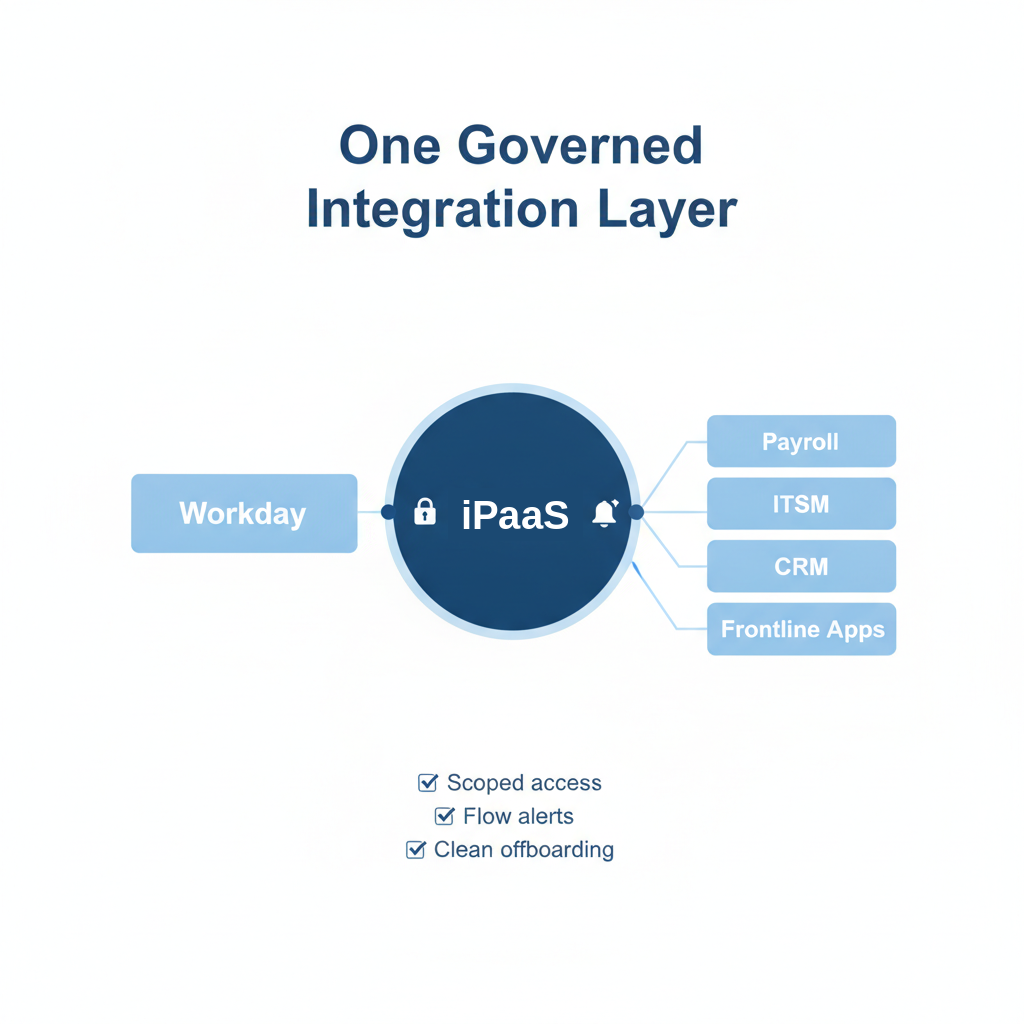
CloudApper iPaaS connects Workday to payroll, ITSM, CRM, and frontline apps through governed, scoped connections instead of a separate ISU for every vendor. IT sees which downstream system receives which fields, gets alerts when a flow fails (see integration monitoring and alerting), and can retire a downstream connection when a contract ends. It runs alongside Workday, inside its security model.
Frequently Asked Questions
Q: What is a Workday integration system user?

A Workday integration system user is a non-human account that integrations and third-party apps use to call Workday’s APIs, with permissions granted through an integration system security group.
Q: What is the difference between a constrained and unconstrained ISSG in Workday?
An unconstrained integration system security group can access data for all workers in its permitted domains. A constrained group limits access to the organizations assigned to it, such as one region or company.
Q: Should a Workday ISU be exempt from password expiration?
Vendors request it because an expired password stops the integration. If you grant it, assign an owner and a rotation schedule.
Q: How do I see what a third-party app can access in Workday?
Open the app’s integration system security group and review its domain permissions. Compare each Get and Put policy against the features you are buying and remove the rest.
Q: What happens to a Workday ISU when a vendor contract ends?
Nothing, unless someone acts. Add each ISU to offboarding so it is disabled and its API client secrets are revoked when the contract closes.
If you are approving a new Workday connection and want a second opinion on its permission scope, talk to the CloudApper team. We will show what our integration needs and what it does not.

What is CloudApper AI Platform?
CloudApper AI is an advanced platform that enables organizations to integrate AI into their existing enterprise systems effortlessly, without the need for technical expertise, costly development, or upgrading the underlying infrastructure. By transforming legacy systems into AI-capable solutions, CloudApper allows companies to harness the power of Generative AI quickly and efficiently. This approach has been successfully implemented with leading systems like UKG, Workday, Oracle, Paradox, Amazon AWS Bedrock and can be applied across various industries, helping businesses enhance productivity, automate processes, and gain deeper insights without the usual complexities. With CloudApper AI, you can start experiencing the transformative benefits of AI today. Learn More
- Useful Links:
- Agentic AI
- No-Code/Low-Code
- Custom Software
- HCM Personalization
- iPaaS
- FedRAMP

Brochure
CloudApper AI TimeClock
For accurate & touchless time capture experience.
Download Brochure
CloudApper AI Solutions for Workday



- Works with








- and more.
Similar Posts

Workday Biometric Time Clock Compliance: Consent, Retention, and Deletion Rules…

Workday Kiosk Security: Protecting Pay Slips and PII on Shared…