Automatic lunch deduction is fast but misstates the day for anyone who works through the break, while lunch punches depend on employees remembering. See how to pick one lunch rule per site and confirm it at clock-out so payroll reflects what actually happened.

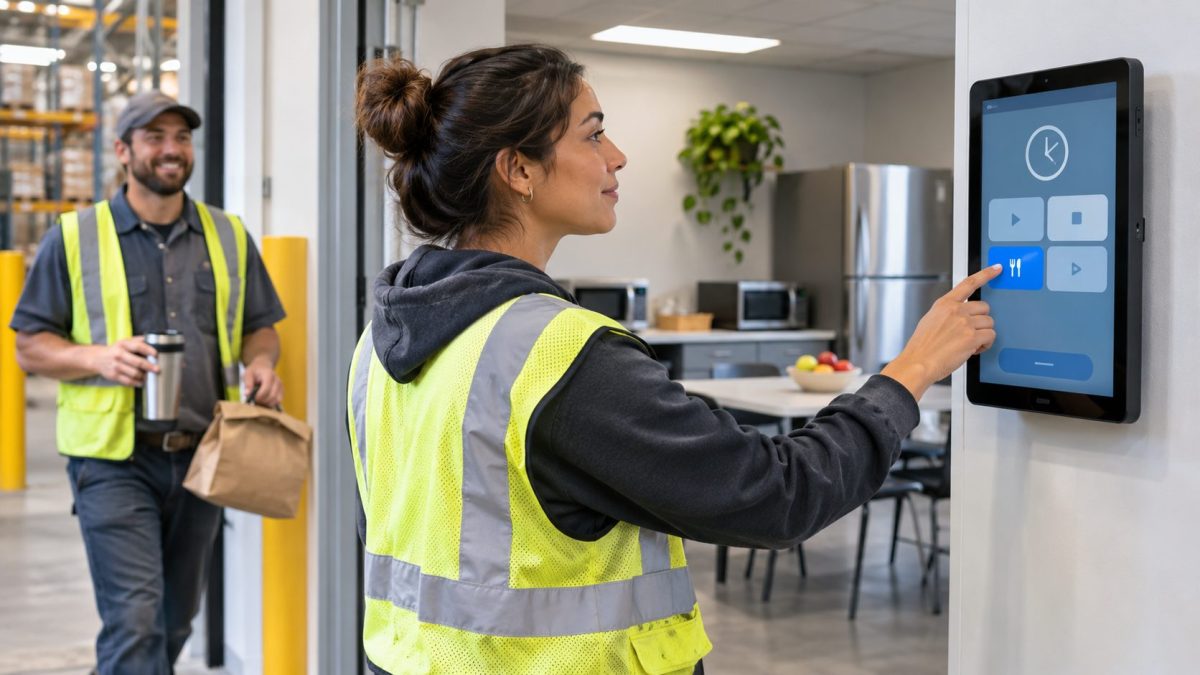
TL;DR
- Pick one lunch rule per site: automatic deduction, lunch punches, or deduction with a clock-out check.
- Automatic deduction is fast but misstates the day for anyone who works through lunch.
- Lunch punches show the real break, but forgotten punch-backs create manager corrections.
- Ask one clock-out question so a skipped lunch reaches payroll as a documented exception.
- Capture the break on everyday tablets while your HR systems keep applying your pay rules.
Table of Contents
- Where manual lunch tracking breaks down
- How automatic lunch deduction and lunch punches work
- How CloudApper AI TimeClock supports your lunch rule
- Choosing the lunch rule your workplace can stand behind
Every unpaid lunch raises the same payroll question: did the employee actually take it? Some employers subtract lunch automatically, others ask staff to punch out and back in, and each habit creates its own kind of error. An automatic lunch deduction time clock setup is fast, but it misstates the day for anyone who works through the break. Lunch punches record what happened, but they depend on people remembering one more step. The practical answer is time tracking software that captures the lunch facts at the clock, enforces your minimum break, and confirms the day with a short question, so the deduction your pay rules apply is based on what really happened. CloudApper AI TimeClock does exactly that, is compatible with Workday, UKG, Oracle and Dayforce, and runs on iPads and Android tablets.
Where manual lunch tracking breaks down
On paper, lunch looks simple. A supervisor writes 12:00 to 12:30 for the whole crew because that was the schedule, even though half the crew ate later and two people covered the floor.

An automatic deduction with no check behind it has the opposite problem. Thirty minutes come off every shift, so the employee who answered phones through the break is underpaid, and nobody notices until a paycheck is questioned.
Lunch punches fix the guessing but add a step. When someone forgets to punch back in, fixing missed punches from memory takes manager time, and every timesheet edit made after the fact makes the record harder to defend.
How automatic lunch deduction and lunch punches work
There are three common setups. With automatic deduction, your pay rules subtract a set unpaid lunch from any shift past a threshold you choose. With lunch punches, the employee clocks out for lunch and back in, so the timecard shows the real break. The third setup combines them: the employee punches for lunch or works through the usual deduction, and the clock asks a short question at clock-out, known as a meal break attestation. A “no” is saved with the punch and flagged for review.
Teams with protected lunch periods often do well with automatic deduction. Teams with staggered or interrupted lunches usually need punches or the prompt. A lunch break calculator covers a single timecard, but a whole workforce needs the break captured at the clock.
The U.S. Department of Labor reported that it recovered more than $259 million in back wages for nearly 177,000 employees in fiscal year 2025, which shows how much clear hours records matter when pay is questioned. Meal period rules also differ by state, as California’s time clock requirements show, and catching a skipped lunch the same day beats answering for meal break violations later.
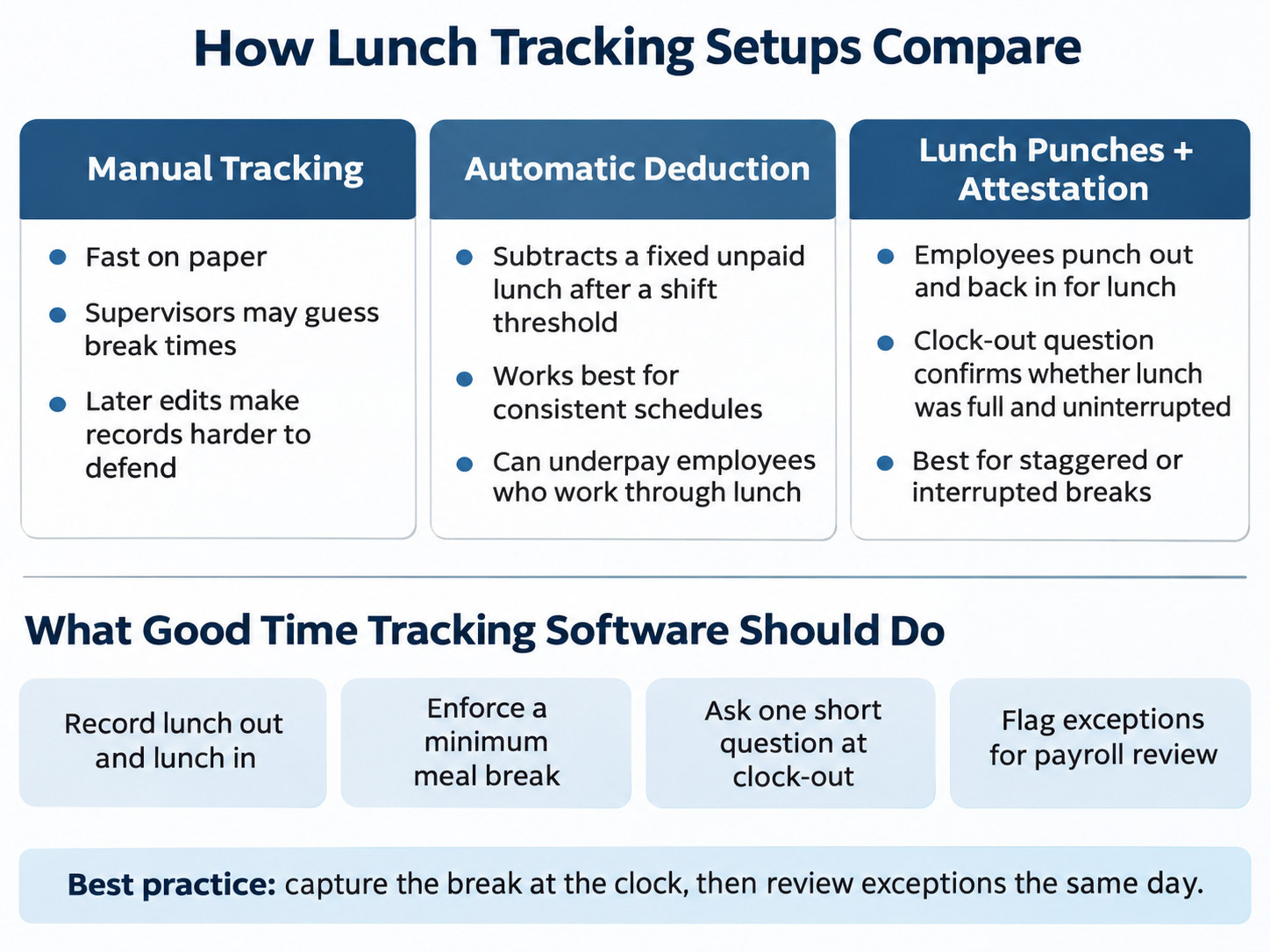
This scales because the break rule lives at the clock instead of in a training program. A multi-site business can set break requirements by location, job group or state and review exceptions in one place. That is good employee time tracking at scale, and clean punches reach payroll integration with fewer corrections. Healthcare, manufacturing, retail, hospitality, schools, construction and warehouse teams, including inventory management providers working inside client sites, all face the same question.
How CloudApper AI TimeClock supports your lunch rule
CloudApper AI TimeClock turns everyday tablets into time clocks. Employees punch in with Face ID, a PIN, a badge or a QR code, and the same device works as a time clock with breaks, recording lunch out and lunch in. You can set a minimum meal break, and if an employee tries to clock out before taking it, the clock reminds them. At clock-out it can ask whether they received a full, uninterrupted lunch. The answer is stored with the punch, so a skipped lunch reaches payroll as a documented exception while your HR systems keep applying your pay rules.
Punches sync to payroll and your HR systems, even when a site loses its connection, and geofencing ties each one to the right location. A group punch records a whole crew in one tap. Supervisors stop correcting lunches by hand, which makes this time tracking software easier for employees and payroll to trust. Everyday tablets also cost less than dedicated terminals and are simple to replace or add. It works especially well for multi-site operations and shift crews with staggered lunches.
Choosing the lunch rule your workplace can stand behind
Manual tracking leaves supervisors guessing, automatic deduction misstates the day for anyone who works through lunch, and lunch punches only help when employees remember them. Capturing the break at the clock, then confirming it with one question, is what lets the approach scale across industries and states. CloudApper AI TimeClock puts that on tablets your team already knows, runs on iPads and Android tablets, and sends clean punches to Workday, UKG, Oracle and Dayforce, so those systems keep managing payroll, scheduling and the employee record with better data coming in. If you would like to see each lunch setup across your locations, you can book a demo with our team.
Frequently asked questions
What is automatic lunch deduction on a time clock?
Automatic lunch deduction is a pay rule that subtracts a set unpaid lunch period from each shift that runs past a threshold you choose, so employees do not need to punch out and back in for lunch.
Is automatic lunch deduction allowed?
In many places it is, as long as employees actually receive the unpaid break and have a way to report when they did not. Meal period rules differ by state and by industry, so confirm your requirements with your payroll or legal team before you set the rule.
How can a time clock help when lunch is deducted automatically?
The clock can ask a short question at clock-out, such as whether the employee received a full, uninterrupted lunch. A “no” is saved with the punch, so a manager can review it and payroll can pay the time.
Do employees need to clock out for lunch?
Only if your lunch setup uses lunch punches. With automatic deduction, employees can work through the usual lunch window without clocking out, and the clock can still ask a short question at clock-out to confirm they received their lunch. With lunch punches, they clock out for lunch and back in, so the timecard shows the real break.
Can different locations or job groups use different lunch rules?
Yes. With the right time tracking software you can set lunch requirements by location, job group or state, so a site with protected lunch periods can rely on automatic deduction while another site uses lunch punches and a clock-out question.

What is CloudApper AI Platform?
CloudApper AI is an advanced platform that enables organizations to integrate AI into their existing enterprise systems effortlessly, without the need for technical expertise, costly development, or upgrading the underlying infrastructure. By transforming legacy systems into AI-capable solutions, CloudApper allows companies to harness the power of Generative AI quickly and efficiently. This approach has been successfully implemented with leading systems like UKG, Workday, Oracle, Paradox, Amazon AWS Bedrock and can be applied across various industries, helping businesses enhance productivity, automate processes, and gain deeper insights without the usual complexities. With CloudApper AI, you can start experiencing the transformative benefits of AI today. Learn More
- Useful Links:
- Agentic AI
- No-Code/Low-Code
- Custom Software
- HCM Personalization
- iPaaS
- FedRAMP
Brochure
CloudApper AI TimeClock
For accurate & touchless time capture experience.
Download Brochure
CloudApper AI Solutions for HR

- Works with








- and more.
Similar Posts
Cold Storage Warehouse Time Clocks: Keeping Punches Accurate When Workers…

Plant Turnaround Contractor Time Tracking: Capturing Hours for Short-Term Site…