Workday's opt-in Equifax connector automates employment and income verification for U.S. Workday Payroll customers, yet many requests still reach HR. This guide covers what Workday handles natively, where third-party payroll, agency forms and phone requests fall outside automation, and how CloudApper iPaaS routes the rest with an audit trail.

TL;DR
Workday's opt-in, no-cost connector to Equifax's The Work Number automates employment and income verification for U.S. Workday Payroll customers. Requests still reach HR when payroll runs outside Workday, when entities are outside the U.S., when agencies need a signed form, or when a phone caller needs judgment. Turn on the connector, publish letter templates, and write a release policy first. CloudApper iPaaS then routes the remaining requests to Workday and payroll data, gets approval, and logs every release.
Table of Contents
- What Workday Handles Natively
- Where Verification Requests Still Reach HR
- What to Set Up in Workday First
- Where Native Options Run Out
The most common employment verification request should never reach HR. In August 2024, Workday announced a no-cost, opt-in connector to Equifax’s The Work Number for U.S. Workday Payroll customers, planned for 2025, so lenders and benefits agencies get answers without HR touching the request. HR teams still field verification calls every week, because the connector answers the easy requests and the hard ones still land in HR. Those are the requests where CloudApper adds a layer alongside Workday.
What Workday Handles Natively
The Equifax integration draws on Workday Payroll data. Once on, verifiers asking about employment dates, title or income get answers from The Work Number. For letters, Workday’s document generation can merge hire date, job title and pay from the worker record into a template, producing a standard letter on demand.
Where Verification Requests Still Reach HR
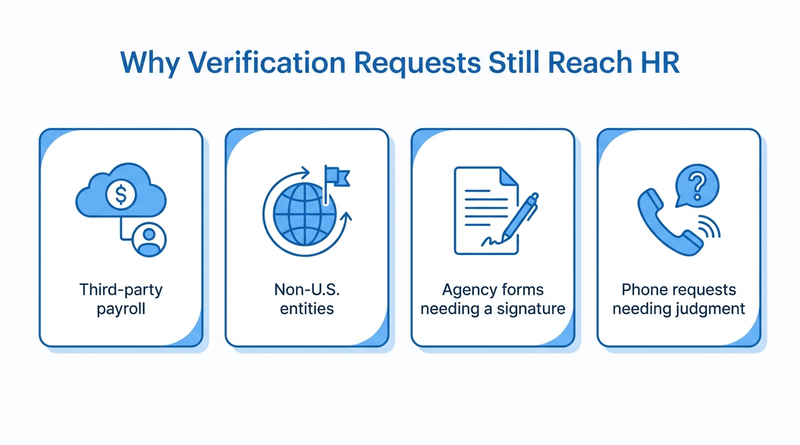
The connector depends on Workday Payroll. Organizations running Workday HCM with a separate payroll provider, the setup in connecting Workday to a third-party payroll system, don’t have pay data in Workday for it to read. Coverage is U.S. only, so Canadian entities stay manual. Agency forms for childcare subsidies, housing or SNAP often need a signature no data feed can provide. Former employees ask too, often after losing access as described in Workday access for former employees.
What to Set Up in Workday First
- Turn on the Equifax connector if you run Workday Payroll in the U.S., and tell employees it exists.
- Publish one verification letter template per entity, and limit pay fields to what your policy allows.
- Write a release policy stating which fields need written consent, and train anyone who answers the phone.
- Track manual requests as cases so you can see volume by source, entity and request type.
Treat phone requests carefully. A caller posing as a lender and asking for salary uses the same pretext as the attacks in Workday direct deposit fraud.
Where Native Options Run Out
After the connector and templates, what’s left needs outside data, a signature, or a release decision. Those requests arrive by fax, email and phone, with no link to a worker record or audit trail. That gap matters during an audit of how employee data is shared. This is where CloudApper connects the request to the data instead of leaving it in someone’s inbox.
How CloudApper Routes Requests to the Right Data
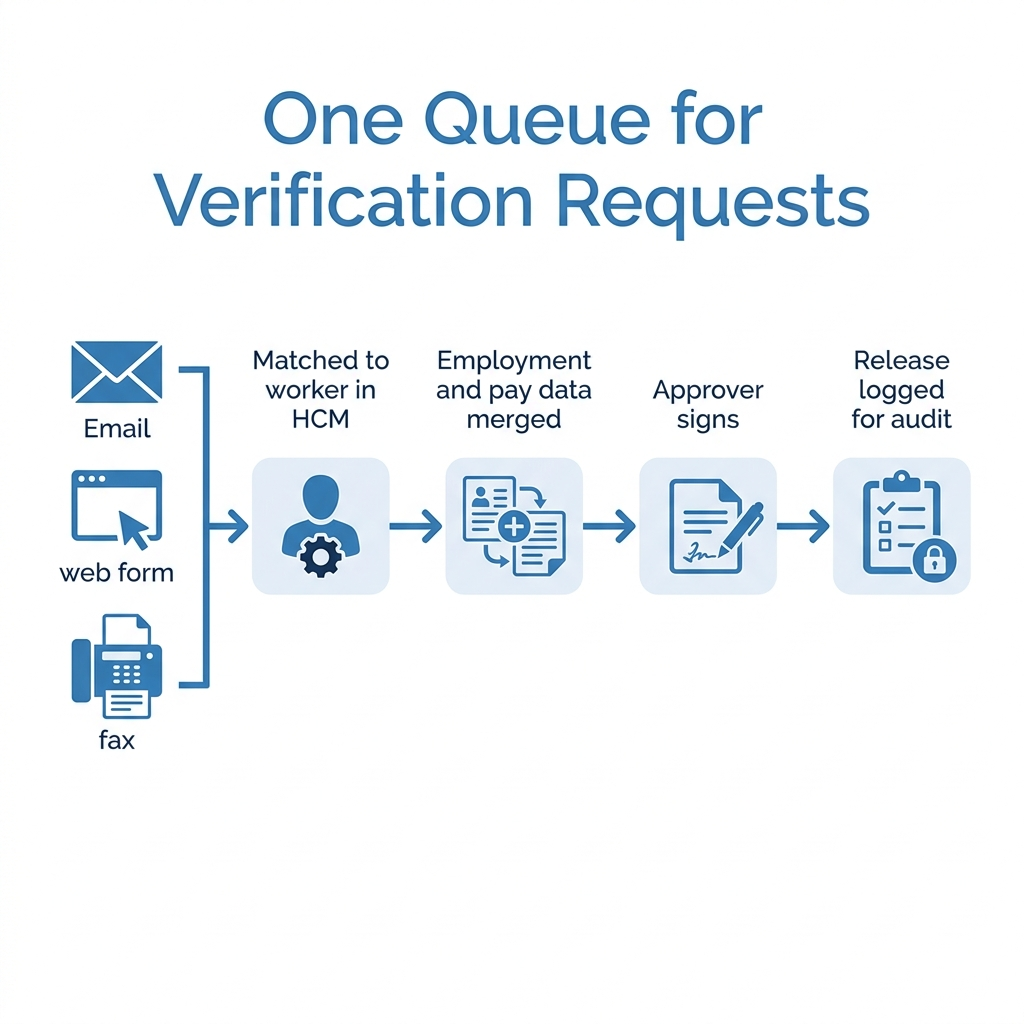
CloudApper iPaaS collects verification requests from email, web forms and fax-to-email into one queue and matches each to a worker in Workday. It pulls employment data from Workday and pay data from your payroll system, fills the form or letter, and routes it to your named approver. Every release is logged with requester, fields shared and consent on file. Employees can start their own requests, cutting HR traffic like that in paystub access for hourly workers.
Frequently Asked Questions
Q: Does Workday do employment verification?

Yes. U.S. Workday Payroll customers can opt in to a no-cost connector to Equifax’s The Work Number for automated employment and income verification.
Q: Is the Workday Equifax integration free?
Yes. Workday announced it at no additional cost to customers, and it is opt-in.
Q: Can Workday HCM customers with third-party payroll use the Equifax connector?
The connector draws on Workday Payroll data. With a separate payroll provider, income verification runs through that provider or manually.
Q: How do I create an employment verification letter in Workday?
Use Workday document generation with a letter template that merges hire date, job title and pay from the worker record.
Q: What information can HR release in an employment verification?
It depends on your policy and state law. Many employers confirm dates and title but require written consent for pay.
Q: How do former employees get employment verification?
Through the automated service if their records are covered, or by contacting HR or payroll.
Q: Why do verification requests still reach HR after enabling automation?
Agency forms need signatures, some payroll systems fall outside the connector, and phone requests need judgment.
If verification requests still land in inboxes and fax queues, talk to the CloudApper team about routing them to the right data alongside Workday.

What is CloudApper AI Platform?
CloudApper AI is an advanced platform that enables organizations to integrate AI into their existing enterprise systems effortlessly, without the need for technical expertise, costly development, or upgrading the underlying infrastructure. By transforming legacy systems into AI-capable solutions, CloudApper allows companies to harness the power of Generative AI quickly and efficiently. This approach has been successfully implemented with leading systems like UKG, Workday, Oracle, Paradox, Amazon AWS Bedrock and can be applied across various industries, helping businesses enhance productivity, automate processes, and gain deeper insights without the usual complexities. With CloudApper AI, you can start experiencing the transformative benefits of AI today. Learn More
- Useful Links:
- Agentic AI
- No-Code/Low-Code
- Custom Software
- HCM Personalization
- iPaaS
- FedRAMP

Brochure
CloudApper AI TimeClock
For accurate & touchless time capture experience.
Download Brochure
CloudApper AI Solutions for Workday



- Works with








- and more.
Similar Posts

How to Rehire in Workday: Service Dates, I-9 and ACA…

The Workday Mobile App and Off-the-Clock Work: Which Hourly Tasks…