- The Offboarding Gap Nobody Talks About Enough
- What Workday Does Natively on Termination
- What Workday Does Not Touch
- The Manual Offboarding Problem
- What Automated Offboarding Looks Like
- What This Requires: Connecting Workday to Your IAM Stack
- How CloudApper iPaaS Handles This
- A Step-by-Step Offboarding Checklist for Workday Organizations
- Frequently Asked Questions
- What to Do Next
When an employee is terminated in Workday, the record update is immediate. Workday marks the worker inactive, the security role is removed, and that person can no longer log in to the HCM. From Workday’s perspective, offboarding is complete.
From a security perspective, it’s barely started.

The average employee uses 29 different SaaS applications. Workday only controls access to one of them. Unless the termination in Workday triggers a cascade to Active Directory, SSO, cloud applications, shared credentials, and physical access systems — automatically, within minutes — that former employee’s digital footprint remains live across your enterprise long after their last day.
This article walks through exactly what Workday does natively when a termination is processed, what it doesn’t touch, and what a properly automated offboarding sequence looks like across your full systems stack.
The Offboarding Gap Nobody Talks About Enough
The numbers on this problem are stark.
Research from Beyond Identity found that 89 percent of former employees still retain access to at least one application from their previous employer. Gartner data shows that only 44 percent of companies ensure all access rights are revoked within 24 hours of an employee’s departure. And Ponemon Institute’s 2024 Cost of Insider Risks Report put the average cost of an insider threat incident — many of which originate from former employees who retained access — at $15.38 million.
These aren’t abstract statistics. Recent cases include a former Nuance Communications employee who accessed patient data after termination, contributing to a breach affecting over a million patients at Geisinger Health. A former employee at FinWise Bank accessed and exported sensitive customer files after their employment ended, with the breach disclosed in 2025. A U.S. government agency breach in 2024 was initiated through a former employee’s admin account that was never fully deactivated.
The common thread isn’t sophisticated hacking. It’s an open door that nobody closed.
NIST SP 800-53 control PS-4 requires that on termination, organizations disable system access within an organization-defined time period and revoke all authenticators. SOC 2, ISO 27001, HIPAA, and most other compliance frameworks include equivalent requirements. An unrevoked account isn’t just a security risk — it’s an audit failure waiting to happen.
What Workday Does Natively on Termination
When a termination is processed in Workday — whether initiated through the Terminate Employee business process or through a scheduled future-dated termination — several things happen automatically:
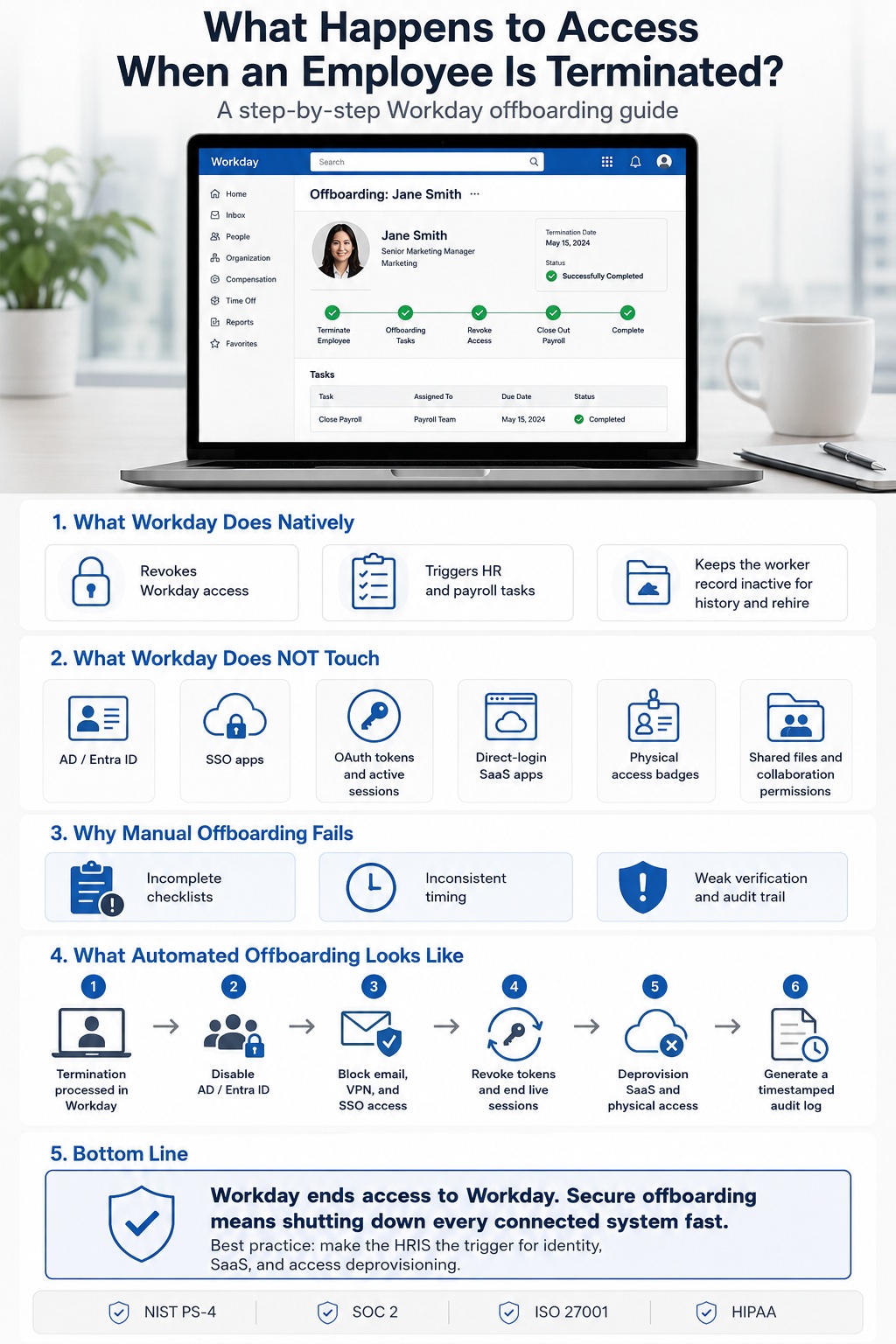
Workday access is revoked: The worker’s security group assignments are removed. They can no longer log in to the Workday portal. This happens immediately on the effective termination date.
Business process tasks are triggered: Depending on your business process configuration, the termination can trigger workflow steps — notifications to HR, payroll processing of final pay, time-off payout calculations, and others.
The worker record is preserved as inactive: Workday retains the terminated worker’s data for historical reporting, compliance, and rehire purposes. The record isn’t deleted; it’s deactivated.
Payroll is handled: If you run payroll through Workday, final paycheck processing is incorporated into the termination workflow.
This is genuinely useful. For organizations that run their HR and payroll entirely within Workday, the native termination process covers a meaningful chunk of offboarding administration cleanly.
What Workday Does Not Touch
Workday’s access revocation applies only to Workday. Every other system the employee had access to is outside Workday’s scope unless an integration specifically connects them.
Active Directory and Azure AD / Microsoft Entra ID: Most enterprise environments manage user accounts and permissions through AD or Entra ID. A terminated employee’s AD account — and by extension, their access to email, shared drives, VPN, and any application that uses AD for authentication — remains active until IT manually disables it, or until an automated integration fires.
SSO-gated applications: If your organization uses Okta, Azure AD, or another SSO provider, disabling the account in the identity provider blocks SSO-based logins to connected applications. But this only works if the termination in Workday actually triggers the identity provider update — which requires a working integration between Workday and the IdP.
OAuth tokens and active sessions: This is one of the most commonly overlooked offboarding gaps. Even when an SSO or IdP account is disabled, OAuth tokens issued to third-party applications (Slack, Salesforce, Google Workspace, and others) may remain valid until they expire. A former employee who authenticated to an application before their account was disabled may retain an active session for hours or days afterward. Proper deprovisioning requires explicitly revoking OAuth tokens, not just blocking future logins.
SaaS applications with direct logins: Any application the employee accessed with a direct username and password — rather than through SSO — is invisible to an SSO-based deprovisioning. Shared credentials, personal API tokens, and applications that were provisioned outside central IT are particularly vulnerable.
Physical access: Building access cards, key fobs, and biometric access systems are separate from any digital identity system and require their own revocation process.
Collaboration and file-sharing permissions: Shared Google Drive folders, SharePoint sites, Slack channels, and externally shared document links may persist indefinitely after account termination. Access revocation at the account level doesn’t automatically remove the former employee from resources they were explicitly shared on.
The Manual Offboarding Problem
Without automation connecting Workday’s termination event to downstream systems, the gap between “terminated in Workday” and “access fully revoked everywhere” is filled by people — usually IT and HR staff working from a checklist, under time pressure, often without complete visibility into everything the employee had access to.
This process breaks in predictable ways:
The checklist is incomplete: The average enterprise employee has accounts across dozens of SaaS applications. A checklist built around the applications IT knows about doesn’t cover shadow IT, personal API tokens, or applications provisioned by department managers outside of central IT.
Timing is inconsistent: For voluntary resignations, offboarding tasks are often spread across the notice period or deferred to the last day. For involuntary terminations — where the risk of intentional data exfiltration is highest — the notification to IT frequently comes after the employee has already been informed, not before.
Cyberhaven’s 2024 research found a 720 percent spike in data exfiltration activity just before layoffs are announced. This means the most critical window for access control is precisely the period when manual processes are most likely to be delayed, overwhelmed, or incomplete.
Verification is hard. Manual offboarding doesn’t produce a clean audit trail. If an auditor or incident responder asks when access was revoked and across which systems, the honest answer in most manual-process environments is “we think so, but we’re not certain.”
What Automated Offboarding Looks Like
The security standard for offboarding is that the HRIS — Workday, in this context — is the authoritative trigger. When Workday marks a worker as terminated, that event should automatically initiate a deprovisioning sequence across every connected system, without requiring a human to open a ticket or work through a checklist.
Best-in-class programs achieve full access revocation in under 30 minutes through this kind of automation. The sequence generally looks like this:
- Workday processes the termination. The effective date triggers the event.
- The identity provider is updated. Active Directory or Entra ID account is disabled. This blocks email, VPN, and SSO-gated application access.
- Active sessions are terminated. OAuth tokens are revoked. Any active application sessions are killed explicitly — not just blocked from future login.
- SaaS deprovisioning runs. Applications connected through the SSO or a SaaS management layer are systematically revoked.
- Physical access is deactivated. Building access system is notified; badge and biometric access is disabled.
- An audit trail is generated. Every revocation action is logged with a timestamp, creating the documentation required for compliance audits.
Steps 2 through 6 happen in sequence within minutes of step 1 — without IT opening a ticket.
What This Requires: Connecting Workday to Your IAM Stack
Making Workday the authoritative trigger for automated deprovisioning requires an integration between Workday’s termination event and your identity systems. There are several ways to build this:
Workday-to-Active Directory integration via Workday Studio. Workday has native capability to push changes to Active Directory using its Studio integration framework. This can be configured so that a termination in Workday disables the AD account within a defined window. The limitation is that Studio integrations require Workday developer expertise to build and maintain, and regression testing after each of Workday’s bi-annual releases falls to your integration team.
Workday-to-IdP via middleware. If your organization runs enterprise middleware like MuleSoft or Boomi, adding a Workday-to-Okta or Workday-to-Entra ID connector extends your existing integration infrastructure rather than introducing new tooling.
iPaaS with pre-built Workday connectors. No-code integration platforms with pre-built Workday connectors allow the termination trigger to propagate to multiple downstream systems without writing custom integration code — including AD, Okta, and any other system in your stack that has an API.
How CloudApper iPaaS Handles This
CloudApper iPaaS connects Workday’s termination event to downstream IAM and IT systems through pre-built connectors and a no-code workflow builder, without requiring Workday Studio development expertise.
When a termination is processed in Workday, CloudApper iPaaS can trigger a configurable sequence in near real time:
- Active Directory / Entra ID account disable, cutting access to email, VPN, and AD-authenticated applications
- SSO provider update (Okta, Azure AD, and others), blocking SSO-gated application logins
- ServiceNow ticket creation for physical access revocation, device retrieval, and any manual steps that can’t be automated
- Notification to the employee’s manager and IT security with a deprovisioning confirmation and timestamp
- Audit log entry recording the termination event and every downstream action taken
The workflow is configured in CloudApper’s no-code builder, which means HR operations or IT teams can adjust the sequence — add a new application, change the notification recipients, update the timing — without opening a development ticket. The Workday connector is maintained through Workday’s bi-annual releases, which removes one of the most common failure modes for custom integration work: the integration that silently stops working after a platform update.
The honest scope note: CloudApper iPaaS handles the IAM and system deprovisioning layer. The SaaS sprawl problem — former employees retaining access through OAuth tokens they issued before termination, or direct logins to applications that were never in central IT’s inventory — requires additional tooling focused specifically on SaaS visibility and OAuth token revocation. For most organizations, the Workday-to-AD/IdP automation closes the largest and most immediately dangerous gap. The SaaS sprawl layer is the next investment, not the prerequisite.
A Step-by-Step Offboarding Checklist for Workday Organizations
For organizations building or auditing their offboarding process, here’s what a complete sequence looks like when Workday is the HRIS of record:
Day of termination decision (before the employee is notified for involuntary exits):
- Initiate termination in Workday with the effective date
- Ensure the Workday-to-AD integration fires (automated or trigger manually if not automated)
- Begin privilege review: identify any applications provisioned outside central IT
At or before the effective termination time:
- Workday access deactivated (native)
- AD/Entra ID account disabled
- SSO provider updated; active sessions and OAuth tokens revoked
- Physical access deactivated
- Company devices remotely locked or wiped
- Shared credentials the employee knew (VPN, shared accounts) rotated
Within 24 hours:
- SaaS application audit: verify deprovisioning across all centrally managed applications
- Externally shared documents and folders reviewed; permissions removed
- Manager notified of knowledge transfer requirements and file ownership transitions
Within one week:
- Access review completed and documented
- Audit log preserved for compliance purposes
- Any discovered residual access remediated
Ongoing:
- Quarterly orphaned account audits to catch any access that persisted despite the offboarding process
Frequently Asked Questions
Does Workday automatically revoke access when an employee is terminated?
Workday automatically revokes access to Workday itself when a termination is processed. It does not automatically revoke access to other systems — Active Directory, SSO-gated applications, SaaS platforms, or physical access — unless a working integration connects Workday’s termination event to those systems.
How long does it typically take to fully offboard an employee?
With manual processes, about a third of organizations take more than 24 hours to fully offboard a former employee. Only 34 percent of organizations revoke system access on the day an employee leaves. With automated offboarding triggered from Workday, best-in-class programs achieve full access revocation within 30 minutes.
What is the security risk of a terminated employee retaining access?
Research shows 89 percent of former employees retain access to at least one application from their previous employer. Former employees with retained access can exfiltrate data, access sensitive systems, or inadvertently expose information. The Ponemon Institute puts the average cost of an insider threat incident at $15.38 million.
Is it enough to just disable the SSO account?
No. Disabling an SSO or identity provider account blocks new SSO-based logins but does not revoke existing OAuth tokens or terminate active sessions. An employee who authenticated to an application before their account was disabled may retain live access until the session expires naturally. Complete deprovisioning requires explicitly revoking tokens and terminating sessions, not just blocking future logins.
What compliance frameworks require access revocation on termination?
NIST SP 800-53 (control PS-4), SOC 2 (logical access controls), ISO 27001, HIPAA, and GDPR all include requirements for timely access revocation when employment ends. In regulated industries, an unrevoked account is not just a security risk — it’s a compliance violation with potential for significant penalties.
Can Workday’s termination business process trigger downstream deprovisioning automatically?
Yes, with the right integration. Workday Studio can be configured to push termination events to Active Directory. iPaaS platforms with pre-built Workday connectors can propagate the termination trigger to multiple downstream systems — AD, Okta, ServiceNow, and others — in near real time without custom development work.
What about contractors, part-time workers, and temp agency staff?
These populations are often the riskiest from an offboarding perspective because their access is frequently managed inconsistently and their termination events don’t always route through the same HRIS workflows as full-time employees. A comprehensive offboarding process should cover all worker types, with clear process owners for each.
What to Do Next
The first step is usually an audit, not a purchasing decision. Pull a list of active accounts in your identity provider and cross-reference it against your active employee roster in Workday. The gap between those two lists — accounts that exist in AD or Okta but don’t correspond to active workers in Workday — is your current orphaned account exposure. Most organizations find more than they expected.
From there, the question is how much of your offboarding sequence is currently manual, and which steps represent the highest risk if they’re missed or delayed. For most organizations, the Workday-to-AD link is the most critical gap to close first.
If you’d like to talk through your specific Workday and IAM stack setup, the CloudApper team is available here.

What is CloudApper AI Platform?
CloudApper AI is an advanced platform that enables organizations to integrate AI into their existing enterprise systems effortlessly, without the need for technical expertise, costly development, or upgrading the underlying infrastructure. By transforming legacy systems into AI-capable solutions, CloudApper allows companies to harness the power of Generative AI quickly and efficiently. This approach has been successfully implemented with leading systems like UKG, Workday, Oracle, Paradox, Amazon AWS Bedrock and can be applied across various industries, helping businesses enhance productivity, automate processes, and gain deeper insights without the usual complexities. With CloudApper AI, you can start experiencing the transformative benefits of AI today. Learn More
- Useful Links:
- Agentic AI
- No-Code/Low-Code
- Custom Software
- HCM Personalization
- iPaaS
- FedRAMP