A weekend prototype that works is not enterprise grade software. These are the ten gaps that stop a vibe-coded app at its production review, from shared logins and exposed API keys to a single environment and personal-login integrations, and how to close each one.


TL;DR
- Most vibe-coded prototypes fail an enterprise review on the same ten points, and almost none of them are about whether the code runs.
- Identity, roles and audit history are the gaps that stop a launch fastest.
- Exposed secrets, unreviewed dependencies and personal-login integrations do the damage after launch.
- Fixing all ten by hand means building an identity and operations layer that your team then has to own.
- A managed platform supplies that layer underneath the app, so the app you built stays the app you maintain.
Table of Contents
You built it over a weekend and it worked. Someone in operations started using it on Monday, and now a director wants it rolled out to the whole department. The question lands on IT: can this go live?

AI app builders are built to get from an idea to a working screen in hours, and they are good at it. None of them set out to be the layer underneath the app, where identity, roles, audit history, backups and ownership live. So the honest answer to “is your vibe coding production ready” is usually no, and enterprise grade raises the bar further. Below are the ten signs that come up most, each with its fix. Teams that would rather not hand-build that layer tend to put the app on a managed platform like CloudApper AI instead.
Is your vibe coding production ready? Ten checks before enterprise launch
Veracode’s 2025 GenAI Code Security Report ran more than 100 language models through 80 coding tasks and found that 45% of the generated samples introduced security vulnerabilities.
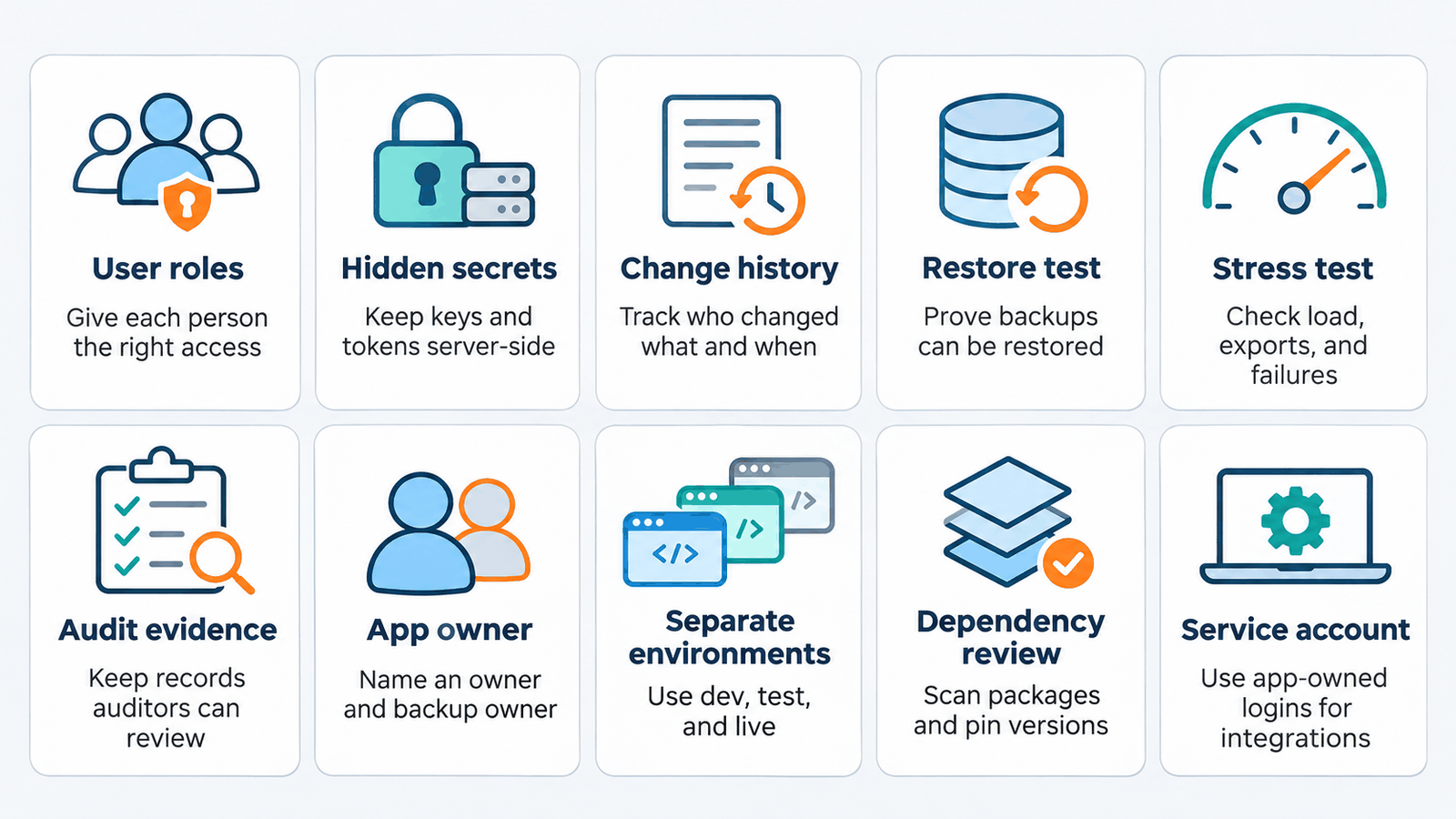
1. Anyone with the link can do anything
The prototype had one user, so it never needed roles. Now three departments want in. Production needs real identity tied to your directory, with roles that separate what a supervisor sees from what a clerk sees. Skip this and you inherit the over-permissioned access problem.
2. Secrets are sitting in the front end
API keys, database URLs and tokens end up in client-side code because that makes a demo work fastest. Anyone with browser developer tools can read them. Move every credential server-side, rotate anything ever exposed, and hold keys in a managed store. Check the generated code for injection flaws while you are in there.
3. You cannot answer who changed a record
Finance asks who edited an amount two weeks ago. If the app overwrites rows, no log search will answer. Keep an append-only record of user, timestamp and previous value from day one, because SOC 2 auditors ask for change evidence.
4. There is a backup but no tested restore
A nightly export is not a recovery plan until someone restores it into a clean environment and confirms the data came back. State the recovery point you can meet, then rehearse it. An untested plan means finding out during the outage.
5. Only people who want it to work have tested it
The builder clicks the happy path and it passes. Nobody has tried 200 concurrent users, a 50,000-row export or a dropped connection mid-save. Run those before launch. Scanners help, but passing SAST and DAST does not prove the app behaves.
6. There is no evidence an auditor would accept
Auditors will not ask whether the app is secure. They will ask for the access review, change approvals and test records. Decide now which artifacts the app produces on its own, because evidence assembled by hand afterward rarely survives a walkthrough.
7. Nobody owns it after launch
The builder has a day job, and it is not this. When they change roles, the app keeps running until it breaks, then belongs to whoever answers the ticket. Name an owner, a backup owner and a budget line before go-live, since much of the cost of vibe-coded apps arrives after the build.
8. The build environment is the live environment
Edits go straight to the running app, so a Tuesday fix can break Wednesday’s work. Enterprise grade production needs separate development, test and live environments, with changes promoted between them and a way to roll back.
9. Nobody has reviewed what it pulls in
AI tools add packages freely, including ones nobody on your team chose. Inventory every dependency, pin versions and scan them. Treat generated code like third-party code and review the supply chain exposure first.
10. It reaches other systems on someone’s personal login
The app connects to your HR, finance or ticketing system with the builder’s own credentials. When that person leaves, access breaks or, worse, stays. Give the app its own service identity with narrow permissions, and review it like any non-human account.
Where this leaves your prototype
None of the ten are coding problems. Shared logins, exposed secrets, missing change history, an unrehearsed restore, untested limits, absent audit evidence, unclaimed ownership, a single environment, unreviewed dependencies and personal-login integrations all sit underneath the application, in the layer prototype tools were never meant to cover. That layer is the same for every internal app you will build, so rebuilding it by hand each time leaves IT maintaining a dozen slightly different versions of the same plumbing. Putting the app on a platform that already provides identity, roles, audit history and hosting leaves your team with the part worth building.
If you want to see what that layer covers before your next prototype goes live, you can book a demo.
Frequently asked questions
What does production ready mean for a vibe-coded app?
Production ready means the application can be used by people other than its builder without creating risk the organization has not accepted. In practice that means real user identity and roles, credentials held server-side, a change history that answers who did what, a restore that has been tested, separate development, test and live environments, reviewed dependencies, a service identity for integrations, known behavior under load, audit evidence the app produces on its own, and a named owner after launch.
Can I fix these problems after launch instead of before?
Some of them, yes. Load testing and ownership can be settled after go-live without losing anything. Audit history cannot, because the records you need are the ones created while the app was already running, and they do not exist retroactively. Exposed credentials also cannot wait, since anything that has been readable in the browser should be treated as already compromised.
Are AI app builders unsafe to use in an enterprise?
No. They are good at what they are built for, which is getting a working application in front of users quickly. The risk comes from treating the output as finished software rather than as a prototype that still needs an identity model, audit history and an operations owner before it holds real data.
How long does it take to make a prototype production ready?
Hand-building the missing layer can take longer than the original build, because identity, roles, audit logging, backups and hosting each need design, testing and documentation. Moving the app onto a platform that already provides those pieces can shorten that work, though it means rebuilding the interface on that platform rather than keeping the prototype’s code.
Who should own this review, IT or the team that built the app?
IT owns the decision, since IT inherits the consequences. The builder owns the context, because they know what the app does and which shortcuts were taken. Reviews go faster when both are in the room, and slower when IT first sees the app on the day someone asks to roll it out.

What is CloudApper AI Platform?
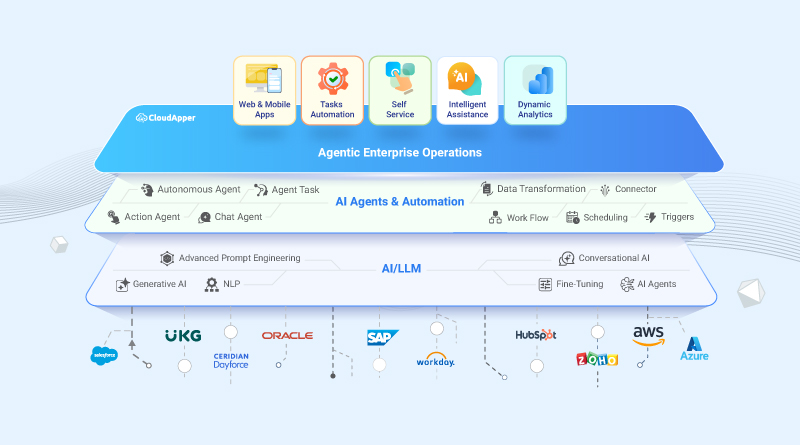
CloudApper AI is an advanced platform that enables organizations to integrate AI into their existing enterprise systems effortlessly, without the need for technical expertise, costly development, or upgrading the underlying infrastructure. By transforming legacy systems into AI-capable solutions, CloudApper allows companies to harness the power of Generative AI quickly and efficiently. This approach has been successfully implemented with leading systems like UKG, Workday, Oracle, Paradox, Amazon AWS Bedrock and can be applied across various industries, helping businesses enhance productivity, automate processes, and gain deeper insights without the usual complexities. With CloudApper AI, you can start experiencing the transformative benefits of AI today. Learn More
- Useful Links:
- Agentic AI
- No-Code/Low-Code
- Custom Software
- HCM Personalization
- iPaaS
- FedRAMP
CloudApper AI Solutions
- Works with









- and more.
Similar Posts
Why Pen Test Findings Keep Tracing Back to Apps IT…

The SOC 2 SoD Violation That Survives a Clean Access…