- Why Workday Doesn’t Just “Connect” to Other Payroll Systems Natively
- Option 1: EIB Files (Enterprise Interface Builder)
- Option 2: Workday Studio Integrations
- Option 3: Third-Party Middleware
- Option 4: No-Code iPaaS Connectors
- How CloudApper iPaaS Handles This
- Choosing the Right Approach
- Frequently Asked Questions
- What to Do Next
Workday is not the payroll system for everyone. That’s not a criticism — it’s just a reality many organizations live with. A company might run Workday for HCM and use ADP, Paychex, Ceridian, or a regional payroll provider that predates their Workday implementation by a decade. The two systems exist side by side, and someone in IT or HR operations has to make them talk to each other.

How that data moves — and how reliably it moves — matters more than most organizations realize until something goes wrong. A missed field mapping. A timing mismatch. A payroll run that processed on stale headcount data. The consequences tend to be immediate and visible in a way that most integration problems aren’t.
This article covers the main options for connecting Workday to a third-party payroll system, what each one actually requires, and where each approach runs out.
Why Workday Doesn’t Just “Connect” to Other Payroll Systems Natively
Workday has a native payroll module. When organizations use it, the data flow from HCM to payroll is handled inside Workday itself — no external integration needed.
But when the payroll system lives outside Workday, you’re working across a system boundary. Workday holds the employee data: compensation records, job changes, leave balances, cost center assignments. The external payroll system needs that data on a schedule, in a specific format, with transformation rules it can actually process.
Workday doesn’t maintain pre-built, maintained connectors to every payroll vendor. What it does provide are tools to extract and package data — which you then configure to match what your payroll system needs.
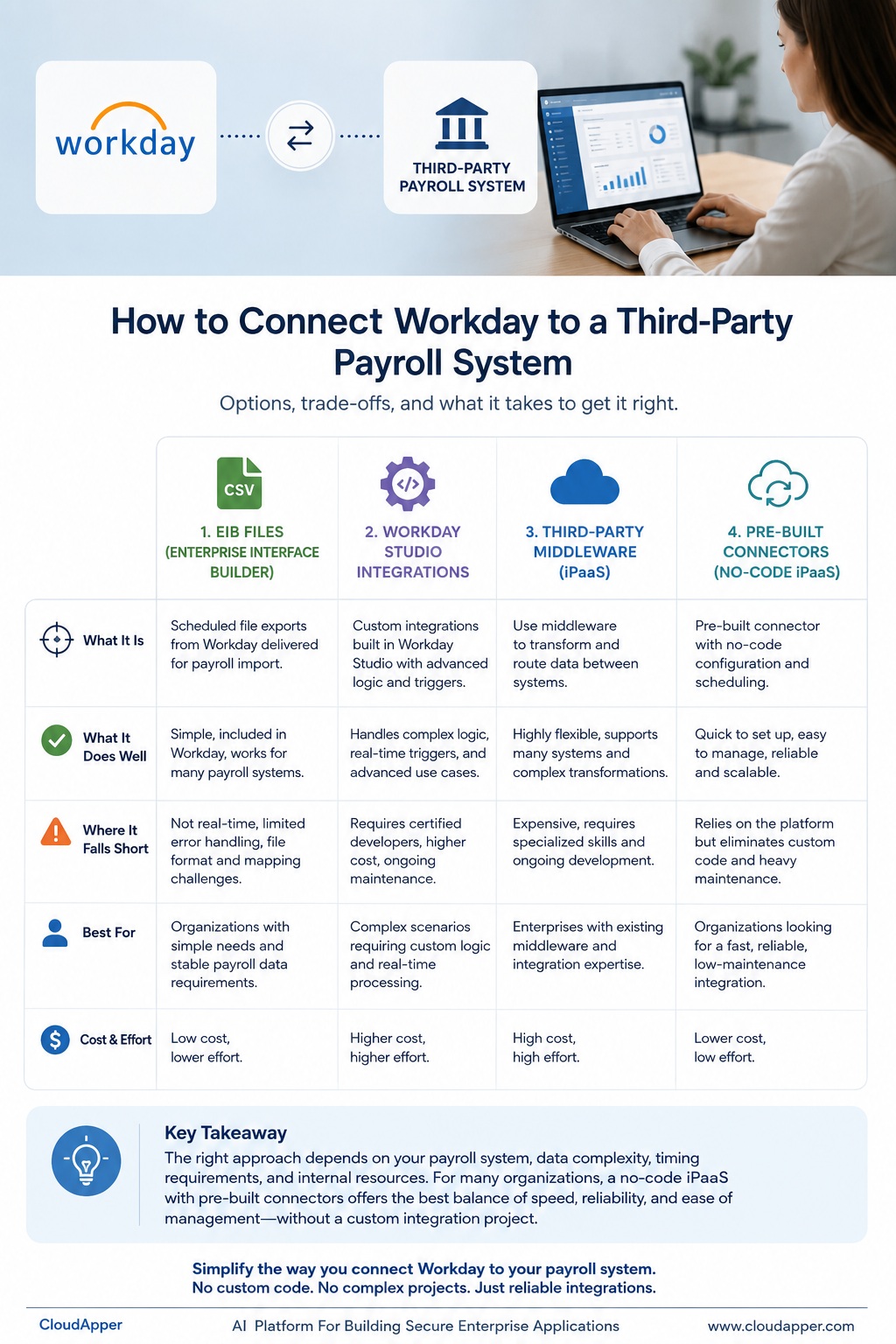
Option 1: EIB Files (Enterprise Interface Builder)
EIB is Workday’s native bulk data export tool. For outbound integrations, it lets you build a scheduled extract from Workday data — employees, compensation changes, terminations, time data — and deliver it as a flat file (CSV, Excel, or fixed-width) to a location your payroll system can pick up.
What it does well:
EIB is free, included in Workday, and doesn’t require third-party middleware. For payroll systems that accept file-based imports on a defined schedule, it’s a workable starting point. Many organizations use it for years without major issues.
Where it becomes a problem:
EIB is not a real-time integration. It runs on a schedule — typically nightly — which means your payroll data is always at least one cycle behind Workday. Mid-cycle changes (a same-day termination, an emergency compensation adjustment) may not flow until the next scheduled run.
The file format has to match exactly what your payroll system expects. Any mismatch — a column in the wrong order, a date format your payroll vendor doesn’t recognize, a value that needs to be derived rather than directly extracted — requires either modifying the EIB configuration or post-processing the file. Both require Workday expertise.
EIB also has no native error handling. If a file fails to transfer, or the payroll system rejects it, Workday doesn’t alert you automatically. Someone has to notice.
For smaller organizations with stable payroll structures and a tolerant payroll vendor, EIB works. For organizations with frequent compensation changes, complex workforce types, or tight payroll cutoffs, the limitations show up quickly.
Option 2: Workday Studio Integrations
Workday Studio is the platform’s more advanced integration development environment. It lets integration developers build custom integration processes with more sophisticated logic than EIB supports — conditional transformations, real-time triggers, API-to-API connections.
What it does well:
Studio integrations can be significantly more capable than EIB files. You can handle complex transformation logic, trigger integrations based on business process events (not just a clock), and build error handling into the integration design.
Where it becomes a problem:
Studio requires a Workday-certified integration developer to build and maintain. That’s either a headcount investment or an ongoing professional services cost. Most organizations without a dedicated integration team find that Studio integrations are expensive to build, difficult to troubleshoot when they break, and hard to modify without the original developer’s context.
Every time Workday releases an update, there’s regression risk. Studio integrations built against a specific Workday version may need to be retested and updated after each bi-annual release cycle — which is maintenance work that has to go somewhere.
Option 3: Third-Party Middleware
Platforms like MuleSoft, Boomi, or Workato sit between Workday and your payroll system, handling the data transformation and routing. Many large enterprises already have one of these in their architecture.
What it does well:
If your organization already has a middleware platform, adding a Workday-to-payroll integration is a matter of building the connectors rather than introducing new infrastructure. These platforms are designed for exactly this kind of cross-system data flow.
Where it becomes a problem:
Enterprise middleware is expensive — both in licensing and in the specialized development skills needed to configure and maintain it. If your organization doesn’t already have MuleSoft or Boomi deployed, you’re not buying a Workday integration; you’re buying an integration platform and then building the Workday integration on top of it.
For organizations that already run enterprise middleware, this is often the right answer. For organizations that don’t, it’s a significant commitment for what may be a single integration use case.
Option 4: No-Code iPaaS Connectors
A newer category of integration platform — integration Platform as a Service (iPaaS) — takes a different approach. Instead of requiring custom development, these platforms offer pre-built connectors to common enterprise systems and a no-code configuration layer for mapping fields, transforming data, and scheduling syncs.
The appeal is straightforward: faster setup, lower ongoing maintenance, no specialized developer required to make changes.
What to look for in a Workday iPaaS connection:
Not all iPaaS platforms handle Workday well. Workday’s REST and SOAP APIs have specific authentication requirements and data structures that require real Workday integration experience to navigate correctly. A platform that advertises Workday connectivity but was built primarily for simpler SaaS-to-SaaS scenarios may fall apart on edge cases — mid-cycle compensation changes, complex cost center structures, multi-entity organizations.
The connectors need to be maintained against Workday’s API versions. If the iPaaS vendor doesn’t actively update their Workday connector after each release, you’ll eventually hit compatibility issues.
How CloudApper iPaaS Handles This
CloudApper iPaaS was built for enterprise systems — not consumer apps. It has pre-built connectors for Workday, ADP, Paychex, UKG, SAP, Oracle, and a range of other HCM and payroll platforms, with a no-code workflow builder that lets HR operations or IT teams configure the integration without writing code.
A few specifics that matter for Workday-to-payroll connections:
Field mapping and transformation: CloudApper iPaaS handles the data transformation between Workday’s data structures and what your payroll system expects — including derived fields, conditional logic, and format conversions. You configure this in the workflow builder, not in code.
Real-time and scheduled sync: Unlike EIB, CloudApper iPaaS can trigger data syncs based on Workday business process events — a compensation change, a new hire completion, a termination — rather than a fixed schedule. If your payroll system can accept real-time updates, you’re no longer waiting for a nightly file.
Error visibility: When a sync fails or a record is rejected, CloudApper iPaaS surfaces the error with enough context to diagnose it — without requiring someone to manually check whether last night’s file transferred correctly.
Maintained connectors: Workday’s API changes with every release. CloudApper maintains its Workday connectors through those updates, so your integration doesn’t silently break after a system update.
The honest caveat: if your payroll vendor has unusual data requirements or your organization has complex multi-entity payroll structures, no iPaaS platform configures itself. Someone still has to map the fields and test the edge cases. The advantage of iPaaS over custom development is that the person doing that work doesn’t need to be a Workday Studio developer — they need to understand the data, not the platform internals.
Choosing the Right Approach
The right option depends on a few practical factors:
How frequently does your payroll data change?
If compensation changes, terminations, and new hires happen continuously and payroll is processed frequently, real-time or near-real-time sync matters. EIB nightly files may not be sufficient.
Does your payroll vendor have an API?
Modern payroll platforms (including ADP Workforce Now, Paychex Flex, and others) have REST APIs that support real-time data push. Legacy payroll systems may only accept file imports. The capability of the receiving system shapes your options on the sending side.
What integration expertise does your team have?
If you have Workday-certified developers in-house or on retainer, Studio is worth evaluating. If not, a no-code iPaaS approach substantially lowers the ongoing maintenance burden.
How complex is your payroll structure?
Single-entity, single-country organizations with standard compensation structures have the most options. Multi-entity, multi-jurisdiction organizations with union rules, variable pay, or non-standard cost center structures need a solution that can handle that complexity — not one that was tested on simpler cases.
Frequently Asked Questions
Can Workday integrate with ADP directly?
Workday and ADP have a partnership that includes some pre-built integration assets, but these still require configuration for your specific data requirements. Most organizations treat it as a starting point, not a finished integration.
What is an EIB file in Workday?
EIB (Enterprise Interface Builder) is Workday’s native tool for building scheduled bulk data extracts. It’s commonly used to send payroll-relevant data to external systems in a flat file format. It’s free and built into Workday, but requires correct configuration and doesn’t support real-time data transfer.
How often can Workday sync data to a payroll system?
With EIB, syncs are typically scheduled — often nightly or weekly. With API-based integrations (Studio or iPaaS), syncs can be event-driven and near-real-time, depending on what the receiving payroll system supports.
Do I need a developer to integrate Workday with a payroll system?
It depends on the approach. EIB requires Workday configuration knowledge. Studio requires a certified Workday integration developer. No-code iPaaS platforms reduce the technical barrier significantly — field mapping and workflow configuration can often be handled by IT operations or business systems staff without developer involvement.
What happens to the integration when Workday releases a system update?
EIB and Studio integrations may need to be retested after each bi-annual Workday release. iPaaS platforms with maintained Workday connectors handle API compatibility updates on their end, reducing but not eliminating post-release testing requirements.
Can CloudApper iPaaS connect Workday to Paychex or Ceridian?
Yes. CloudApper iPaaS has pre-built connectors for a range of payroll platforms including ADP, Paychex, UKG, Ceridian Dayforce, and others. For payroll systems not on the pre-built connector list, CloudApper also supports custom REST API connections.
What to Do Next
If your organization is manually exporting data from Workday and re-entering it in a payroll system — or running an EIB file you built years ago that nobody on the current team fully understands — it’s worth taking stock of what that process actually costs. Not just in IT hours, but in payroll errors, compliance risk, and the delay between when something changes in Workday and when your payroll system knows about it.
Most of the options above can be evaluated without a long procurement process. EIB is already available in your tenant. An iPaaS proof of concept can typically be stood up in days, not months.
If you’d like to talk through your specific Workday and payroll setup, the CloudApper team is available here.

What is CloudApper AI Platform?
CloudApper AI is an advanced platform that enables organizations to integrate AI into their existing enterprise systems effortlessly, without the need for technical expertise, costly development, or upgrading the underlying infrastructure. By transforming legacy systems into AI-capable solutions, CloudApper allows companies to harness the power of Generative AI quickly and efficiently. This approach has been successfully implemented with leading systems like UKG, Workday, Oracle, Paradox, Amazon AWS Bedrock and can be applied across various industries, helping businesses enhance productivity, automate processes, and gain deeper insights without the usual complexities. With CloudApper AI, you can start experiencing the transformative benefits of AI today. Learn More
- Useful Links:
- Agentic AI
- No-Code/Low-Code
- Custom Software
- HCM Personalization
- iPaaS
- FedRAMP